
Siri AI Is Live in Canada. Here’s How to Get Your Business Recommended When Customers Ask Siri
Bottom line first: Siri AI is live in Canada, in English and in beta. It answers questions with a recommendation, not a list of links. Apple has not published how it picks a business, but Apple Maps is Apple’s own place data. A claimed, complete Apple Business listing is the safest first move. It takes about an hour.
A customer asks Siri for a good place nearby.
Siri gives one answer.
If your Apple Maps listing is unclaimed or half empty, you are asking Siri to recommend a business it knows little about. This guide covers what changed, what Siri AI may look at, and what to fix this week.
What changed when Siri AI went live in Canada?
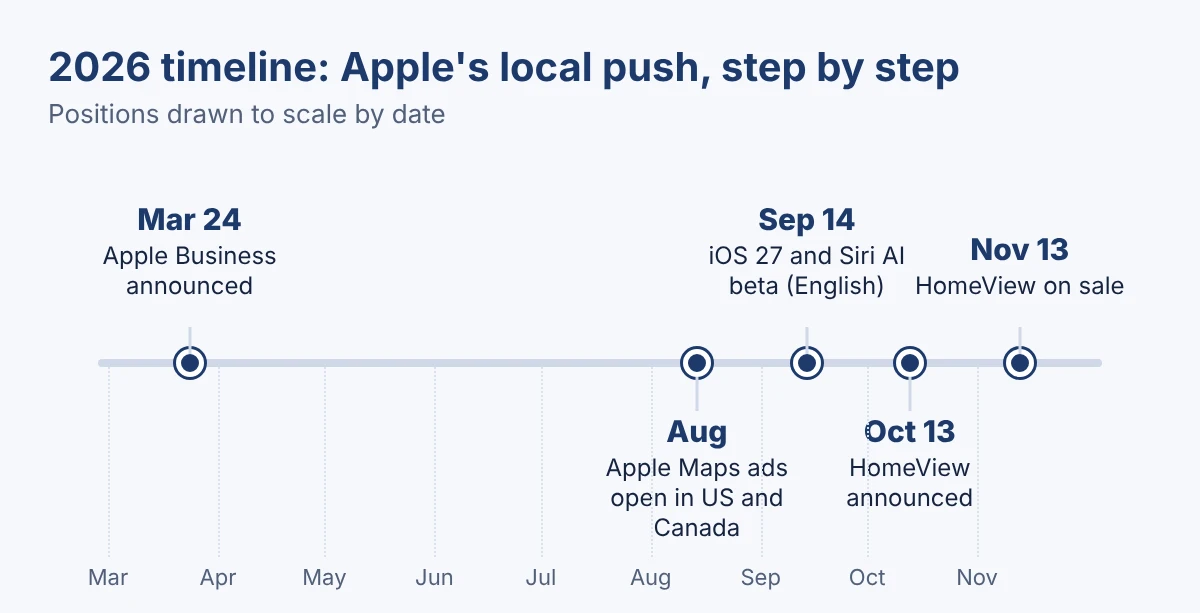
Apple released iOS 27 on September 14. Siri AI came with it, in beta and in English first.
It is not on by default. In Settings, you open Siri and choose Try Siri AI (Beta). That puts you on a waitlist. You also need an Apple Intelligence-capable iPhone, which means an iPhone 15 Pro or newer.
It is also spreading beyond the phone:
- HomeView. Apple announced the smart home display on October 13. It goes on sale November 13.
- Apple TV 4K. The new model ships with Siri AI. Second and third generation models get it in beta with tvOS 27.2.
- Canada. It is on the launch list for the home devices, in English only.
It is a beta, and many customers are still on the waitlist. But the habit of asking Siri a question and getting one answer is starting now. Your listing should be ready before they ask.
How does Siri AI decide which business to recommend?
Apple has not published a ranking recipe for local picks. Nobody outside Apple can give you the exact mix.
Here is what we do know. Apple lists restaurant recommendations among the things Siri AI can answer. Apple Maps is Apple’s own map and place data. So place cards, reviews and the web are the likely inputs. Treat that as a working assumption, not a rule.
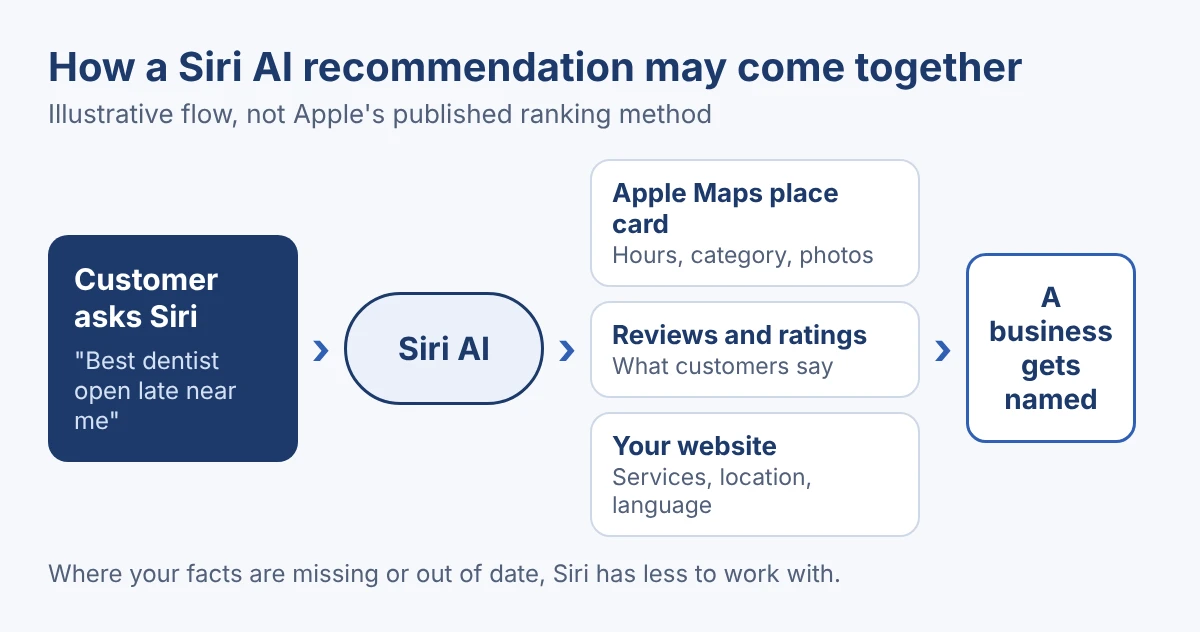
Whatever the exact mix, three things are in your hands:
- Your place card. Name, category, hours, photos and links.
- Your reviews. What customers say, and how recently. If this is thin, our reviews and reputation work is the place to start.
- Your website. Clear pages for each service and each location.
The first one is the one most owners have never touched.
What is Apple Business, and why claim your Apple Maps listing?
Apple Business is the new name for Business Connect. Apple announced it in March 2026 as one platform for businesses of all sizes. The brand tools from Business Connect now live there: brand profiles, rich place cards and Showcases. It is also where you buy Apple Maps ads.
Claiming means you stop letting Apple Maps guess. The steps:
- Create an Apple Business account.
- Verify your organization.
- Claim each location you run.
Claiming a location was free when Business Connect launched in 2023. Confirm today’s terms in your account.
Think of it as a second front door, next to your Google Business Profile. If you have done the Google side, you know the work. See our Google Maps case study for how we approach it. The Apple side needs the same care.
Which details does Siri answer from?
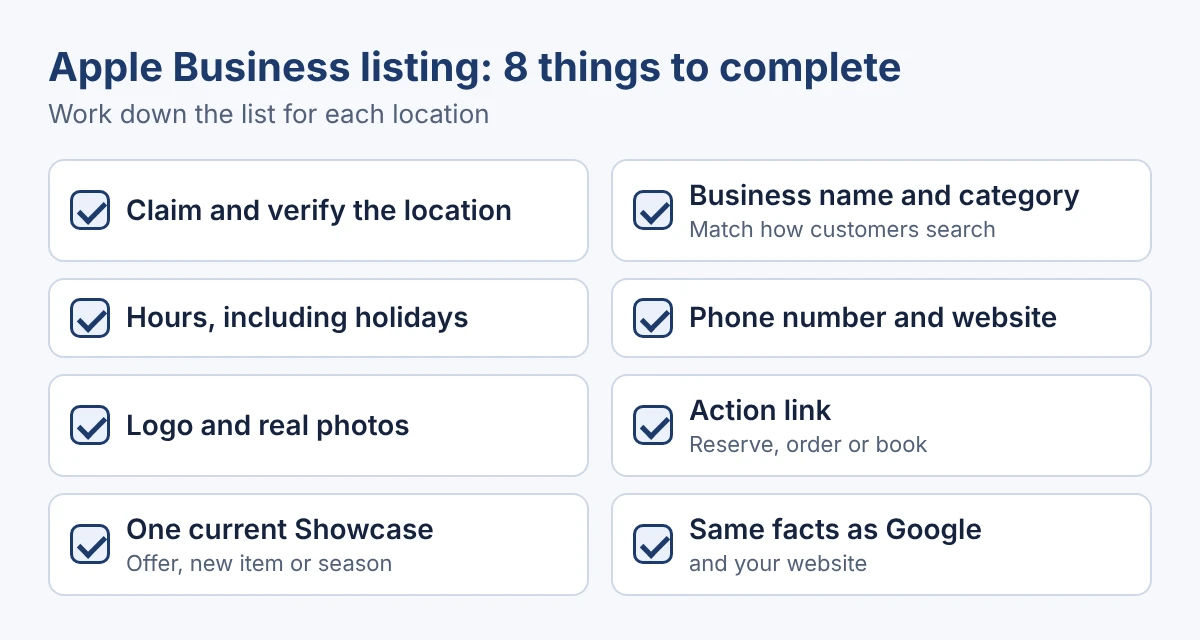
Siri may read any fact a place card holds. Whether it uses each one is Apple’s call. So fill all of them in.
- Hours. Regular and holiday hours.
- Category. The type of business, as a customer would say it.
- Contact details. Phone number and website.
- Photos and logo. Real ones.
- Actions. Links to order, reserve or book.
- Showcases. Offers, new products or seasonal items on your place card. They are set for each location.
Put your menu or service list on your website in plain text as well. Then the listing and the site say the same thing.
What happens when French Siri AI arrives?
For now, Siri AI is English only. Reports said French, Japanese, Korean, Portuguese and Spanish would follow in October. Apple’s support page said French is planned for later this year. As of today, Canadian French was not part of the launch, and the date is not confirmed.
That matters in Canada. When French arrives, French-speaking customers will ask Siri in French. A listing and a website that only speak English may give Siri less to work with.
Get ready now:
- Add a French version of your key service and location pages.
- Keep your name, address, phone number and hours identical in both languages.
- Ask a French-speaking customer to review the French wording.
The same idea applies to other languages. Here is how to test your visibility in other languages.
Should you pay for Apple Maps ads?
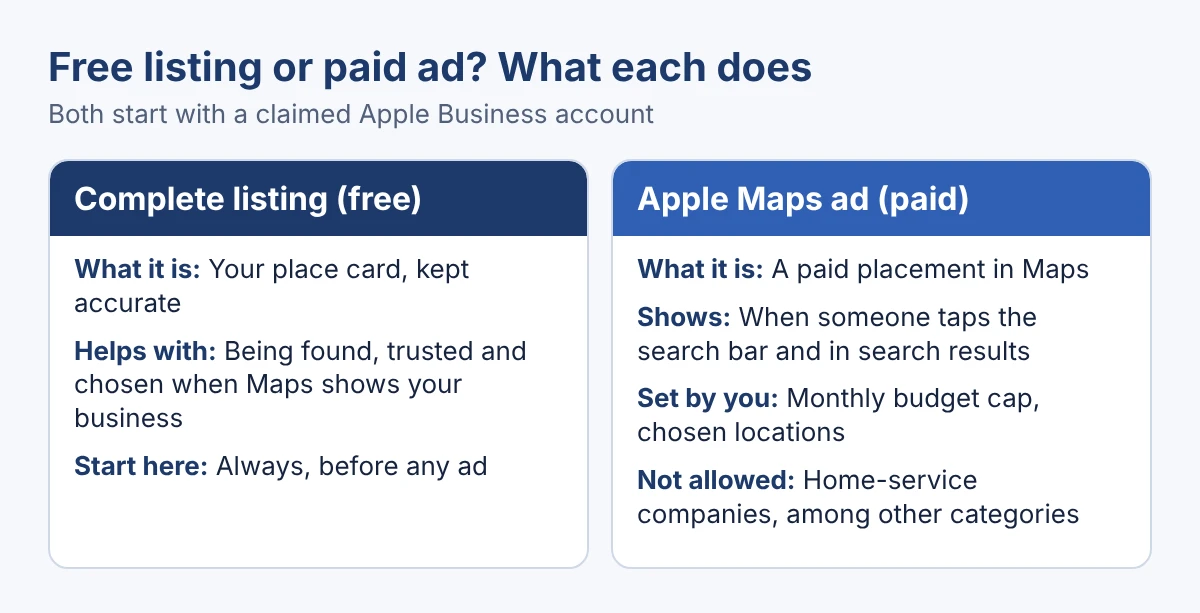
Apple Maps ads are open to businesses in the US and Canada. You buy them in Apple Business, and you need a claimed location first. Ads show when someone taps the search bar, and in search results, where Apple shows one ad.
You set a monthly budget and pick which locations to promote. Some organizations may get a one-time $150 USD sign-up credit. Home-service companies are reportedly barred, along with some other categories.
A simple rule:
- Start with the free listing. An ad that sends people to a half-empty place card wastes money.
- Consider an ad if customers visit you in person and you sit in a busy, competitive area.
- Skip it for now if your listing is incomplete, or if you cannot measure visits and calls.
Apple has not said that an ad changes what Siri AI says. Keep the two apart.
What can you fix in one hour?
Set a timer. Work through these six steps in order:
- Claim and verify your business (10 minutes). Create your Apple Business account, verify the organization and claim each location. Everything else depends on this step.
- Fix the basics (10 minutes). Check the business name, category, address, phone number and website. Pick the category a customer would actually search for.
- Set your hours (10 minutes). Add regular hours and holiday hours. A wrong “open now” answer costs you the visit.
- Add a logo and real photos (10 minutes). Use clear photos of your storefront, your work and your team. Skip stock images.
- Add an action and one Showcase (10 minutes). Link the action customers want, such as reserve, order or book. Then add one current offer, new item or seasonal item as a Showcase.
- Match everything and add French (10 minutes). Compare the listing with your Google Business Profile and your website, and fix any difference. If you serve French speakers, add a French version of your key page.
Running several locations, or want AI search covered across Siri, ChatGPT and Google? That is what our AI search optimization services are for.
How do you test what Siri says about you?
You need an iPhone with Siri AI turned on. If the option does not show, iPhone in Canada reports that setting the Siri language to English (United States) can bring it up.
Ask Siri these, using your own business and area:
- The category question. “Find a [your category] near me.”
- The neighbourhood question. “What is the best [your category] in [your neighbourhood]?”
- The facts question. “Is [your business] open now?” and “What is the phone number for [your business]?”
- The action question. “Can I book at [your business]?”
For each answer, write down three things: whether you were named, whether the hours and phone number were right, and which competitors came up. Repeat monthly. Siri is one of several AI tools your customers use, so run our free AI visibility check to see the others.
Frequently asked questions
Is Siri AI available in Canada?
Yes, in beta and in English. You turn it on in Settings under Siri, which adds you to a waitlist. It needs an Apple Intelligence-capable iPhone, such as an iPhone 15 Pro or an iPhone 16 or later. Apple’s support page lists English only for now.
Is Apple Business the same as Apple Business Connect?
Apple Business is the new all-in-one platform announced in March 2026. The brand tools from Business Connect, such as brand profiles, rich place cards and Showcases, are now part of it.
Does it cost anything to claim my Apple Maps listing?
Claiming a location was free when Apple launched Business Connect in 2023. Check your Apple Business account to confirm today’s terms. Apple Maps ads are a separate, paid option.
Will an Apple Maps ad make Siri recommend my business?
Apple has not said that it will. Ads appear in Maps, when someone taps the search bar and in search results. Treat the ad and the Siri answer as two separate things.
When does French Siri AI arrive in Canada?
Reports expected French in October, and Apple’s support page said it was planned for later this year. Canadian French was not available at launch, and the date has not been confirmed. Check Apple’s Canadian site for the current status.
Claim it before they ask
You cannot control what Siri says. You can control the facts it has to work with.
An hour on your Apple Business listing is the cheapest step you can take.
Claim the listing. Complete it. Then ask Siri.
See who AI names when customers ask for your kind of business
Siri is only one place your customers ask. ChatGPT, Gemini and Perplexity answer the same questions, and each may pick a different business.
Run a free Radar scan in 30 seconds. See whether AI recommends you, who it names instead, and three quick wins.
No sign-up. No email. Instant results.
Run my free Radar scan →
About the author
Simar Singh runs Digital 6ix, a Toronto agency for local SEO, maps and AI search visibility. He writes about how customers find businesses across Google, Apple Maps and AI assistants. Find him on LinkedIn.
Sources
- CNN: Apple HomeView and Siri AI
- iPhone in Canada: older Apple TV 4K and Siri AI in Canada
- CNBC: Apple releases iOS 27 with a redesigned Siri AI
- 9to5Mac: Siri AI launches in English, five languages in October
- 9to5Mac: ads are coming to Apple Maps in the US and Canada
- Apple Newsroom: Introducing Apple Business
- Apple Support: Promote your business on Apple Maps with Apple Business
- Apple Support: How to get Siri AI
- MacRumors: which Apple home devices get Siri AI, and when
- iPhone in Canada: how to enable Siri AI in iOS 27
- Apple Newsroom: Introducing Apple Business Connect (2023)
Instant AI visibility scan
Siri is one AI tool of several. Scan your business with Radar in 30 seconds to see where AI names you, and who it names instead.
Run my free scanBook a free audit call
Not sure where your Apple Maps listing stands? We will review it with your Google profile and plan the fixes.
Book my call