

Google’s Universal Cart Is Live: How Small Online Shops Get Into AI Shopping Carts Before Black Friday
Bottom line first: Google’s Universal Cart now lets U.S. shoppers fill one cart with products from many stores inside Search, AI Mode and the Gemini app. They then pay with Google Pay or hand the cart over to the store’s own site. For a small shop, being recommended is no longer enough. Your product also has to be easy to add to the cart and easy to buy. That depends on clean product data, matching price and stock, clear shipping and returns, and a checkout that works.
Black Friday is weeks away, and the way people shop inside Google just changed.
This guide covers what Universal Cart is, the two ways a cart turns into a sale, why it is a GEO problem, a readiness checklist for Merchant Center and Shopify stores, what Canadian shops can do right now, and how to measure it.
What Google launched this week
Universal Cart is a shopping cart that follows the shopper across stores. Google announced it at I/O in May 2026. It is now live in the U.S. in Google Search, including AI Mode, and in the Gemini app.
Here is what coverage says it does:
- Shoppers save products from different retailers in one place.
- The cart can track price drops and restocks.
- Shoppers can pay with Google Pay inside the cart, or send the items to the merchant’s own cart.
- The retailer stays the merchant of record, so the store, not Google, owns the order and the customer relationship.
Launch coverage names big retailers such as Nike, Sephora, Target, Ulta Beauty, Walmart and Wayfair, plus Shopify stores such as Fenty and Steve Madden. YouTube and Gmail are expected to follow later.
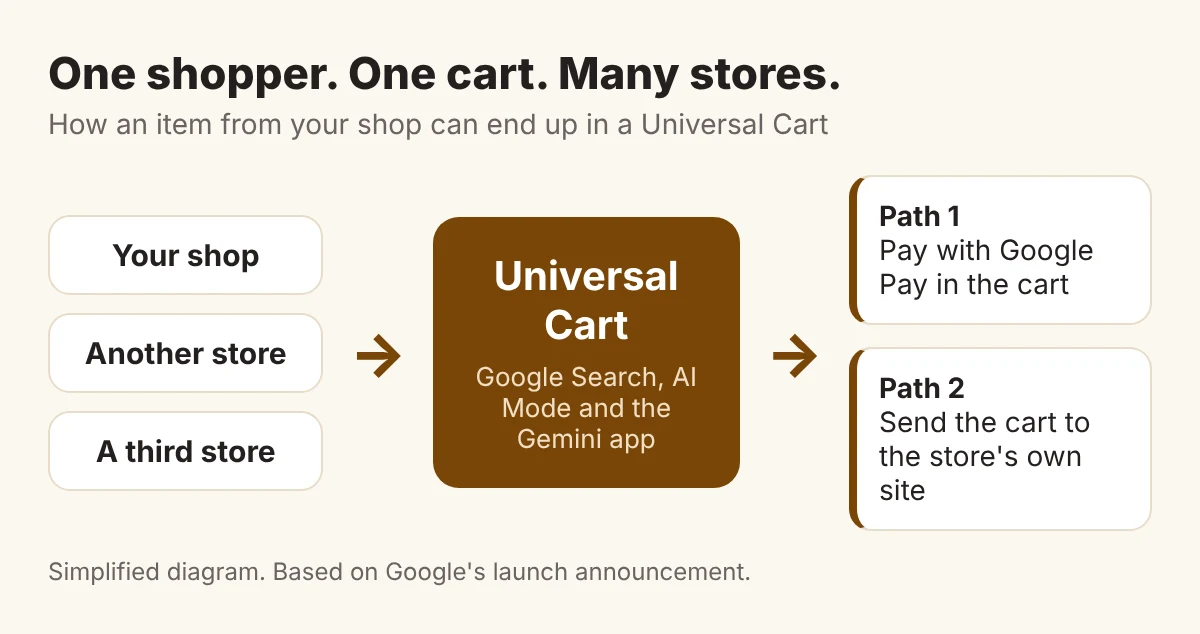
This is not a test of a feature nobody uses. It is a new place where a buying decision can finish before the shopper ever opens your site.
The two checkout paths, side by side
Once a shopper is ready to buy, the cart can go one of two ways.
Native checkout. The shopper pays inside Google with Google Pay. The store must support Google’s checkout through the Universal Commerce Protocol (UCP), the open standard Google built with Shopify.
Cart transfer. The shopper’s items are handed to your own site, and they finish checkout there. According to Search Engine Journal’s look at the handoff, Google’s developer guidance describes the transfer as one way. Later changes in the cart do not sync back, and native checkout is not required.
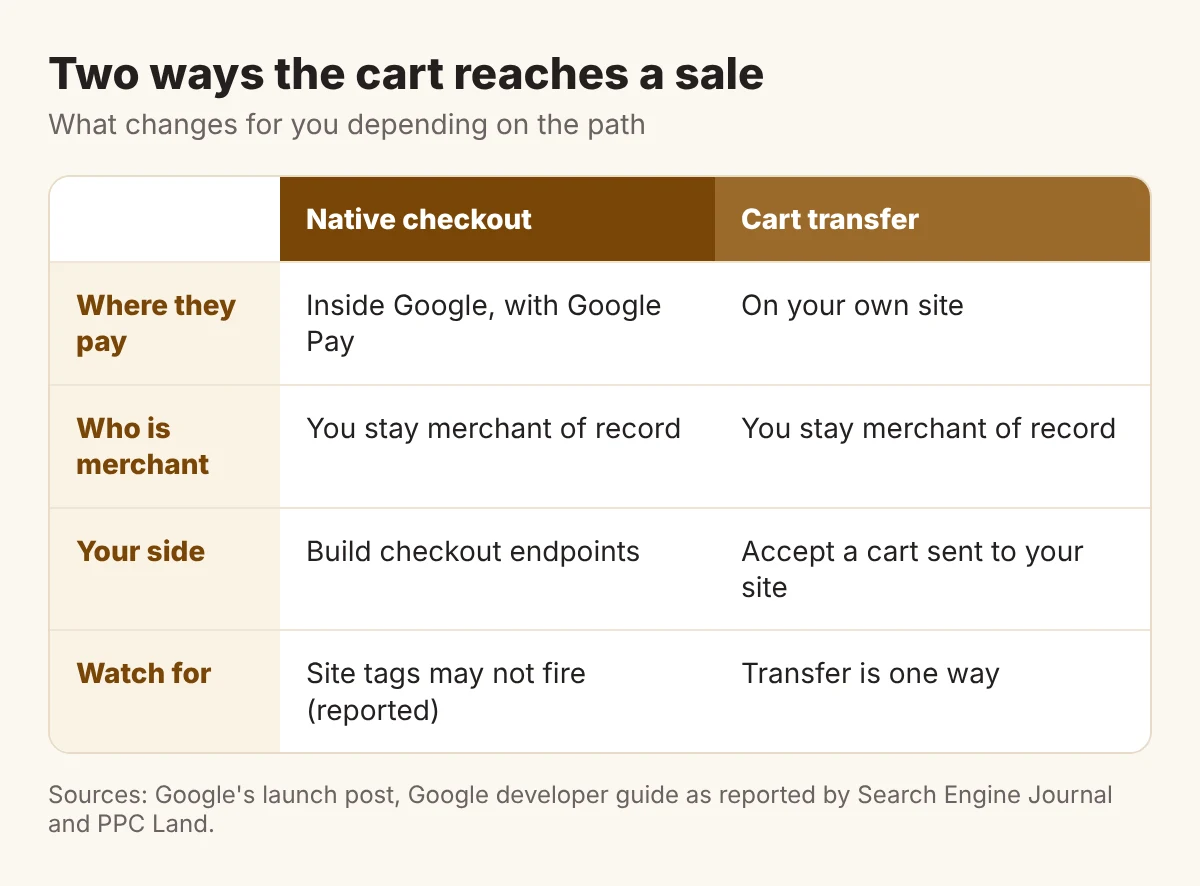
Check your tracking. One analysis of native checkout reports that Google Analytics and custom pixels do not fire inside it. We could not confirm this from Google’s own documents, so test it before you rely on your usual reports.
Most small shops will start with cart transfer. It is the lighter path, and you keep checkout on your own site.
Why getting into the cart is a GEO problem
Generative engine optimization is the work of being found and recommended in AI answers. Universal Cart adds one more step to it: the add to cart.
Google has not published a recipe for which products an AI answer puts in front of a shopper. So treat what follows as a sensible working theory, not a rule. AI shopping tools can only recommend what they can read. That is product feed data, price, stock, shipping, returns and reviews.
Think of an example, and it is only an example. A shop sells two near-identical products. One has a complete feed, a price that matches its page, stock status that is correct and a clear returns policy. The other has gaps. If both are shown to a shopper, the first one is easier to add and easier to trust.
That is why this belongs with AI search optimization. The work is the same: make your business clear, consistent and easy to quote. Here it is applied to products.
You can also see where you stand today. The free AI Visibility Check shows whether AI names your business for the searches that matter.
The cart-ready checklist for Merchant Center and Shopify stores
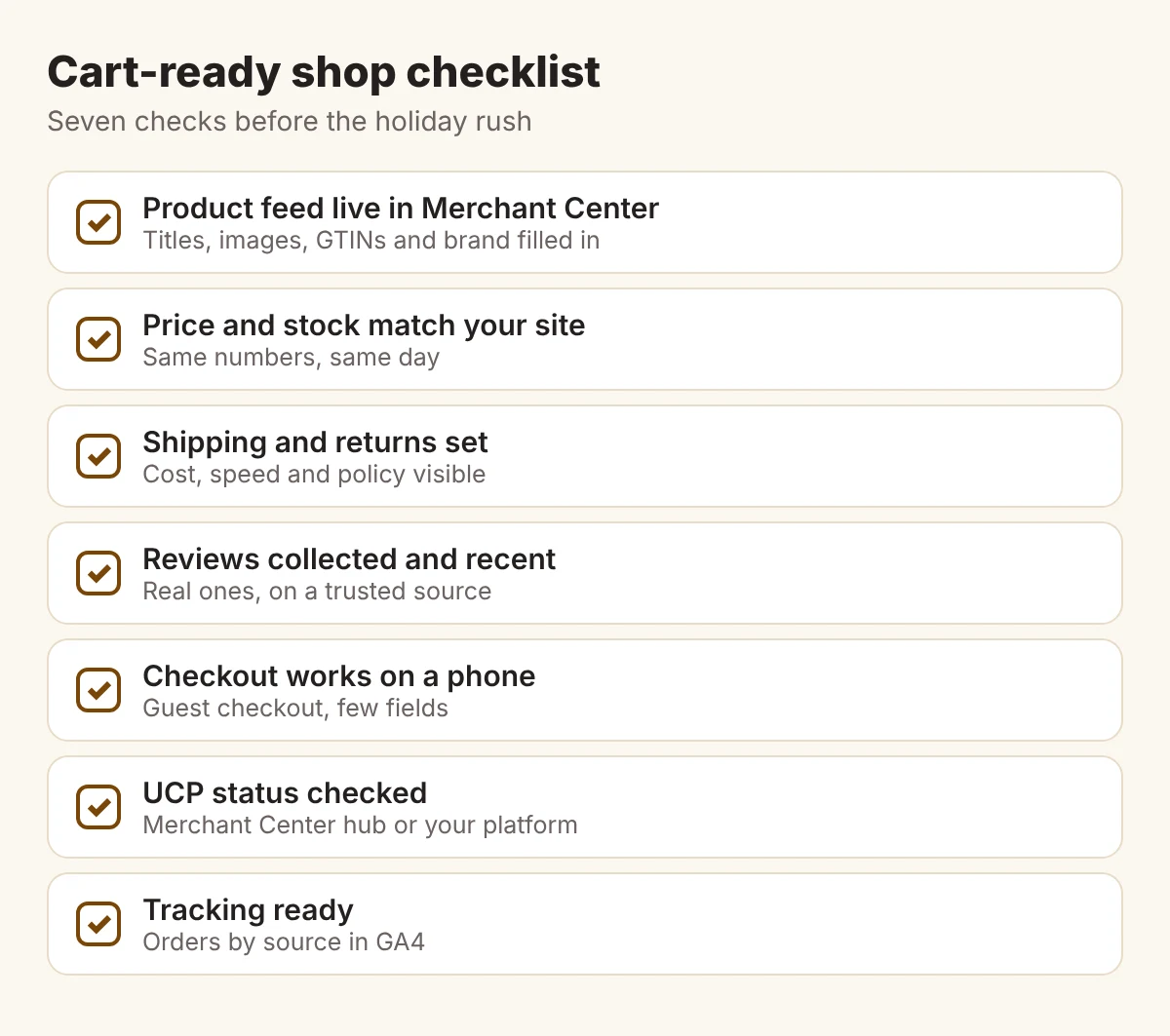
Work through these before the holiday rush. Most of it is plain housekeeping.
- Get your product feed into Merchant Center. Fill in titles, images, brand and product identifiers such as GTINs where they apply.
- Match price and stock to your site. A cart that shows one price and a checkout that shows another costs you the sale and the trust.
- Set shipping and returns. Cost, delivery time and return policy should be visible, not buried.
- Keep reviews real and recent. Ask recent buyers. Never buy or fake them.
- Make checkout easy on a phone. Offer guest checkout and ask for as few fields as you can.
- Find out your UCP status. Merchant Center is rolling out a UCP integration hub in the U.S. It lets merchants choose cart transfer, native checkout and identity linking. Reports say only selected merchants get the onboarding flow, so confirm yours.
- On Shopify, look at your settings. TechWyse reports that Google is enrolling eligible U.S. Shopify stores in native checkout without setup. Check Merchant Center and your sales channel settings to see what is on. Our Shopify review for Canadian businesses covers what the platform really costs.
The Canada angle: U.S. only, for now
Universal Cart is live in the U.S. only. Google has not said when it will reach other countries.
The Merchant Center UCP hub follows the same pattern. PPC Land reports, citing Search Engine Land, that Canada and Australia are now expected next year. An earlier Google help page said sooner. Treat 2027 as the current position and watch for updates.
That does not mean a Toronto shop can sit still. If you sell to U.S. customers, you can act now:
- Check whether your store can ship to the U.S. and say so clearly in your feed and on your site.
- Show shipping and returns for U.S. buyers, in the currency they expect.
- Apply for the UCP hub only if Google lets you. Do not assume it is open to you.
- Do the housekeeping now, so you are ready when Canada opens.
If you sell only in Canada, the checklist still helps. Clean product data is useful in every Google shopping surface, not just this one.
How to measure whether it works
You cannot manage what you cannot see. Set up four checks and look at them each week through the holiday season.
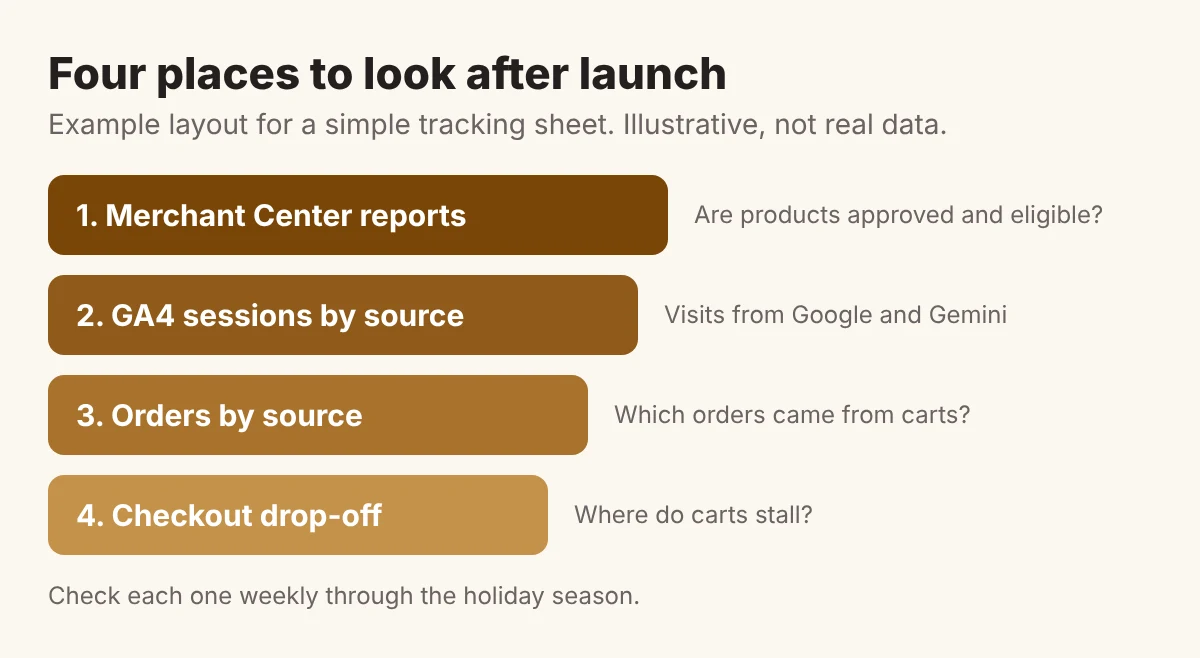
- Merchant Center. Are your products approved and eligible? Fix warnings first.
- Traffic by source. Gemini now tags its links, so you can see how many customers AI sends your business in GA4.
- Orders by source. Look for orders that start from Google and Gemini visits.
- Checkout drop-off. If carts arrive and orders do not, the problem is on your checkout page.
Write the numbers down in the same place each week. The GEO Tracker template is a free place to start.
Remember: Google has not said whether merchants pay any fee on Google Pay checkouts inside the cart. Ask before you build around native checkout.
Frequently asked questions
What is Google Universal Cart?
Universal Cart is a shopping cart in Google Search, AI Mode and the Gemini app. Shoppers can save products from different stores in one place, then pay with Google Pay or send the items to the store’s own site. It is live in the U.S.
Can Canadian shops use Universal Cart?
Not yet. Universal Cart is limited to the U.S., and Google has not said when it will reach other countries. Reports say the Merchant Center hub for Canada is expected next year. Canadian shops that sell to U.S. customers can prepare now.
Do I need native checkout to be in the cart?
No. Google’s developer guidance describes cart transfer as an option where native checkout is not required. The shopper’s items are handed to your own site, and you keep checkout there.
How do I know if Universal Cart sends me customers?
Check your Merchant Center reports, then look at GA4 traffic and orders by source. Gemini now tags its links, which helps you separate AI traffic. Look at checkout drop-off as well.
The cart is the new shortlist
Being named by AI gets you looked at. Being easy to buy gets you paid.
Be easy to recommend. Be easier to buy.
See if AI would put your shop in the cart
Shoppers now ask Google and Gemini what to buy. If your shop is not in the answer, it cannot be in the cart.
Start with a free Radar scan in 30 seconds. See whether AI recommends you, who it names instead, and three quick wins.
No sign-up. No email. Instant results.
Run my free Radar scan →
About the author
Simar Singh founded Digital 6ix, a Toronto agency for SEO, GEO and content. He helps businesses get found and recommended in Google, ChatGPT, Perplexity and Gemini. The agency shares its working templates free at digital6ix.ca/templates. Say hello on LinkedIn.
Sources
- Google: Universal Cart launches today in the U.S.
- Digital Commerce 360: Google Universal Cart for agentic commerce
- Search Engine Journal: Universal Cart store handoff
- Search Engine Land: Merchant Center UCP integration hub
- PPC Land: Canada and Australia wait for the UCP hub
- Google Merchant Center Help: onboard to the Universal Commerce Protocol
- TechWyse: Google enrolls eligible Shopify merchants in native AI checkout
Instant AI visibility scan
Wonder if AI names your shop? Radar checks in about 30 seconds, shows who it names instead, and lists three quick fixes.
Run my free scanBook a free audit call
Selling online? Talk it through with us: how AI sees your products, what rivals do, and where to start.
Book my call