
Gemini Now Tags Its Links: How to See How Many Customers AI Actually Sends Your Business
Bottom line first: Gemini now adds utm_source=gemini to many of the links it cites, so visits from Google’s AI assistant can show up by name in Google Analytics 4 instead of hiding in Direct. Open your source report, search for “gemini”, then build one AI channel and count the calls, bookings and forms those visitors produce. Google has not announced the change, so check your own data before you trust it.
Most owners can’t say how many customers AI sends them. The traffic is real. The label is missing.
This guide walks through a short GA4 setup you can finish in about an hour, what it still can’t see, and the mistakes that make AI traffic look smaller than it is.
What changed: Gemini now tags its links
Around September 30, a Reddit user noticed Gemini adding utm_source=gemini to outbound links. Google’s John Mueller replied in the thread and said he had seen it too. Search Engine Journal reported it on October 1.
There is no official Google announcement. Google hasn’t said which Gemini surfaces add the tag, or whether it will stay.
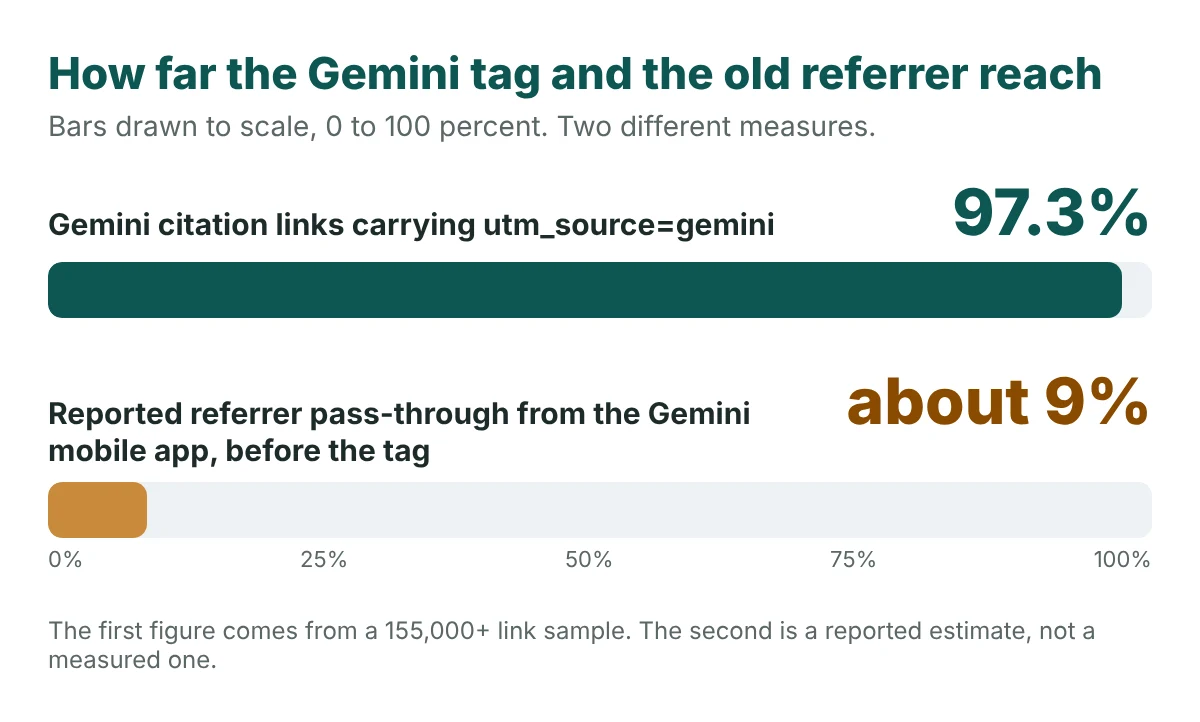
One sample gives a sense of scale. An analysis from Suff Digital on September 23 looked at more than 155,000 cited links across AI platforms. It found that 97.3% of Gemini’s citation links carried utm_source=gemini, as Zero Click Labs summarized.
Why AI visits used to hide in Direct
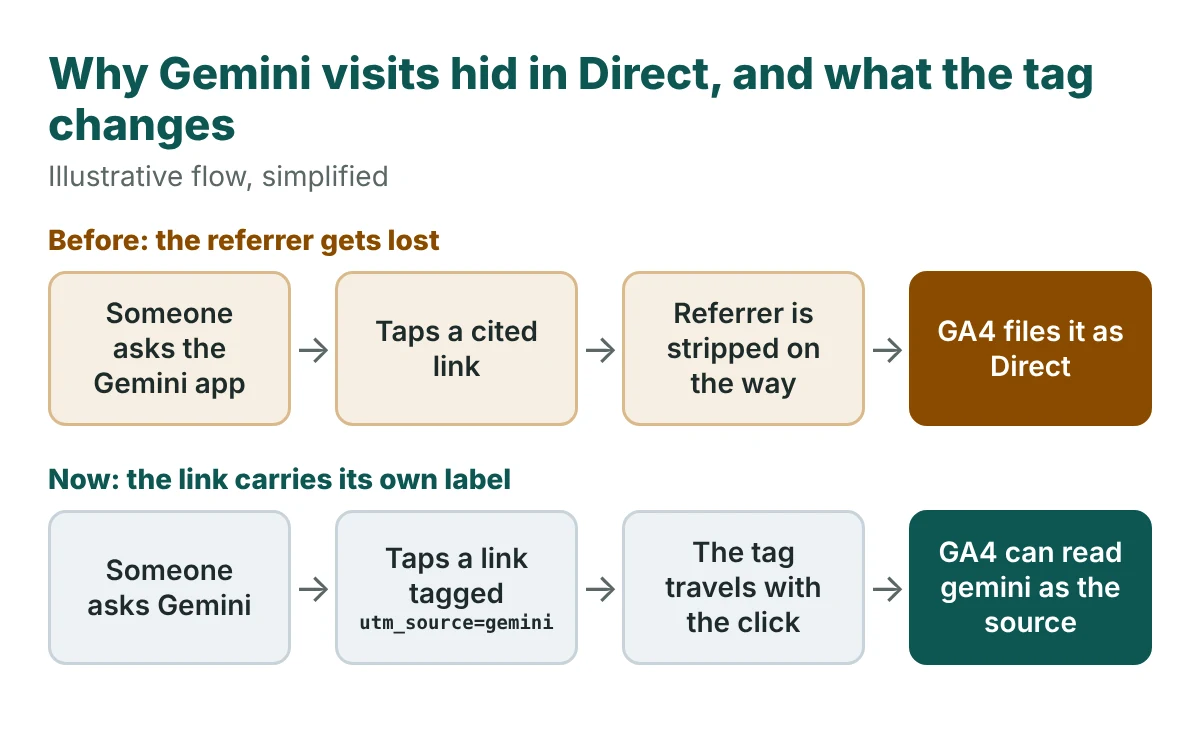
GA4 normally learns where a visit came from through the referrer, the small note a browser passes along when someone clicks a link.
Apps and in-app browsers often drop that note. When it’s gone, GA4 has nothing to read and files the visit under Direct.
The same Search Engine Journal coverage reports that the referrer reached sites only about 9% of the time from the Gemini mobile app. Treat that as a reported estimate, not a measured one.
A tag in the link itself doesn’t depend on the browser. It travels with the click. That’s why a few extra characters matter.
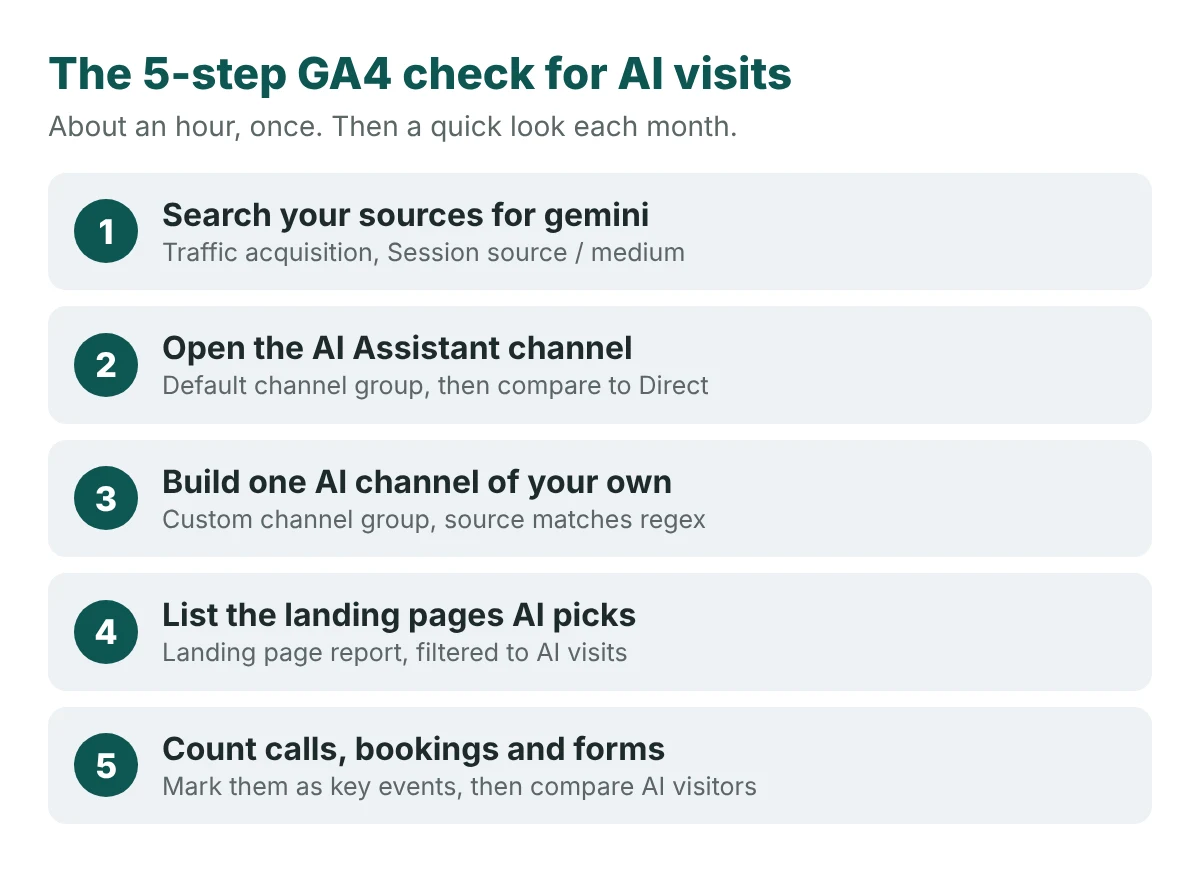
How to track AI traffic in GA4: 5 steps
You need view access to your GA4 property. Menu names change now and then, so look for the closest match if one has moved.
- Search your sources for “gemini”. Go to Reports, then Acquisition, then Traffic acquisition. Change the first column to Session source / medium and search for “gemini”. Set the date range to start on October 1 so you see the tagged era.
- Open the AI Assistant channel. Google added an AI Assistant channel to GA4’s default channel group in May 2026. Switch the column to Session default channel group and look for it. Then compare its size with Direct. A rise in one and a dip in the other is a good sign the labelling is working.
- Build one AI channel of your own. The default channel won’t catch everything. In Admin, open Data display, then Channel groups, and create a group with an “AI traffic” channel where Source matches a regex that includes the names you care about, such as
gemini|chatgpt|perplexity|claude|copilot. Move it above Referral so it gets first pick. Check your list against what actually appears in your source report. - List the landing pages AI picks. Open the landing page report and filter it to your AI channel. These are the pages AI already trusts enough to send people to. They are the pages to protect and improve first.
- Count calls, bookings and forms. Sessions don’t pay your bills. Mark the actions that do as key events, then compare how AI visitors behave against everyone else.
- Restaurant: reservation clicks, call taps, direction requests
- Dental clinic: booking form submits, call taps
- HVAC contractor: quote form submits, call taps
Those lists are examples of what to count, not results. Pick the two or three actions that match how your customers actually reach you.
Phone calls need extra care. A call tap on your site is an easy key event. A call to the number on your Google Business Profile isn’t a website visit at all. For the bigger picture of which numbers matter, read why strong marketing metrics can still leave the phone silent.
To keep the monthly numbers in one place, use our free GEO tracker template.
What GA4 still can’t see
Even with the tag, a lot stays blurry. Know where, so you don’t read a small number as a small channel.
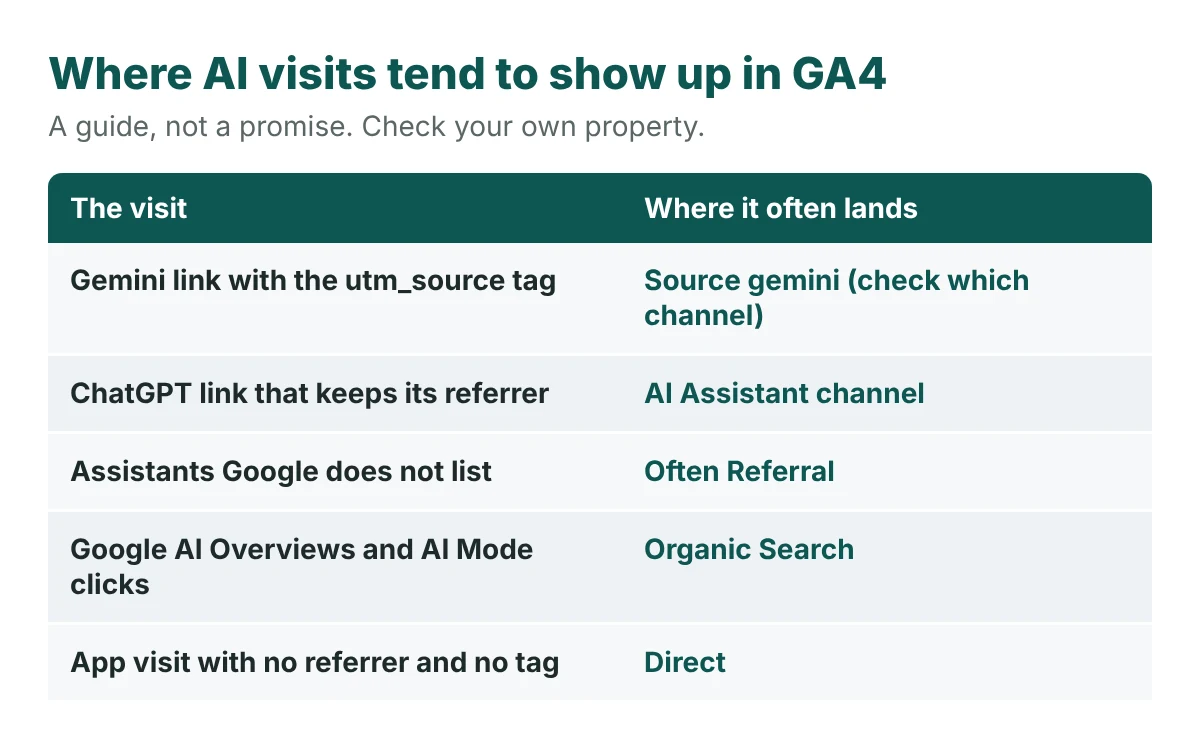
- Google AI Overviews and AI Mode. Clicks from these usually count as Organic Search, the same as a normal result. You can’t split them out in GA4 alone.
- Visits with no tag and no referrer. These still land in Direct.
- Other assistants. Tools outside Google’s built-in list may appear as Referral, which is why the custom channel in step 3 helps.
- People who ask AI, then search your name. They never click the AI link. They show up as branded search or Direct.
- A tag without a medium. A source with no medium can land in Unassigned in some GA4 setups. If you see “gemini” as a source but not in a channel, look there.
Add two low-tech checks. Watch branded search in Google Search Console for a lift. And add “How did you hear about us?” to your booking form, with “AI assistant” as an option. Customers will tell you what the report can’t.
It also helps to know whether AI names you at all. Run the free AI visibility check and compare it with what your reports show.
Common mistakes
- Judging AI by sessions alone. Ten visits that call you are worth more than a hundred that bounce.
- Reading one month as a trend. AI answers shift from run to run, so volumes move. See how to measure AI visibility when ChatGPT keeps changing.
- Treating the tag as permanent. Google hasn’t documented it. Recheck every month, and keep the custom channel in step 3 in place.
- Tagging your own links with the same names. If you use
utm_source=geminiin your own campaigns, you’ll mix your data with Gemini’s. - Ignoring the pages AI picks. The landing page list in step 4 tells you where to improve content first. Pages like these are what AI search optimization work builds on.
Quick recap checklist
- Searched your sources for “gemini” since October 1
- Compared the AI Assistant channel with Direct
- Built a custom AI channel and moved it above Referral
- Listed the landing pages AI sends people to
- Marked calls, bookings and forms as key events
- Added a “how did you hear about us” question
- Set a monthly reminder to repeat the check
Frequently asked questions
Does Gemini really add UTM tags to its links?
Reports say it does. A Reddit user spotted utm_source=gemini around September 30 and Google’s John Mueller said he had seen it too. Google hasn’t published documentation, so confirm it in your own GA4 data.
Where does Gemini traffic show up in GA4?
Search your Session source / medium report for “gemini”. Depending on how the link is tagged and how your property is set up, the visits may sit in the AI Assistant channel, in Referral, or in Unassigned. A custom channel group lets you gather them in one place.
Can GA4 track ChatGPT and Perplexity traffic too?
Partly. Visits that keep their referrer show up under the source name, such as chatgpt.com. Visits from apps that strip the referrer land in Direct. A custom channel group helps you gather the ones that do show up.
Can I track Google AI Overviews and AI Mode clicks in GA4?
Not on their own. Those clicks usually count as Organic Search, so GA4 can’t separate them from regular results without extra tools.
How often should I check my AI traffic?
Monthly is a practical rhythm. AI answers and tagging behaviour can change without notice, so a regular look shows whether the numbers are real movement or a reporting shift.
Count the customers, not just the clicks
AI traffic will always be partly hidden. The goal isn’t a perfect number. It’s a steady, honest read on whether AI is sending people who call, book and buy.
If you can’t see AI sending customers, you can’t improve it.
See whether AI is naming your business at all
Tracking visits is half the job. The other half is knowing if AI recommends you when someone in your area asks.
Run a free Radar scan of your business in about 30 seconds. See who AI names, who it names instead, and three quick wins.
No sign-up. No email. Instant results.
Run my free Radar scan →
About the author
Simar Singh founded Digital 6ix, a Toronto agency focused on SEO, GEO and measurement. He is certified in Google Analytics and Google Search Console, and writes about turning search and AI data into calls, bookings and sales. Free audit and tracking templates are at digital6ix.ca/templates. Connect with Simar on LinkedIn.
Sources
Instant AI visibility scan
Curious if AI names you when locals ask? Radar checks in about 30 seconds and shows who it recommends instead.
Run my free scanBook a free audit call
Want help setting up your tracking? We will review your GA4 and show where AI visits may be hiding.
Book my call