
AI Agents Are Now Booking Appointments and Filling Out Forms on Websites. Microsoft’s Free Clarity Tool Shows If They’re on Yours
Bottom line first: AI agents from OpenAI, Google and Anthropic now visit websites and try to submit forms and book appointments. In Microsoft’s study of 5.23 million agent sessions, about 20% included a form submission and about 8% a booking action. Microsoft Clarity is free, and its new Agent Activity dashboard shows which agents reach your site and what they do there. Check it this week, then clear any dead ends from your booking flow.
Until now, AI sent you a recommendation. A customer asked, AI named a few businesses, and the customer took it from there.
That is changing. Agents now open the website themselves and try to finish the job.
From recommending to doing: what an agent visit is
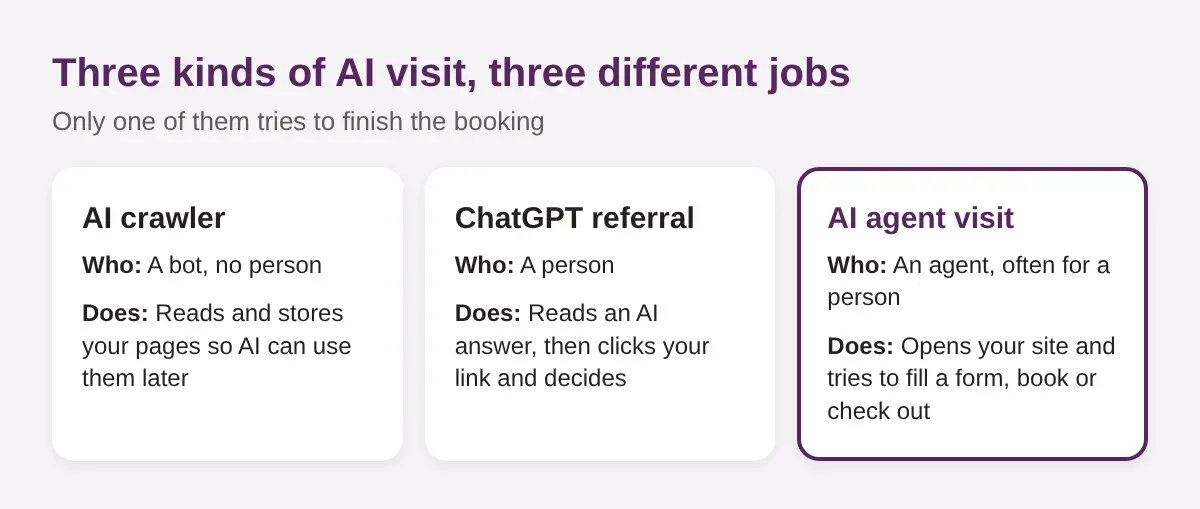
Three kinds of AI visit can reach your site. They look similar in a report and mean very different things.
- An AI crawler reads your pages so AI tools can use them later. It never fills in anything. We covered how that works in our post on how ChatGPT’s search index finds business websites.
- A ChatGPT referral is a person. They read an AI answer, click your link and decide for themselves.
- An agent visit is software acting for a person. It opens the page, reads it and tries to do something: submit a contact form, check availability, book, or check out.
The last one is new for most small businesses. We wrote about the restaurant and hotel side of it in AI agents that book tables and rooms for customers. Now there is a free way to see it on your own site.
The numbers: 5.23 million agent sessions in four weeks
5.23 million agent sessions across 230,511 Clarity projects, August 13 to September 9, 2026.
Microsoft announced agentic analytics for Clarity on November 4, 2026, alongside a study of that traffic. Agent traffic was identified from agentic browsers run by OpenAI, Google and Anthropic.
Agent traffic grew fast
Weekly agent sessions nearly doubled in three weeks. By the end of the window they were close to 2 million a week.
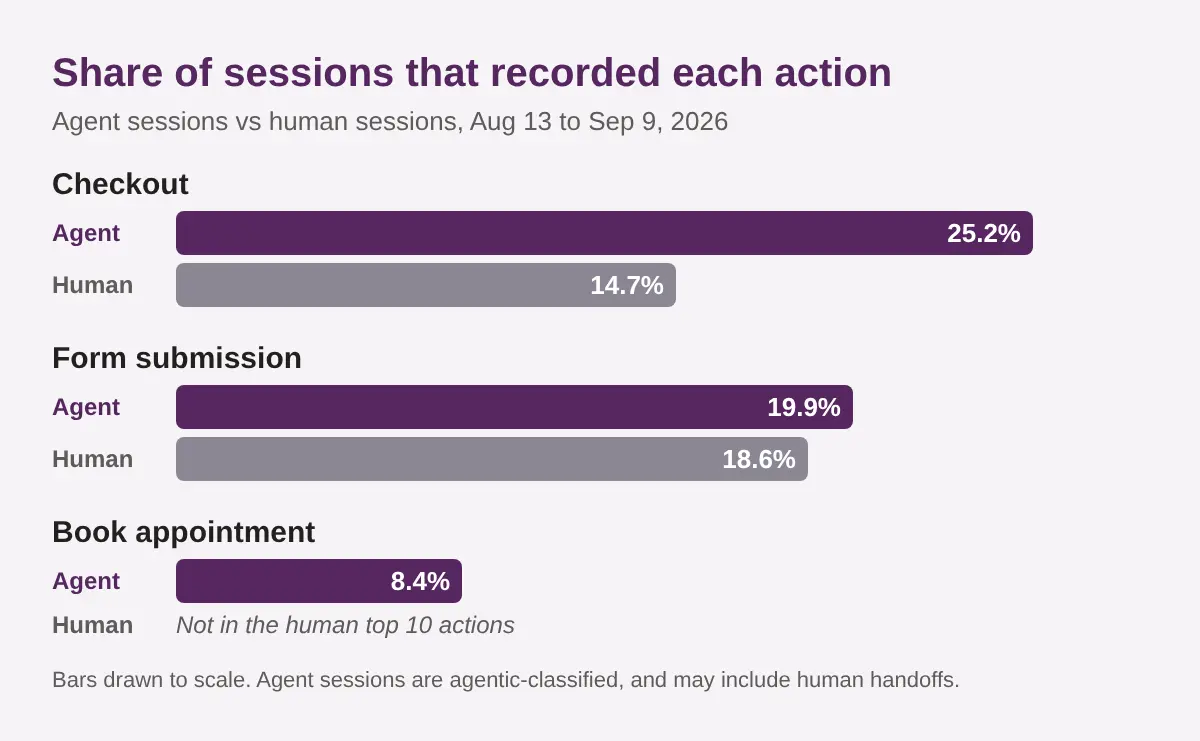
About 20% of agent sessions included a form submission
Agents submitted forms in 19.9% of their sessions. Human sessions came in at 18.6%. For a service business, that form is your lead.
About 8% included an appointment booking
Book appointment showed up in about 8% of agent sessions (8.4%). It was not among the top 10 actions in human sessions.
Checkout was the outlier
Checkout appeared in about 25% of agent sessions against about 15% of human sessions. That matters most for online shops.
What the numbers don’t tell you
These are Clarity’s own caveats and a few of ours. Read the figures with them in mind.
- “Agentic” is a label, not proof. Clarity says it cannot yet separate the agent part of a session from the human part. Some sessions may include a person taking over.
- It covers three providers. Agents from OpenAI, Google and Anthropic. Others are not counted.
- It is not a Toronto sample. The study covers sites that run Clarity, from every industry. Your site may see far less, or none.
- An action is not a sale. A recorded form submission does not tell you it was a real enquiry or a completed booking.
- The maths has been questioned. One trade publication, PPC Land, noted that the published percentages do not line up neatly with the headline session count. Treat the exact decimals as approximate.
Use the direction, not the decimals. Agents are visiting, and some are trying to book. That is enough reason to check your own site.
How to see agents on your own site
- Create a free Clarity project. Sign in at clarity.microsoft.com and add your site.
- Install it on WordPress. Add the Microsoft Clarity plugin from the WordPress plugin directory and connect it to your project. No developer needed.
- Give it a few weeks. The dashboard needs traffic to show anything.
- Open Agent Activity. Microsoft says this dashboard is available for projects that have agentic traffic. If it is empty, you may simply not have any yet.
- Check Bot Activity too. It is a separate report for automated traffic, so you can tell crawlers from agents.
Menu names change. If you cannot find a dashboard, search Clarity’s help pages for its current name.
Clarity does not replace your normal analytics. For people who arrive from AI answers, see our guide to tracking AI traffic in GA4.
Reading the data: who came, where they went, where they stopped
Once agent sessions appear, ask three questions.
- Which agents visit? Note the provider. It tells you which AI assistants your customers may be using.
- Which pages do they reach? Service pages, pricing, contact, booking. An agent that never reaches your pricing page is probably missing something.
- Where do they stop? Look for sessions that reach the booking page but never reach the confirmation page. That gap is your dead end.
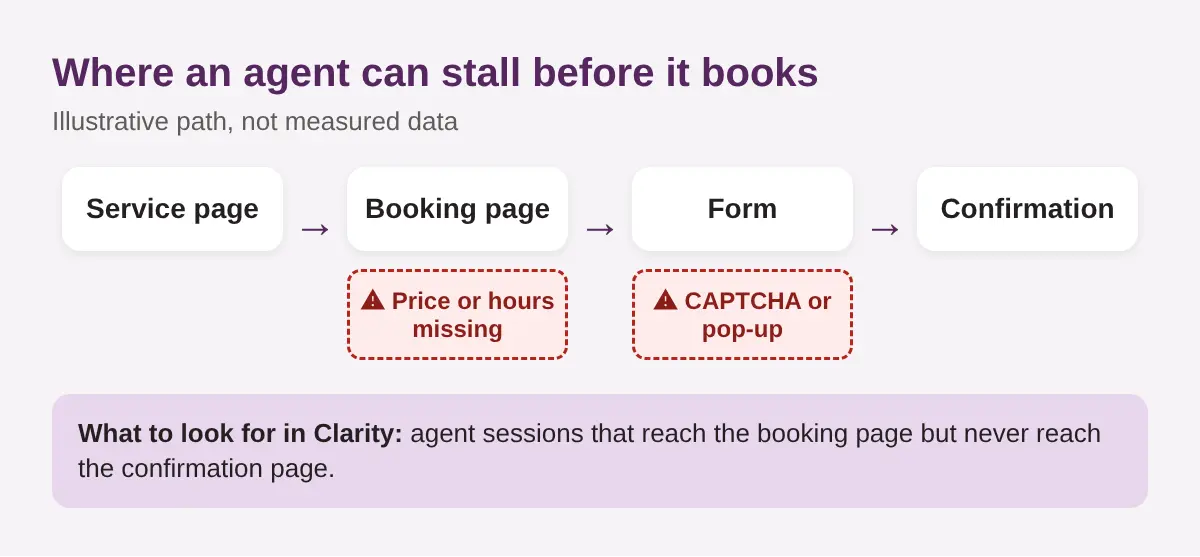
Then open a few recordings and watch. A pop-up covering the form, a CAPTCHA, or a price hidden in an image is easy to spot once you see it.
Make your booking and contact flow agent-friendly
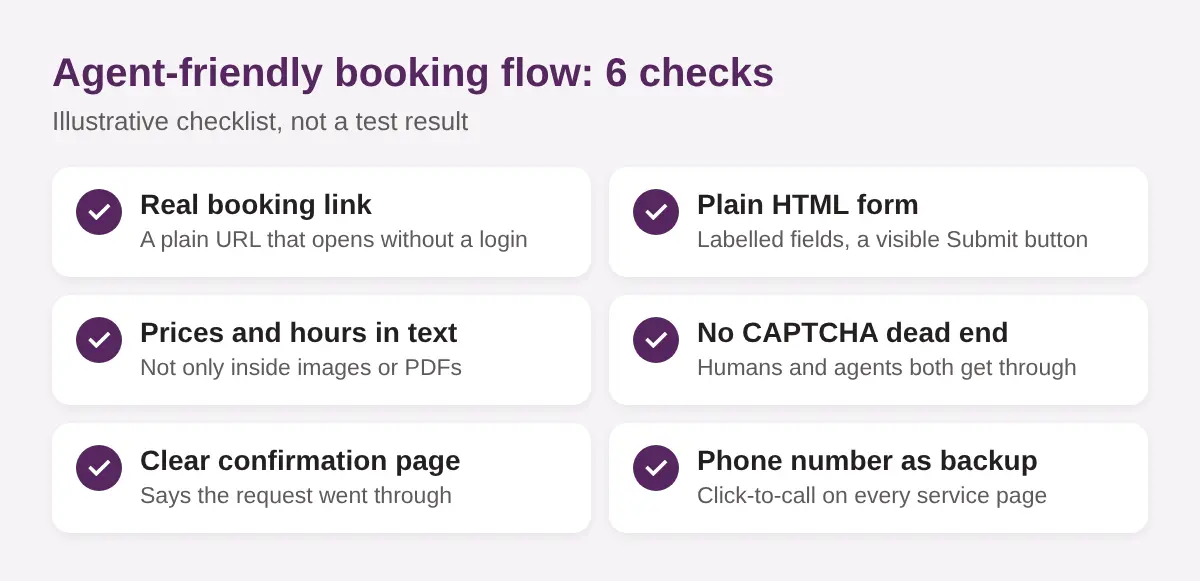
Most of this is plain good practice. It helps people and agents.
- Give it a real booking link. One URL that opens without a login.
- Use a plain HTML form. Labelled fields and a visible submit button.
- Put prices and hours in text. Not only in images, PDFs or pop-ups.
- Remove CAPTCHA dead ends. If you need spam protection, use one that does not block a real customer’s agent.
- Show a clear confirmation page. It tells the visitor, and your analytics, that it worked.
- Keep a phone number. Click-to-call on every service page.
If you book through Square, Jobber or Calendly, test your public link yourself. Open it in a private window, with no login, and see if a stranger can finish a booking in a few clicks.
Should you turn on a Brand Agent?
Clarity’s Brand Agents are the other side of this story. Instead of an outside agent visiting you, you put an AI assistant on your own site that speaks for your brand. The Clarity WordPress plugin now lists Brand Agents support.
Reasons to try it:
- It can answer routine questions when nobody is at the desk.
- It sits inside a tool you may already use for free.
Reasons to wait:
- Microsoft’s partner results, such as an up to 2X conversion lift, are vendor claims. They are not independent tests.
- It adds a visitor-facing AI that can get an answer wrong, so it needs your correct prices, hours and policies first.
- Visitors’ chats with an AI raise privacy questions. Read Clarity’s documentation on how that data is handled, update your privacy policy, and tell visitors they are talking to an AI. Ask your lawyer how Canadian privacy rules apply to you.
Our suggestion: fix your booking flow and watch Agent Activity first. Turn on a Brand Agent later, if you have a clear use for it.
Your checklist for this week
- Install Clarity if you have not.
- Test your own flow. Book yourself from your phone, logged out.
- Move key facts into text: prices, hours, service area, cancellation rules.
- Remove one blocker: a CAPTCHA, a pop-up, or a login wall.
- Check Agent Activity in two weeks and note which agents came.
- Check your recommendations. An agent can only visit you if AI sends it your way. Run our free AI Visibility Check to see whether AI names you at all.
The pages that get you recommended are the same pages an agent will try to use. If you want help with both, see our AI search optimization services in Toronto.
Frequently asked questions
Can an AI agent really book an appointment on my website?
Yes, it can try. Microsoft’s Clarity data recorded a Book appointment action in about 8% of agent sessions. Whether the booking finishes depends on your page. A plain form or a real booking link gives it the best chance.
Is Microsoft Clarity free?
Yes. Clarity is a free analytics tool from Microsoft, and the new Agent Activity dashboard is part of it. It appears for projects that have agent traffic.
Are AI agents the same as AI crawlers?
No. A crawler reads and stores your pages. An agent opens your site and tries to do something, like submit a form or book. Clarity shows them in different reports.
Should I block AI agents from my site?
Not if you want customers who use them. An agent that books for a customer is a customer. Make your flow easy, and check your site for bad or spammy form submissions the way you would for any visitor.
Does this change how I get recommended in AI answers?
It adds a step. AI first has to recommend you. Then the agent has to be able to finish the job on your site. Clear pages help with both.
Getting recommended is step one
AI used to stop at the recommendation. Now it may open your website and try to book.
Be easy to recommend. Be easy to book.
See whether AI is sending customers your way
Agents only visit businesses that AI already knows about. Before you fix the booking page, find out if you are in the answer.
Run a free Radar scan of your business in 30 seconds. See who AI names instead of you, and three quick wins.
No sign-up. No email. Instant results.
Run my free Radar scan →
About the author
Simar Singh runs Digital 6ix, a Toronto agency that works on SEO, local search and AI visibility. He writes about how small businesses get found and chosen when customers ask AI. The agency shares its audit and planning templates free at digital6ix.ca/templates. Find Simar on LinkedIn.
Sources
- Agents act, LLMs recommend, People browse: Clarity connects all three (Microsoft Clarity)
- Microsoft Clarity gains agentic analytics, brand agents and Ask Clarity (Search Engine Land)
- Microsoft Clarity Gains Agentic Analytics & Ask Clarity (Search Engine Roundtable)
- Clarity: AI Agent Sessions Hit Checkout 25% vs 15% Humans (Relevant Audience)
- Checkout appears in 25% of AI agent sessions vs 15% for humans (PPC Land)
- Microsoft Clarity plugin (WordPress.org)
Instant AI visibility scan
Agents only visit businesses AI already knows. Scan yours with Radar in 30 seconds and see who AI names instead.
Run my free scanBook a free audit call
Not sure what agents see on your site? Book a short call and we will look at your booking flow together.
Book my call