
AI Agents Now Book Tables and Rooms for Your Customers. Can They Book Yours?
Bottom line first: AI agents now try to finish bookings, not just recommend places. They get in through two doors: partner platforms like OpenTable and Booking.com, or a browser pass through your own website. The platform door is more predictable. The website door is where Skift’s hotel tests and MERJ’s agent research found agents getting stuck. Test your booking path with an agent this week, and fix whatever stops it.
Your next customer may never open a search page. They may text an agent: book me a table for four on Friday, somewhere near Queen West. The agent picks a place. Then it tries to book it. Whether it can finish is now part of your visibility.
From recommended to booked: what changed
Being recommended by AI used to be the finish line. A person read the answer, chose a place and booked it themselves.
Now the agent tries to do that last step too. Here is what has changed in the past few weeks:
- Lola, September 29. The Booking Holdings-backed assistant launched with memberships and new partners. Travel Weekly reports it can already book restaurants and hotels, and that it draws on Booking Holdings brands such as Booking.com and OpenTable.
- Meta’s Muse, September 29. Meta expanded Muse to small businesses the same day. As a personal agent, Muse then ran into trouble on hotel sites, as Skift’s tests show below.
- Instinct, by text message. Instinct is a personal agent you message on iMessage or WhatsApp. TechCrunch’s October 10 roundup shows how many agents now live inside text threads.
- Google AI Mode, hotels. Google began rolling out hotel booking in AI Mode in the U.S. on August 27. People compare rooms, check cancellation terms and pay with Google Pay in the chat. The hotel or booking platform still takes the booking.
The pattern is the same everywhere. Recommendation is step one. Booking is step two. Agents only finish step two where they can get through.
We covered the discovery side when Google’s AI Mode started watching for new restaurants and deals. This post is about what happens after the shortlist.
The two doors agents use to book you
An agent that wants to book has two ways in.
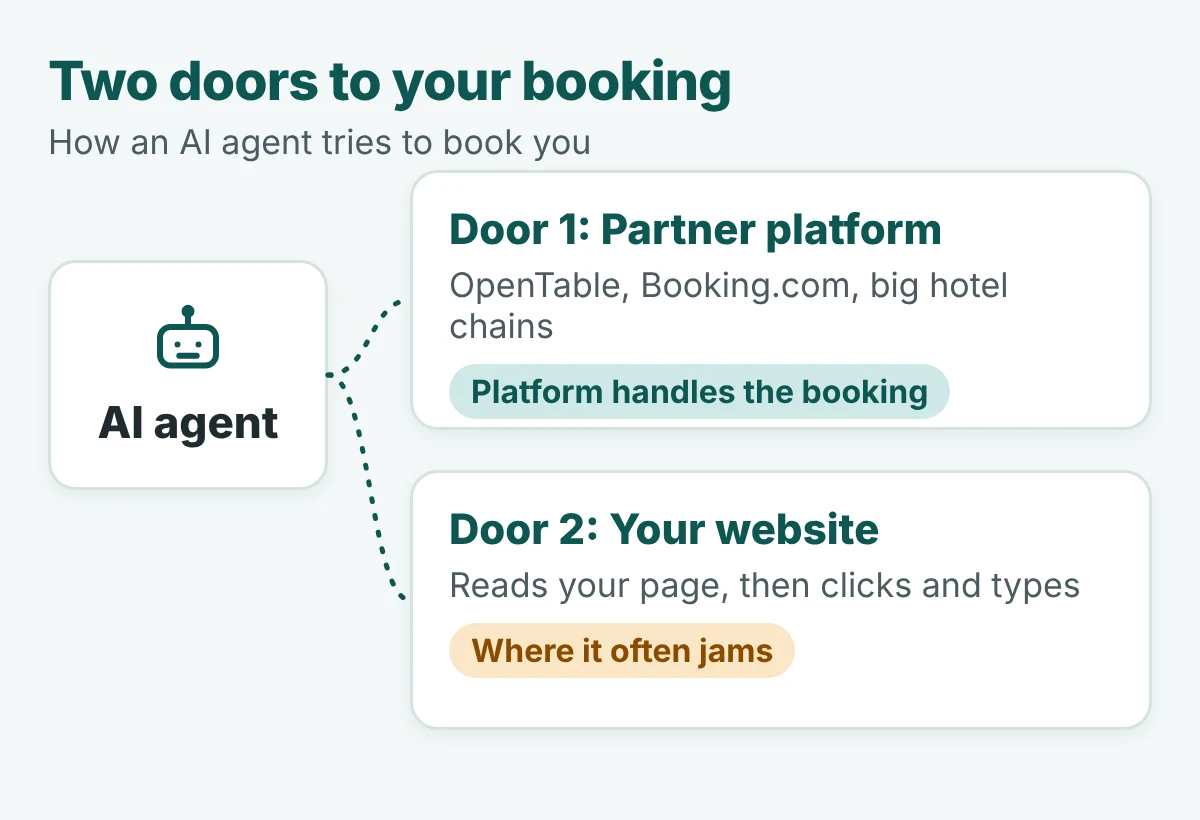
| Door 1: partner platforms | Door 2: your website | |
|---|---|---|
| How the agent gets in | Connects to a booking platform through a partner link. The platform shows availability and takes the booking. | Opens your site in a browser, reads the page, then clicks and types like a person would. |
| Examples | OpenTable, Booking.com, big hotel chains | Your booking page, reservation form or booking widget |
| Who controls the path | The platform and its terms | You |
| What goes wrong | You are not on the platform, or your listing is out of date | Unlabelled buttons, blocking pop-ups, bot checks, forms built only for humans |
| What you do | Be on the right platforms and keep availability accurate | Make the page easy for a machine to read and finish |
When Door 1 fits
If you already take bookings through OpenTable, Libro or Booking.com, an agent that connects to those platforms can often see your availability. You rely on the platform to stay current. Your job is the listing.
When Door 2 matters
If you take direct bookings, or you are not on the platform the agent uses, your own page becomes the route. This is also the door chains want agents to use. Hilton’s technology chief told Skift the aim is to meet travellers in AI tools and bring them back to Hilton.com to book.
Why agents fail on real booking pages
Door 2 is where things jam. Two pieces of evidence show how.
What Skift’s hotel tests showed
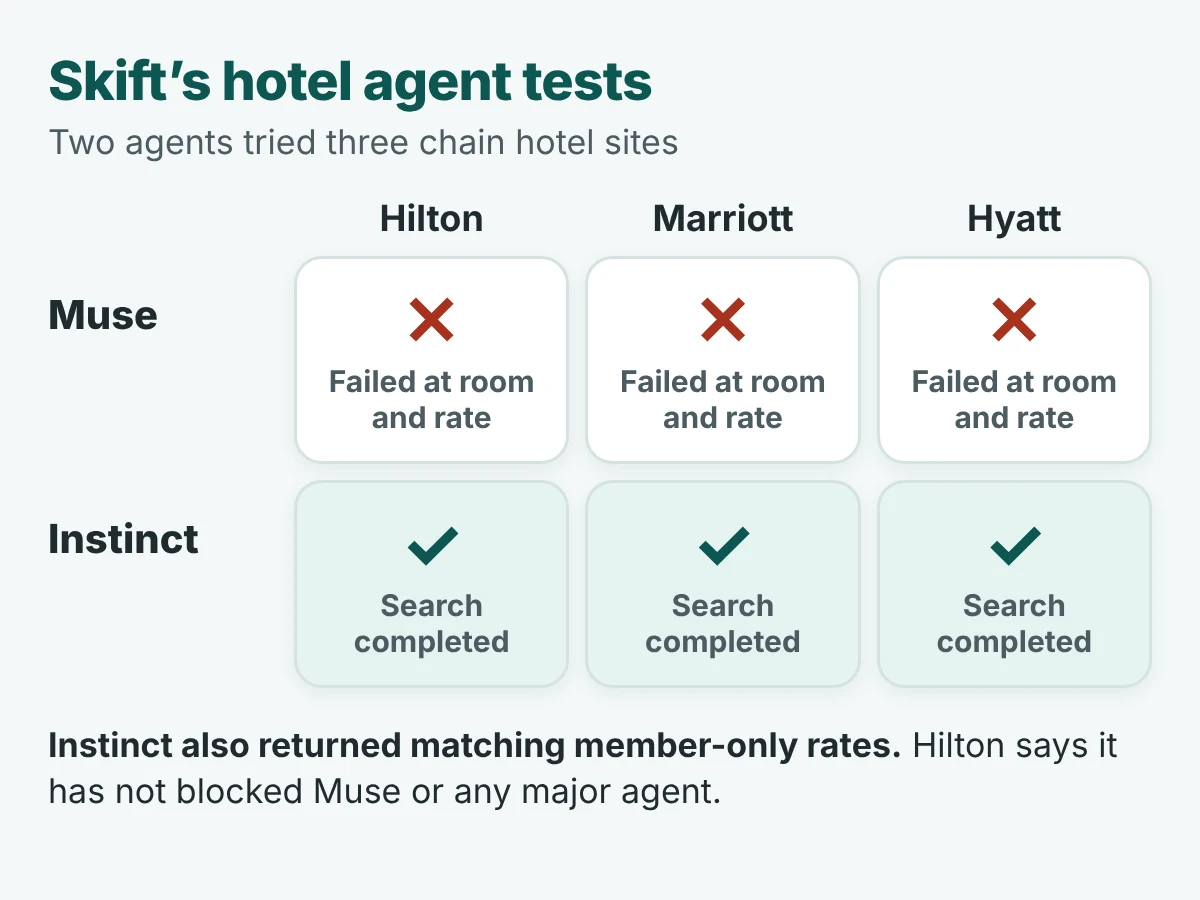
Skift tested Muse on the Hilton, Marriott and Hyatt sites. Muse failed at the room-and-rate step on all three. Instinct completed searches on all three and returned matching member-only rates.
Hilton says it has not blocked Muse or any major agent, and that it accepts bookings from several agents, Muse included. Skift’s point is that letting agents in on paper and letting them finish are not the same thing.
These are big chains with large engineering teams. A small site with a custom widget and a pop-up has plenty to trip over as well.
What MERJ’s agent research found
MERJ began its research in November 2025 and warns that agent behaviour changes as models change, so its findings are version-specific. Even so, the failures are easy to picture:
- Many agents read the page’s accessibility tree, not just what you see. A div styled to look like a button can read as plain content with nothing to click.
- A button hidden with aria-hidden can be visible on screen and still invisible to an agent that reads structure.
- Native confirm dialogs can stall an agent that has no way to handle them.
- Misleading labels send agents to the wrong control. In one test, an agent asked to save a document clicked Cancel first in all 25 runs.
The lesson is simple. A booking page that looks fine to you can be a dead end for an agent.
Visibility without bookability: who gets the booking
If an agent recommends you but cannot finish with you, it may finish somewhere else. Platforms are built to be finished. Their listings are structured and their partner links exist. An independent’s booking page was usually built for a person with a thumb and a bit of patience.
That is a risk, not a certainty. But it points one way: independents can lose bookings to OTAs and big platforms without ever losing a recommendation.
Visibility gets you on the shortlist. Bookability decides who gets the booking.
Keep this in proportion. It is early. Skift reports that Booking.com says AI assistants still drive under 1% of its room nights. The fixes are cheap compared with being late. And the first step is still being recommended, which is the work of AI search optimization.
The Toronto booking checklist
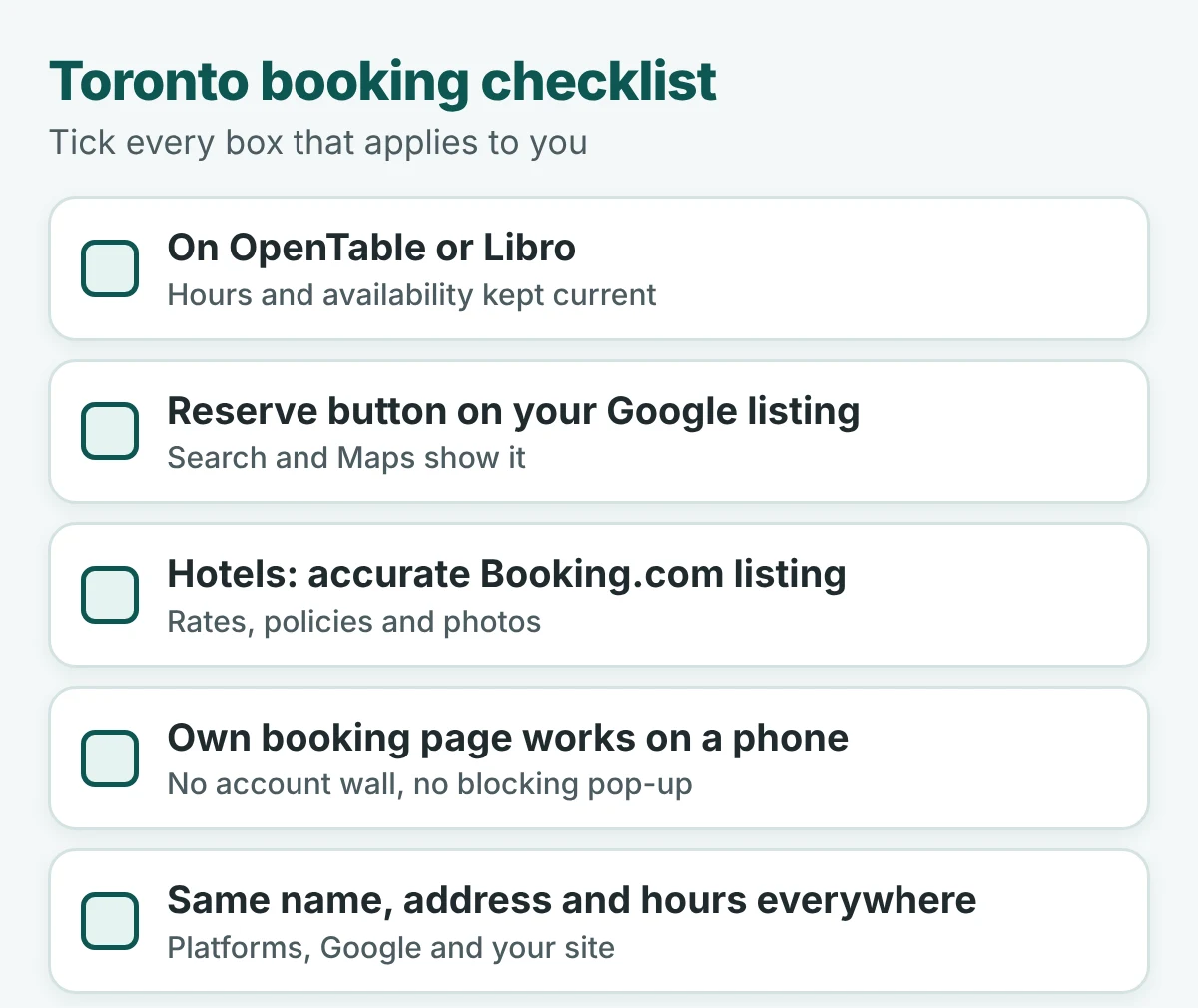
Pick the doors that apply to your business, then tick each box.
OpenTable and Libro
OpenTable announced on April 20, 2026 that it had acquired Libro, the Canadian reservation platform. Reports say Libro keeps operating under its own brand. Both connect to Reserve with Google, and Lola draws on OpenTable through Booking Holdings. Keep hours, party sizes and availability current on whichever you use.
Reserve with Google
This puts a reserve button on your Google search and Maps listing. Google’s Canada blog describes AI booking that links diners to partners such as OpenTable and Libro to finish the reservation. If you use one of those platforms, switch the Google connection on.
Booking.com
Booking.com is a launch partner for hotel booking in Google AI Mode, and Lola members get hotel rates through it. Hotels should keep rates, policies and photos accurate. Note that Google’s AI Mode hotel booking launched for U.S. users, so check what is live in Canada before you plan around it.
Your own booking engine
This is the door you control, and the next section covers it. If you want help tying this together, our restaurant and hospitality marketing team works on exactly this mix of listings, reviews and booking pages.
Make your own booking page agent-friendly
You cannot change what Hilton does. You can change your page. Most fixes are plain web basics, which is MERJ’s point about accessibility and standard markup.
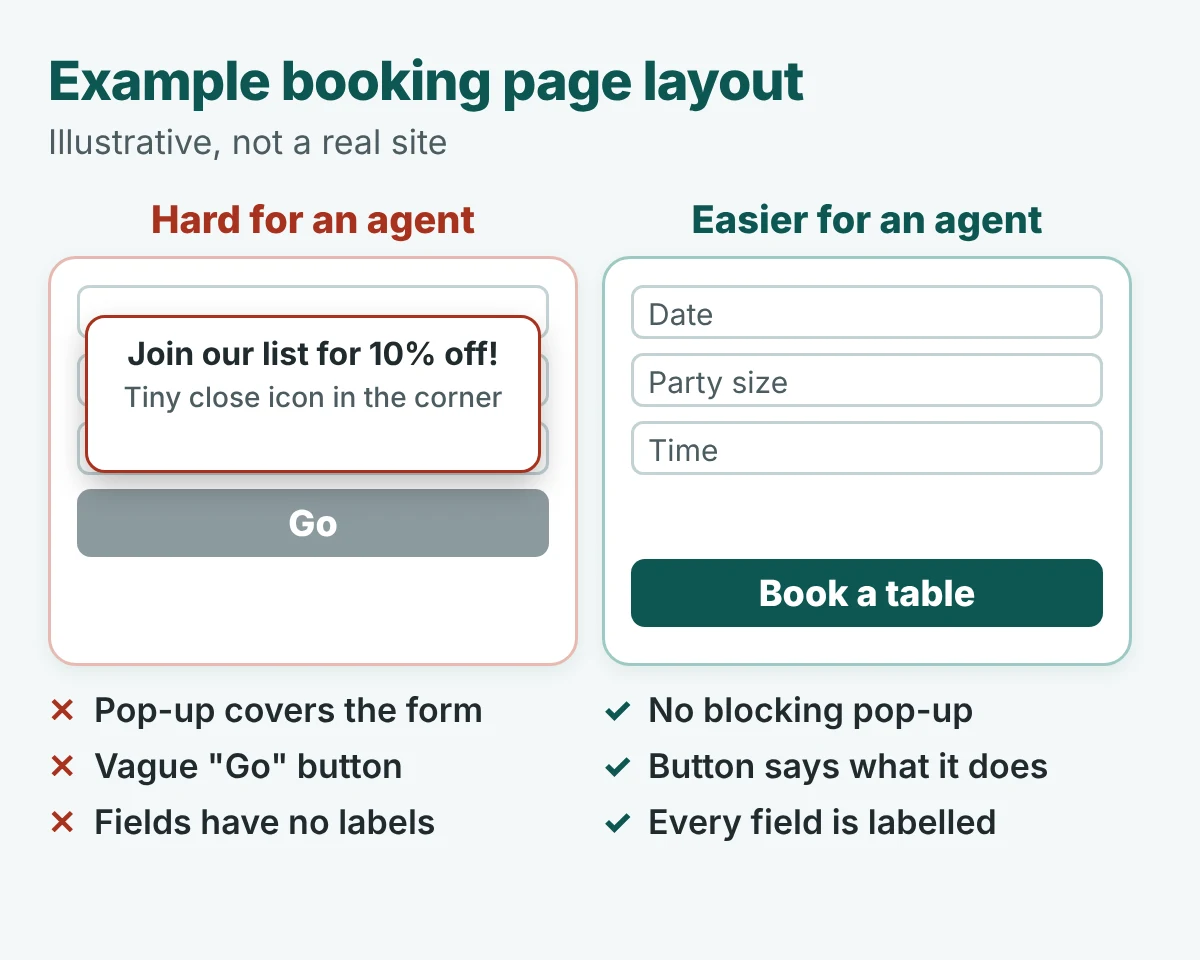
- Use real buttons and links. A styled div can look like text to an agent.
- Label everything clearly. Say “Book a table”, not “Go”. Give the date, party size and time fields visible labels that match what they do.
- Do not hide visible controls. If a button shows on screen, it should also show in the accessibility tree.
- Avoid blocking pop-ups. Newsletter pop-ups, cookie banners and native confirm boxes can stall an agent. Make them easy to dismiss and keep them off the booking form.
- Keep the path short. Fewer steps and no forced account means fewer places to get stuck. This one is our recommendation, not a finding from the research.
- Check your bot protection. Reports point to bot checks as one place agents get stopped. Make sure yours is not turning away the visitors you want.
Run Lighthouse’s Agentic Browsing check
Chrome’s Lighthouse now has an Agentic Browsing category. Per Chrome’s documentation and guides, it looks at an llms.txt file, WebMCP, the accessibility tree (names, labels, structure and visibility) and layout shift. Google describes it as a way to gather data and give actionable signals, not a final ranking.
Open Chrome DevTools, go to the Lighthouse tab, choose Agentic Browsing and run it on your booking page. You need a recent version of Chrome. If a developer maintains your site, technical SEO work is the right place to put the fixes.
Test it yourself this week
You do not need a tool to find out where you stand. You need an agent and twenty minutes.
- Pick your agents. Use whichever you can get into: Google AI Mode, Lola, Muse, Instinct, ChatGPT or Claude. Two or three is enough.
- Ask a real customer question. For example, “Book a table for four at [your restaurant] on Friday at 7” or “Find me a room at [your hotel] for two nights.”
- Let it run and do not help. Watch the whole path. Note every step where it hesitates, asks you to take over or stops.
- Write down where it got stuck. Was it the search result, the platform, your page, a pop-up, a bot check or the payment step?
- Repeat without your name. Ask “Book a table for four in [your neighbourhood] on Friday.” See whether it picks you, and whether it can finish.
- Run the Lighthouse check on your booking page. Fix the top item first, then rerun your agent test.
- Test again in a month. Agents change fast. MERJ says its own findings are version-specific, so one test is a snapshot.
Careful with real money. Agents can complete payments. Use a booking you are happy to cancel, check the cancellation terms, and do not enter card details in a tool you do not trust.
To see whether AI recommends you in the first place, run our AI Visibility Check.
Frequently asked questions
Can an AI agent book a table or room at my business?
Yes, if it can reach a booking route. That means either a platform it connects to, such as OpenTable or Booking.com, or a booking page it can read and operate. Skift’s hotel tests show the second route can fail at the room-and-rate step.
Which booking platforms should a Toronto business be on?
Start with the ones your customers and the agents already use. For restaurants that means OpenTable or Libro, plus a Reserve with Google button on your listing. For hotels it means an accurate Booking.com listing. Keep your own booking page working too.
Does bot protection keep AI agents out?
It can. Skift’s reporting says Muse could not complete bookings on major hotel sites, and other reports point to bot protection as one place agents get stopped. Hilton says it has not blocked Muse. Check your settings so you are not turning away the visitors you want.
What is Lighthouse’s Agentic Browsing check?
It is a category in Chrome’s Lighthouse tool that checks how ready a page is for AI agents. Chrome’s documentation and guides describe checks for an llms.txt file, WebMCP, the accessibility tree and layout shift. Google says the aim is to give signals, not a definitive ranking.
Is it too early to worry about this?
It is early. Skift reports that Booking.com says AI assistants still drive under 1% of its room nights. But the fixes, such as real buttons, clear labels and no blocking pop-ups, also help human visitors, so they are cheap to make now.
The verdict
Two doors, one test. Platforms are the smoother route when you are on them. Your own page is the route you control, and the one most likely to jam. Check both this week.
Being recommended gets you looked at. Being bookable gets you the table.
Before an agent can book you, it has to find you
A booking only happens after a recommendation. If AI does not name your business, no agent will ever reach your booking page.
Run a free Radar scan and see in 30 seconds whether AI names you, who it picks instead, and three quick wins.
No sign-up. No email. Instant results.
Scan my business →
About the author
Simar Singh founded Digital 6ix, a Toronto agency that helps local businesses get found and recommended in Google and in AI answers. He writes about what is changing in search and how small businesses can respond. Free audit and planning templates are at digital6ix.ca/templates. Connect with Simar on LinkedIn.
Sources
- Skift: Hilton Isn’t ‘Blocking’ New AI Agents, But It’s Not Always Letting Them In
- MERJ: How AI Agents Use Websites, Where They Fail, and What to Fix
- TechCrunch: All the AI agents that can live in your text messages
- Travel Weekly: Steve Hafner on the premise and promise of Lola
- Lola: Lola launches AI-powered experiences, memberships and new partners
- TechCrunch: Meta is expanding its AI agent Muse to small businesses
- Skift: Google’s Agentic Hotel Booking Tool Comes to AI Mode
- Skift: Hilton Tech Exec Says AI Agents Put OTAs ‘Under Real Threat’
- Google Canada: Booking restaurants in Canada just got easier with AI
- Verdict Foodservice: OpenTable acquires Canadian restaurant reservation platform Libro
- Chrome for Developers: Lighthouse agentic browsing
Is AI sending you customers?
Radar checks in 30 seconds whether AI names your business, which rivals it picks instead, and what to fix first.
Scan my businessTalk it through with us
Not sure where your booking path breaks? Book a free call and we will map the first fixes.
Book a free call