
ChatGPT Just Added Hundreds of Millions of Pages to Its Search Index. Is Your Business Website One of Them?
Bottom line first: ChatGPT can only recommend a business it can read. Cloudflare and OpenAI say a pilot helped OpenAI’s search crawler find and index hundreds of millions of new pages, but a page that blocks OAI-SearchBot can still be left out of ChatGPT search answers. Many small business sites block it by accident, through a Cloudflare setting, a hosting toggle or a robots.txt line nobody remembers adding. A 10 minute check will tell you if yours does.
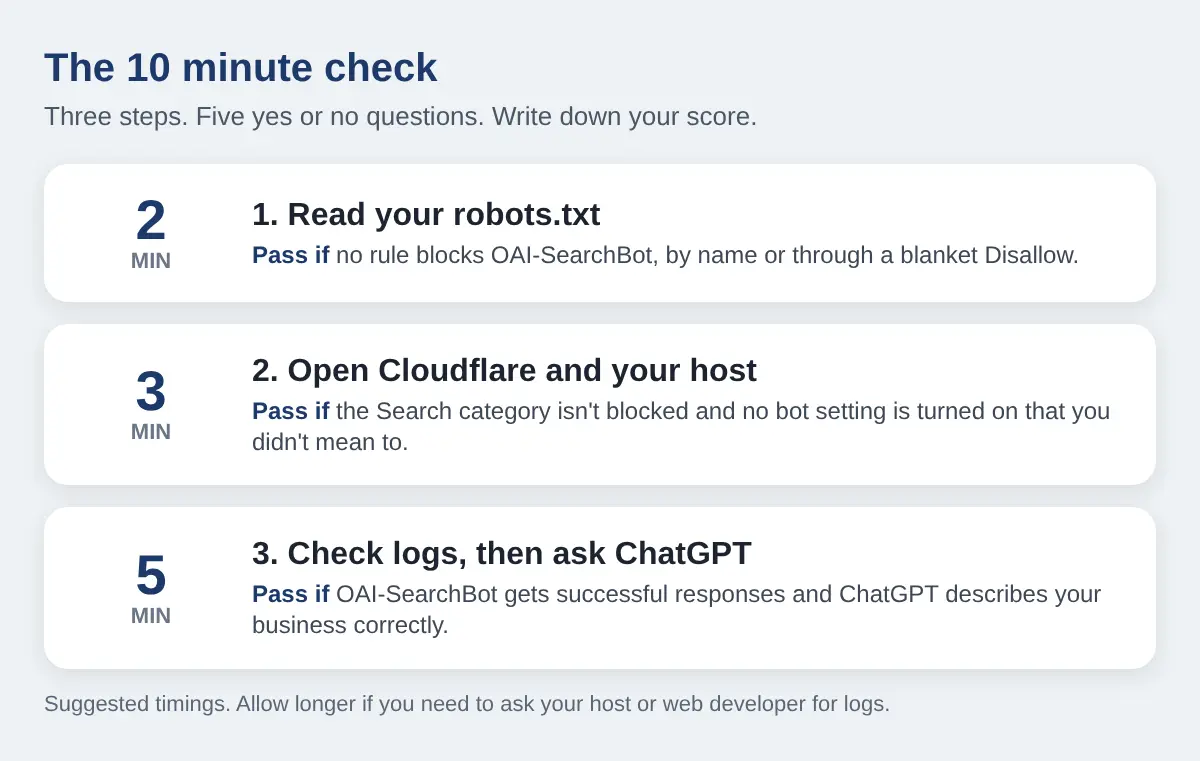
This guide covers what the pilot changed, which OpenAI bots matter, and how to check your own site step by step. Each check ends in a yes or no, so you finish with a score.
What the Cloudflare and OpenAI pilot does and does not prove
On October 15, 2026, Cloudflare and OpenAI shared early results from a research pilot. It was announced on July 8 and ran on about 1% of Cloudflare’s network. The two companies say it helped OpenAI’s search crawler discover and index hundreds of millions of new pages for ChatGPT search.
In plain English, it works like this. Cloudflare sits in front of a large share of the web, so it can see which pages are fresh or have changed. In the pilot, it passed signals like that to OpenAI. OpenAI’s crawler then went to look. OpenAI still decides what to index and how to rank it.
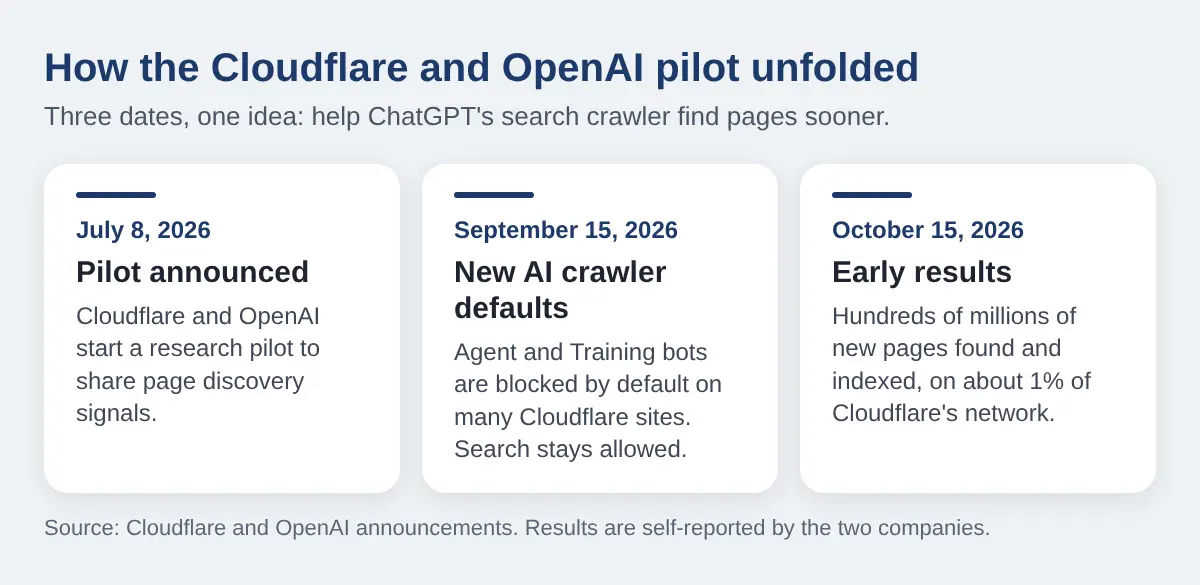
What it suggests: discovery is no longer just a crawler following links. Pages behind Cloudflare may get found sooner.
What it does not prove:
- That you will be cited. The results do not report how often the new pages showed up in ChatGPT answers, or how many visits they sent.
- That your site is open. Cloudflare’s post says a signal about a page doesn’t grant permission to access it. Your robots.txt and security settings still apply.
- That the numbers are independent. They come from the two companies, from a small group of sites.
Two steps, two owners. Being found is step one, and the pilot helps with it. Being allowed in is step two, and only you control it.
Three OpenAI bots, three different jobs
OpenAI documents three crawlers. Each has its own robots.txt rule. Mixing them up is a common mistake in this area.
- OAI-SearchBot builds the index behind ChatGPT search. OpenAI’s docs say sites that opt out of it will not be shown in ChatGPT search answers.
- ChatGPT-User opens a page when a person’s ChatGPT conversation asks for it. OpenAI says it is not used to decide whether content appears in search.
- GPTBot collects content that may be used to train OpenAI’s models. Blocking it is a training choice. It is not the search switch.
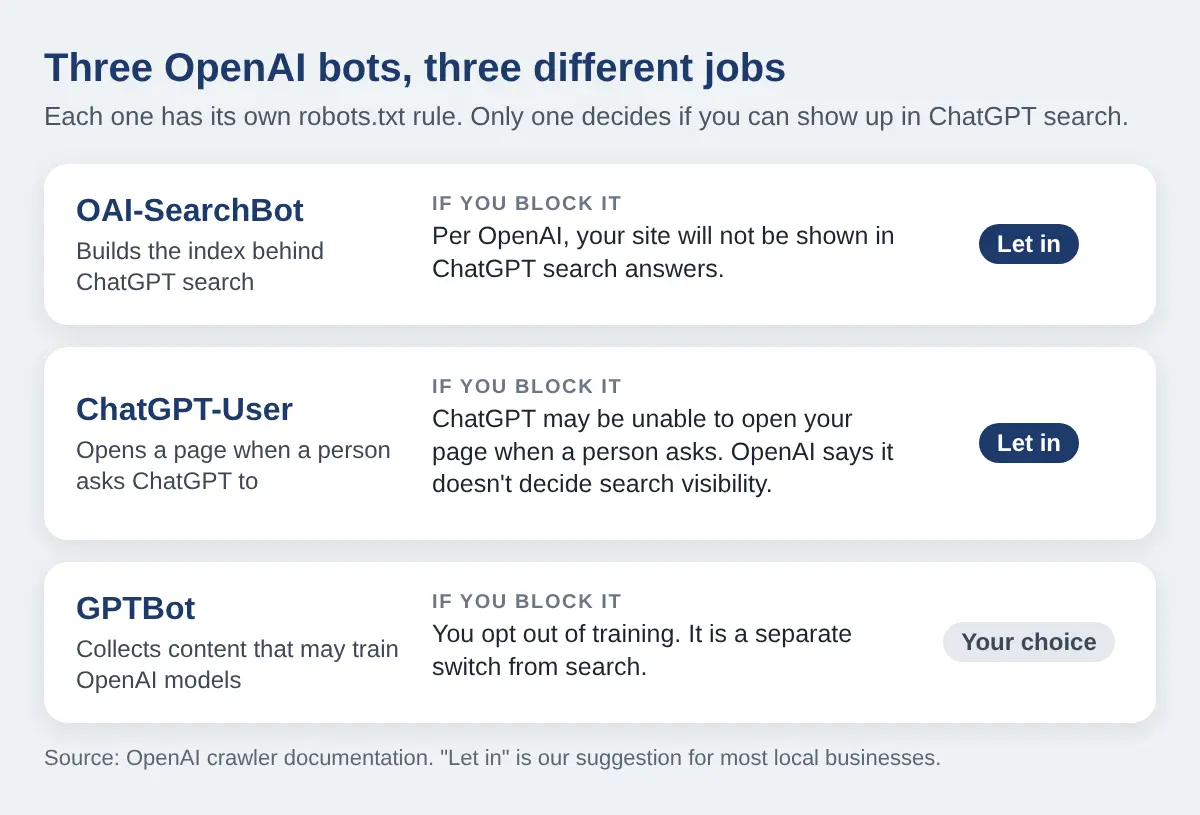
So a site that blocks GPTBot has said nothing about search. A site that blocks OAI-SearchBot has said nothing about training. Many owners copy a “block AI” snippet and end up blocking both without knowing it.
Where Bing fits
OpenAI’s docs describe its own crawler. Many SEO guides also report that ChatGPT search results overlap heavily with Bing’s. OpenAI has not spelled out the exact mix in the documents we checked, so treat Bing as a cheap second door, not a rule. Search for your business on Bing, and check that your site is set up in Bing Webmaster Tools.
Check 1: Read your robots.txt (2 minutes)
Type your domain into a browser, followed by /robots.txt. Read it top to bottom. You are looking for four things:
- A rule that names the bot.
User-agent: OAI-SearchBotfollowed byDisallow: /shuts it out. - A blanket block.
User-agent: *followed byDisallow: /blocks every crawler that has no rule of its own. This often comes from a staging copy that went live. - A pasted list of AI bots. Plugins and “block AI” guides often add a long list. Check that OAI-SearchBot is not on it.
- Nothing at all. An empty or missing file blocks nothing. That is a pass.
A rule that names a bot takes priority over the * rule, so you can fix a blanket block by giving OAI-SearchBot its own rule. Some hosts, plugins and Cloudflare can also add lines to this file for you. The file you read may not be one you wrote.
OpenAI says it can take about 24 hours after a robots.txt change for its search systems to adjust.
Check 2: Look at Cloudflare and your host (3 minutes)
This is where the silent blocks live. Robots.txt is a request. Cloudflare, your host or a security plugin can refuse the visit outright, and nobody on your team sees it happen.
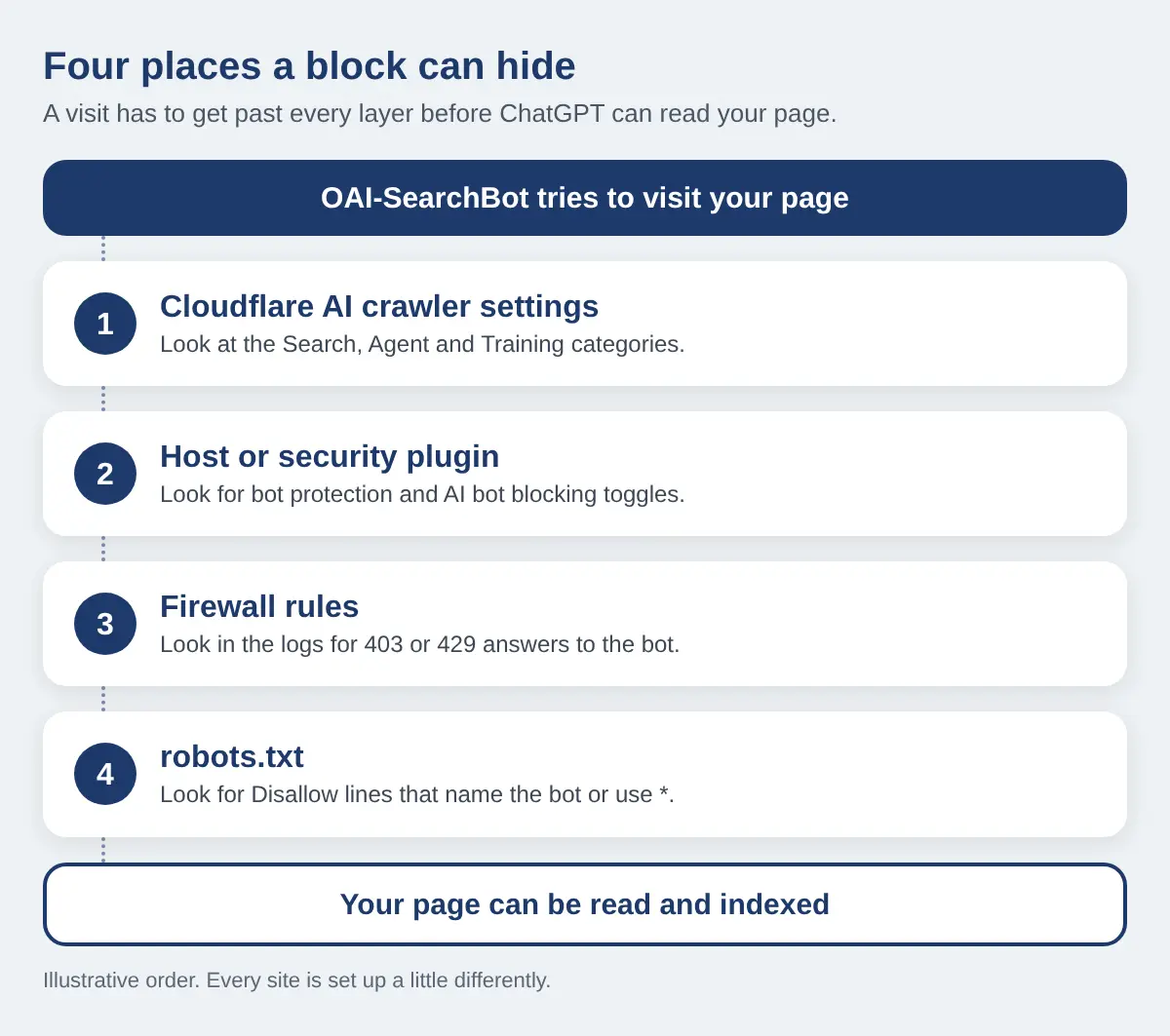
If you use Cloudflare
Cloudflare now sorts AI crawlers into three categories: Search, Agent and Training. Coverage of its announcement says that since September 15, Agent and Training crawlers are blocked by default on many sites, especially new ones, while Search stays allowed. The old “Block AI bots” switch is reported to count as a Training block now. Open your dashboard and check:
- Find the settings. Pick your domain, then look for AI Crawl Control, or a bots section under Security. Menu names move around.
- Read each category. Confirm Search is not blocked.
- Find the OpenAI bots. If the crawler list shows OAI-SearchBot or ChatGPT-User, read the label next to each.
- Check for overlap. A Training block can also catch crawlers that do more than one job. Make sure it is not catching one you want in.
Do not test by switching security off. Change one setting at a time. If you cannot find these screens, ask whoever set up your Cloudflare account.
If you do not use Cloudflare
Look in your hosting panel and in any security plugin for settings named bot protection, AI bot blocking, scraper protection or bad bot list. Read what each one covers. A toggle you switched on years ago for spam may now catch AI crawlers too. If a firewall rule turns out to be the cause and you do not have a developer, this is routine work in technical SEO.
Check 3: Check your logs, then ask ChatGPT (5 minutes)
Look for the bot in your server logs
Ask your host or web developer for the access logs, or open the bot report in your hosting panel. Search for OAI-SearchBot. Then read what came back:
- Successful responses (200). The bot is getting in. Pass.
- 403 or 429 responses. Something is refusing it. A firewall or bot rule is the likely cause.
- No sign of it. It may be blocked before it reaches your server, or it may not have visited yet. A small site can be crawled rarely, so this alone is not proof. Do the live test next.
Ask ChatGPT about your own business
Open ChatGPT with search on and ask three questions:
- Your name and city. “What is [business name] in [city] known for?”
- The customer question. “Best [service] in [neighbourhood].”
- A fact only your site holds. A price, a menu item or your hours.
Note whether it names you, whether the details are right, and whether it links to your site. ChatGPT answers vary from one try to the next, and not being named does not prove a block. A wrong answer, or no answer, is still a useful signal. Our look at how ChatGPT treats Toronto main-street businesses shows how uneven this can be. You can also run a free AI visibility check and compare.
Score yourself, then decide what to let in
Give yourself one point for each yes:
- No robots.txt rule blocks OAI-SearchBot, by name or through a blanket block.
- Cloudflare and your host do not block the Search category or OAI-SearchBot.
- Your logs show OAI-SearchBot getting successful responses, or you have asked your host to confirm.
- ChatGPT describes your business correctly when you ask.
- Your key facts are plain text on the page. The next section covers this one.
5 or 4: you are open. Work on the content. 3 or 2: fix each “no” this week, starting with robots.txt because it is free. 1 or 0: ChatGPT search may not be able to read you at all. Fix access before you write anything new.
What to let in and what to keep out
Allowing search does not mean allowing everything. Each bot has its own rule, so you can choose bot by bot.
| Bot | ✕ Keep out if | ✓ Let in if |
|---|---|---|
| OAI-SearchBot | You do not want to appear in ChatGPT search answers. | You want ChatGPT to be able to recommend you. This is the case for most local businesses. |
| ChatGPT-User | You never want ChatGPT to open your pages for a user. | You want a customer who asks about you to get a real answer from your page. |
| GPTBot | You do not want your content used to train OpenAI’s models. | You do not mind training use. Blocking it is a separate choice from search. |
Here is what a robots.txt looks like when it welcomes search and opts out of training. It is an example only, so keep the rules you already have for Googlebot, Bingbot and the rest.
User-agent: OAI-SearchBot
Allow: /

User-agent: ChatGPT-User
Allow: /

User-agent: GPTBot
Disallow: /
Robots.txt is a request that well-behaved crawlers follow. It is not a lock. If something must stay private, put it behind a login. If you would rather have someone set this up and test it, it sits inside our AI search optimization work.
Make the pages worth indexing
Being allowed in is not the same as being chosen. A crawler that reads your page needs facts it can lift. Put these in real text, not in a PDF, an image or a widget that loads on click:
- Menus, price lists and service lists
- Hours, address, phone number and service areas
- Booking details, such as how to book, what it costs and what to bring
- One page per service or product, with the answer in the first lines
Three Toronto setups to look for. These are illustrative, not client results:
- The restaurant. The menu is a PDF or a photo of a printed page, and the hours live inside a booking widget. Fix it with an HTML menu page, dishes and prices as text, and hours written on the page.
- The clinic. Treatments sit in one accordion that loads on click, and booking happens on a third-party site. Fix it with one page per treatment: who it is for, what to expect, how to book.
- The trades company. A single Services page shows an icon grid with no text, and the service area is a map image. Fix it with a short page per service and the neighbourhoods you cover, written out.
Each of these may hide a good business from ChatGPT even with every bot allowed.
Track the result and set honest expectations
According to reports on OpenAI’s publisher guidance, ChatGPT adds utm_source=chatgpt.com to links it sends people to. In GA4, open your traffic acquisition report and filter for a session source that contains chatgpt.com. Do it today, so you have a baseline. Our guide to tracking AI traffic in GA4 walks through the setup. Visits that arrive by copy and paste can show up as direct traffic, so the number will undercount.
What to expect:
- A day or so for OpenAI’s search systems to notice a robots.txt change.
- Weeks, not days, before you can judge. Being indexed does not mean being cited.
- No promises. Nobody has published citation or traffic data from the pilot. Anyone who quotes you a number for it is guessing.
Re-run the live test with the same three questions once a month, and write down what changes.
Frequently asked questions
Does blocking GPTBot hide my business from ChatGPT?
Not on its own. OpenAI treats GPTBot, which relates to training, and OAI-SearchBot, which relates to search, as separate controls. A block on one does not change the other.
How long does it take after I fix my robots.txt?
OpenAI says it can take about 24 hours for its search systems to adjust after a robots.txt update. Getting cited can take longer, and it is not guaranteed.
Do I have to use Cloudflare?
No. The pilot is a research project on a small share of Cloudflare’s network. Sites that do not use Cloudflare can still be crawled by OAI-SearchBot, as long as nothing blocks it.
Should I allow every AI bot?
Not necessarily. Decide bot by bot. Many local businesses want search and user bots in, and choose separately about training.
If I allow OAI-SearchBot, will ChatGPT recommend me?
No. Access only lets ChatGPT read your pages. Whether it uses them depends on how relevant and clear they are, and on what else it finds about you.
Open the door, then earn the answer
Most of this check costs nothing and takes ten minutes. If one setting is the reason ChatGPT has never heard of you, that is one of the cheapest fixes there is.
ChatGPT can’t recommend what it can’t read.
Can ChatGPT read your site, and does it recommend you?
Letting the crawler in is half the job. The other half is being the business ChatGPT names when a customer asks.
Run a free Radar scan of your business. It shows whether AI recommends you, who it names instead, and three quick wins.
Free. No sign-up. About 30 seconds.
Scan my business with Radar →
About the author
Simar Singh runs Digital 6ix, a Toronto agency for SEO, GEO and content. He works with local and online businesses on being found in search and recommended by AI tools such as ChatGPT, Perplexity and Gemini. Free audit and planning templates are at digital6ix.ca/templates. Find Simar on LinkedIn.
Sources
Instant AI visibility scan
Wondering if ChatGPT can find you? Radar scans your business in about 30 seconds: does AI recommend you, who does it name instead, and what are three quick wins.
Run my free scanBook a free audit call
Want a second pair of eyes on your setup? Book a free call and we will talk through where you stand in AI search and what to fix first.
Book my call