
Google Posts Are Moving Back Up Your Business Profile, and You Can Finally See Who Reads Them: A Posting Plan That Also Feeds Maps and AI Answers
Bottom line first: Google is testing Posts higher in the local knowledge panel, and it has brought back view counts for each post. Neither change is proven to lift your rankings or to get you quoted in AI answers. Both make a simple routine worth running: two posts a week, the same facts on your website and social channels, and a monthly look at the counts.
Until this fall, you could post to your Google Business Profile and have no idea if anyone saw it. Google removed the counts in 2023.
Now they are back. Posts may also be moving back up the page.
This guide covers what changed, how to read the counts and a six-step weekly routine. It also covers what is still hype.
What changed, and what is still only a test
Two separate things happened this fall.
- View counts came back. Google’s Small Business Bulletin of September 10, 2026 announced Google Posts Reporting. Each post card in the Posts section of your dashboard shows how many times people viewed it. Google removed per-post view counts in February 2023.
- Posts may be moving up. On October 19, 2026, Search Engine Roundtable reported that Google moved Posts higher on the local knowledge panel. Ben Fisher saw the placement flip up and down every few days.
Posts were pushed lower in the local panel back in late 2018. This is the first move back up that we know of since.
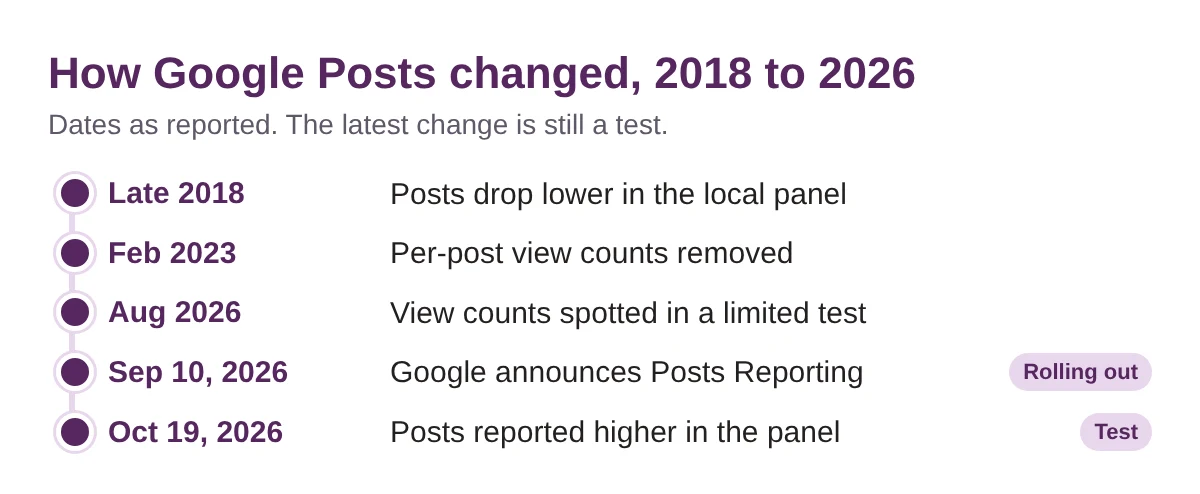
Still a test. The higher placement flips from day to day and may disappear. The view counts are rolling out worldwide but are not in the API yet, so there is no automatic reporting. Do not rebuild your strategy around where Posts sit this week.
Why your Business Profile matters more in the AI era
Local questions to AI often end at your Google listing. Industry analysis, including Steady Demand in August 2026, points to Google Maps data as a main input for local answers in AI Mode. Trade press describes Google’s Ask Maps as drawing on places data and reviews.
So the listing is the page AI may read first about your business. Your hours, your services and your recent activity sit on it.
Posts are the part of that listing you can change in two minutes. That is why a better look at them is worth your time.
Treat this as direction, not proof. Google has not said that Posts feed AI answers. Posts sit inside a bigger job, which is making your whole business easy to find and describe. That is the focus of our AI search optimization work, and our Google Maps case study shows how we approach Maps visibility.
How to read the new view counts
Open your Business Profile dashboard and go to Posts. The count shows on each post card.
- What it covers. Posts from the past 18 months, all types, with Search and Maps views added into one number.
- What it does not say. Google has not defined exactly what counts as a view. It is not clicks, calls or visits.
- What it cannot split. You cannot see how many views came from Search and how many from Maps.
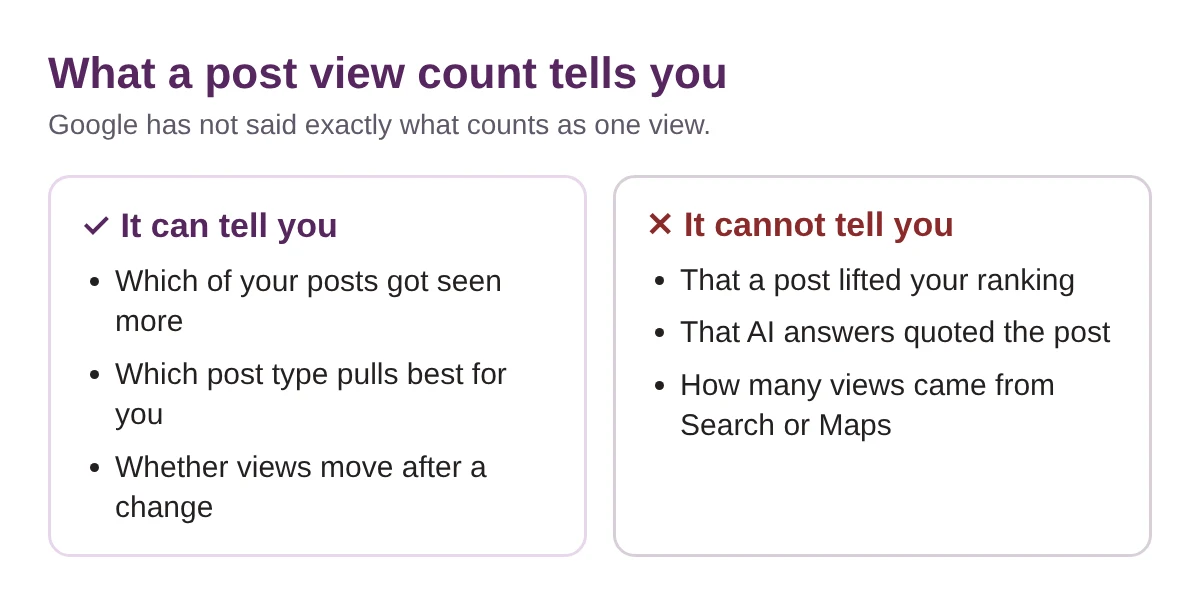
Compare your posts with your own posts. Same post type, similar time live, one change at a time. A post from last week has had less time to collect views than one from last spring.
A 6-step weekly Google Posts routine
This is the routine we would set up for a local business. It takes about 30 minutes a week once the sheet exists.
- Open Posts and write down your baseline. Look at your last 8 to 10 posts in the Posts section of your dashboard. Copy the view count, post type and date into a simple sheet. Counts cover the past 18 months, so older posts show up too.
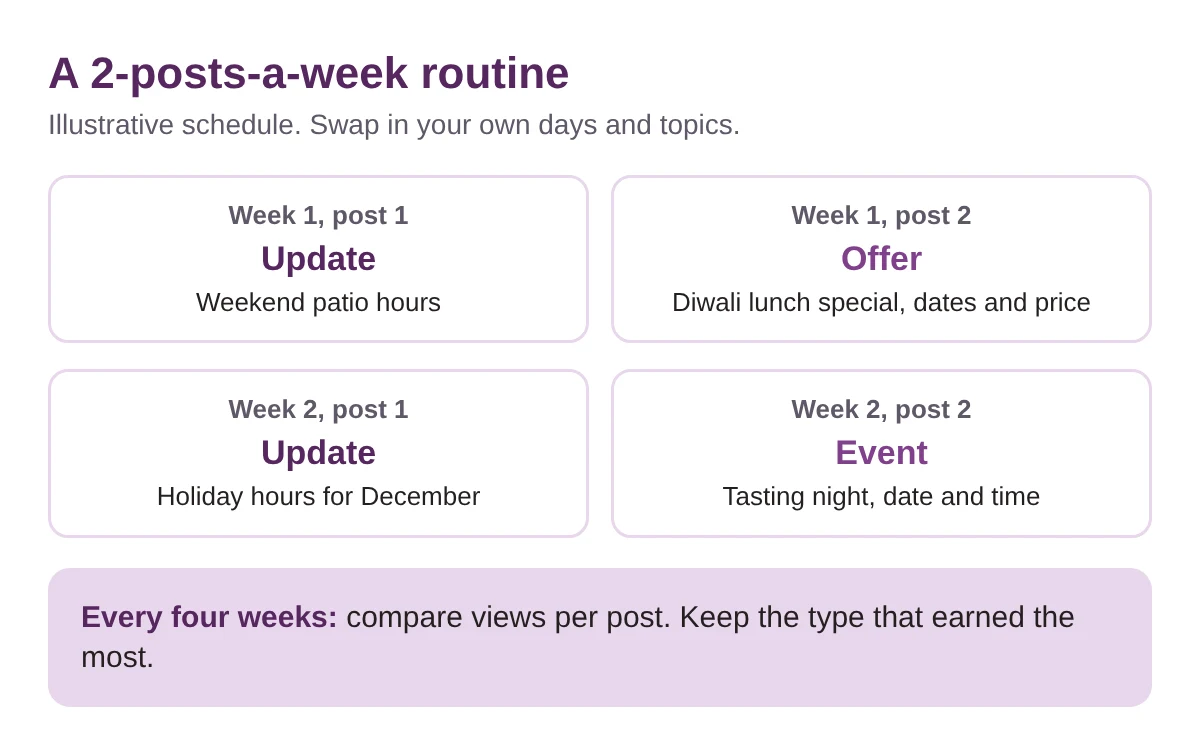
- Pick two post slots a week. Two a week is our suggestion, not a Google rule. Choose two days you can keep, such as Tuesday and Friday. A routine you keep beats a burst you drop.
- Give each post one job. Use the three post types Google offers. An update shares one fact. An offer needs a title, dates and a time. An event needs a title, start and end dates and times. Say the date and the detail in the first line.
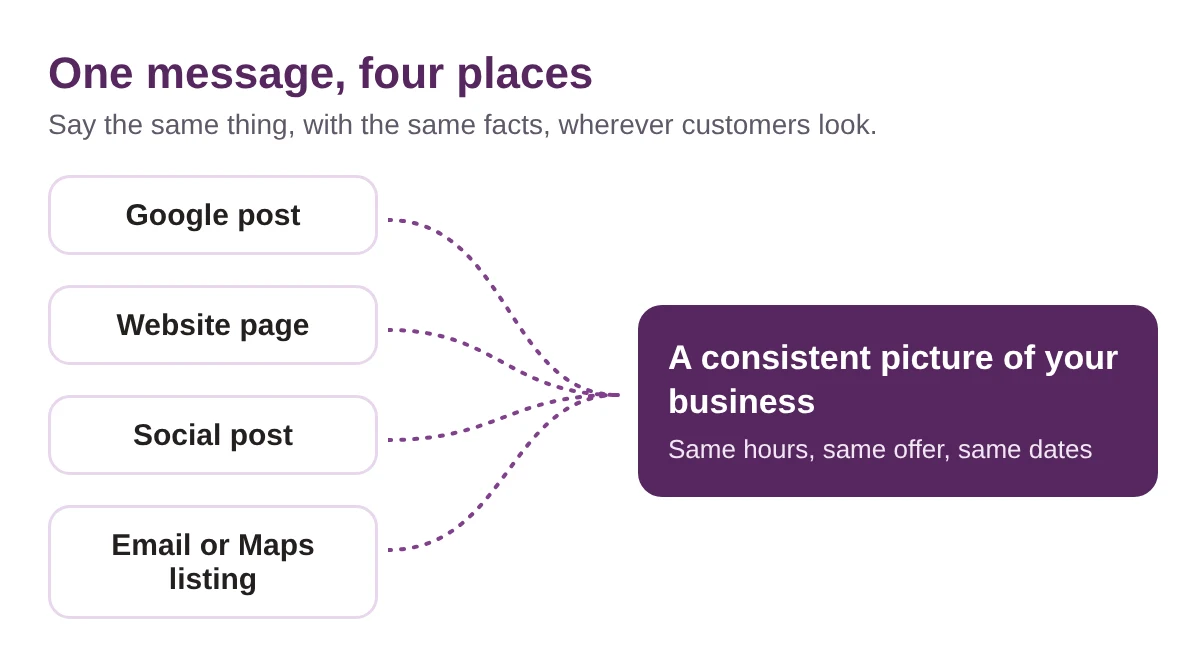
- Put the same facts on your website the same day. If the post says the Diwali lunch special runs until a set date, your website page says the same thing, in the same words. This is the step most businesses skip.
- Repeat the facts on your social channels. Change the format, not the facts. Hours, prices, dates and names stay identical. Plan the month ahead with our free Event Marketing Calendar so the dates are set before you write.
- Review the counts every four weeks. Add each post’s views to your sheet. Keep the post type that drew the most views for you. Drop the one that drew the fewest. Then look at Maps actions and your AI answer checks next to it, using our GEO Tracker template.
What to post: Toronto examples
These are illustrative ideas, not real client posts. Every one has a date and a fact someone can use.
- Patio closing. The last day your patio is open this season, and what the hours are after that.
- Holiday hours. Opening and closing times for each holiday week, posted early.
- Diwali and Christmas specials. Diwali falls on Sunday, November 8, 2026. Post the offer, the dates and the price. Do the same for Christmas.
- New menu items. Name the dish and the price. If it fits, add the dietary badges on your profile too.
- Seasonal services. A winter tire swap, a furnace tune-up or a snow removal sign-up, with dates that customers can book.
“Great food, come visit” gives nobody a fact to quote. “Diwali thali lunch, November 6 to 9, $18” does.
Whatever you post, keep the story the same everywhere. Search, Maps and AI tools may all read the same facts, and a consistent picture is easier to repeat.
Hype to ignore, and mistakes to avoid
- “AI Overviews quote your Posts.” We found no proof that posts are cited directly in AI answers.
- “More views will lift your rankings.” We found no proof of that either. Views tell you what customers noticed.
- “The new placement is here to stay.” It is a test and it flips. Check your own panel instead of trusting a screenshot.
- Posting with no date. Offers and events need dates. Google archives posts older than 6 months unless you set a date range.
- Letting the website lag. A post that says one thing while your site says another gives AI two answers to choose from.
Recap checklist, and how we measure it
- Baseline sheet made from your last 8 to 10 posts
- Two post slots picked and put in your calendar
- Every post has a type, a date and one fact
- Website and social updated with the same facts the same day
- Counts reviewed every four weeks, one change at a time
We track post views next to Maps actions and AI answer checks. Views show what people noticed. Calls and direction requests show who acted. AI answer checks show whether your business is named. Together they tell you whether the routine is worth the time.
Not sure where your listing stands? Run the free Radar scan below.
Post twice a week. Say the same thing everywhere. Measure it monthly.
Is your listing ready for local AI answers?
Customers may already be asking AI for a business like yours. Your Google listing is one of the places it may look first.
Run a free Radar scan and see whether AI names your business, who it names instead, and three quick wins to fix it.
No sign-up. No email. Instant results.
Run my free Radar scan →
About the author
Simar Singh runs Digital 6ix, a Toronto agency for SEO, GEO and content. He writes about how local businesses get found in Google, Maps and AI answers. Free audit and planning templates are at digital6ix.ca/templates. Find Simar on LinkedIn.
Sources
- Search Engine Roundtable: Google testing Google Posts higher in the local knowledge panel
- Search Engine Roundtable: recap of October 19, 2026
- Search Engine Journal: Google Business Profile post view counts
- PPC Land: Google adds post view counts to Business Profile, no API access yet
- Search Engine Roundtable: recap of December 31, 2018
- Google Business Profile Help: add posts to your profile
Instant AI visibility scan
Scan your business with Radar in about 30 seconds. See whether AI names you and what to fix first.
Run my free scanBook a free audit call
Want a second pair of eyes on your listing? We will review your profile and show where to start.
Book my call