
I Gave Bluehost AI Builder One Sentence About a Toronto Garage Business. Here’s What It Built, What It Cost, and What I’d Fix
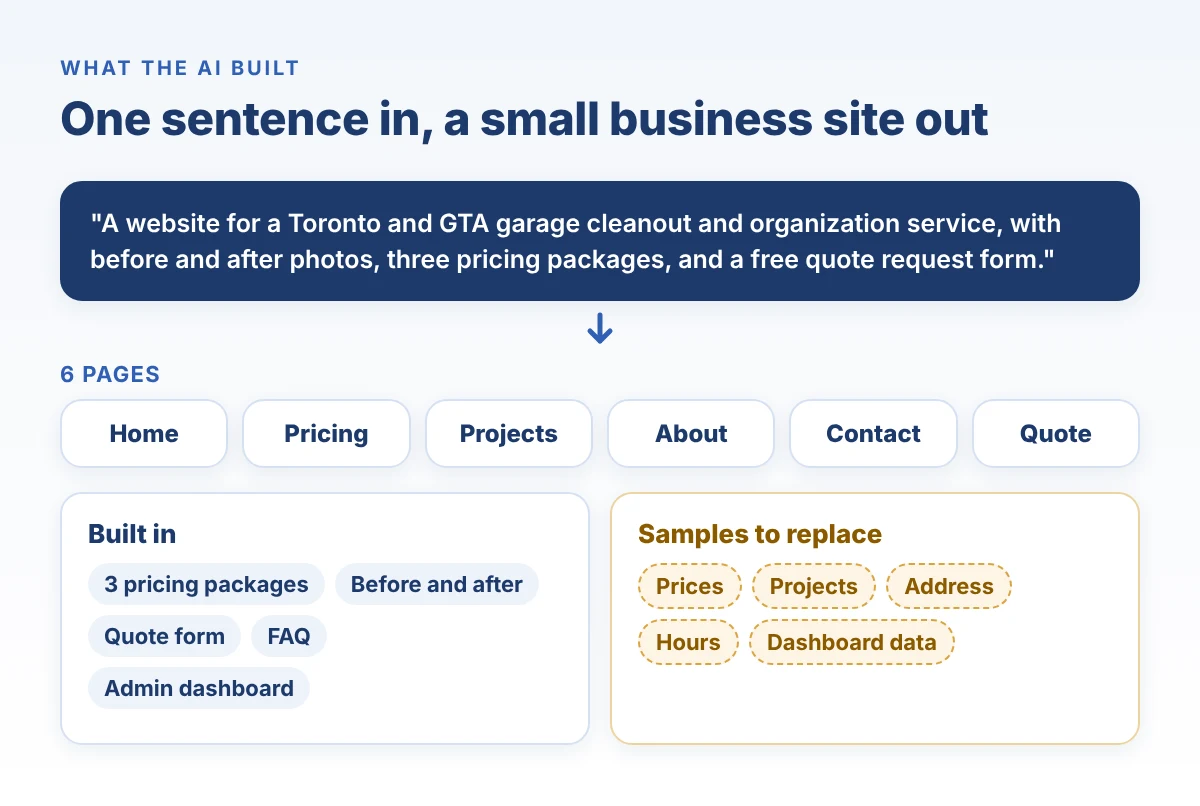
Bottom line first: I gave Bluehost AI Builder one sentence about Garage Therapy, a garage cleanout business in the GTA. About five to six minutes later it had a six-page website with three pricing packages, a before and after section, a quote form and an admin dashboard, for one credit. The structure was ready to show a customer. The prices, projects, address and hours were samples the AI made up, so replace those before you publish. Bluehost AI Builder is $0 to start, no credit card, and paid plans from $20/mo.
Most AI builder reviews show you the landing page. I wanted to see what happens after you hit the button.
So I built something real: a site for Garage Therapy, a garage cleanout and organization service in Toronto and the GTA. Below is every step, with screenshots from the build, the credits it used, and the parts I would change before a single customer sees it.
What is Bluehost AI Builder?
Bluehost AI Builder is a chat-based tool that builds a website or a web app from a plain-language description, then hosts it on Bluehost.
- Describe it. One sentence about what your business needs.
- Watch it build. A first version appears in a live preview.
- Change it by chatting. Ask for edits in plain words.
- Publish. It goes live on Bluehost hosting.
Bluehost announced it on November 6, 2026. It grows out of Bluehost’s earlier AI Website Builder and adds web apps: booking sites, quote request forms, customer portals, directories and internal tools.
Every plan includes hosting and 24/7 human support. Hosting never uses AI credits, so your site stays online even if you run out.
What did I ask it to build?
One sentence. No logo, no photos, no example site.
“A website for Garage Therapy, a Toronto and GTA garage cleanout and organization service, with before and after photos, three pricing packages, and a free quote request form.”
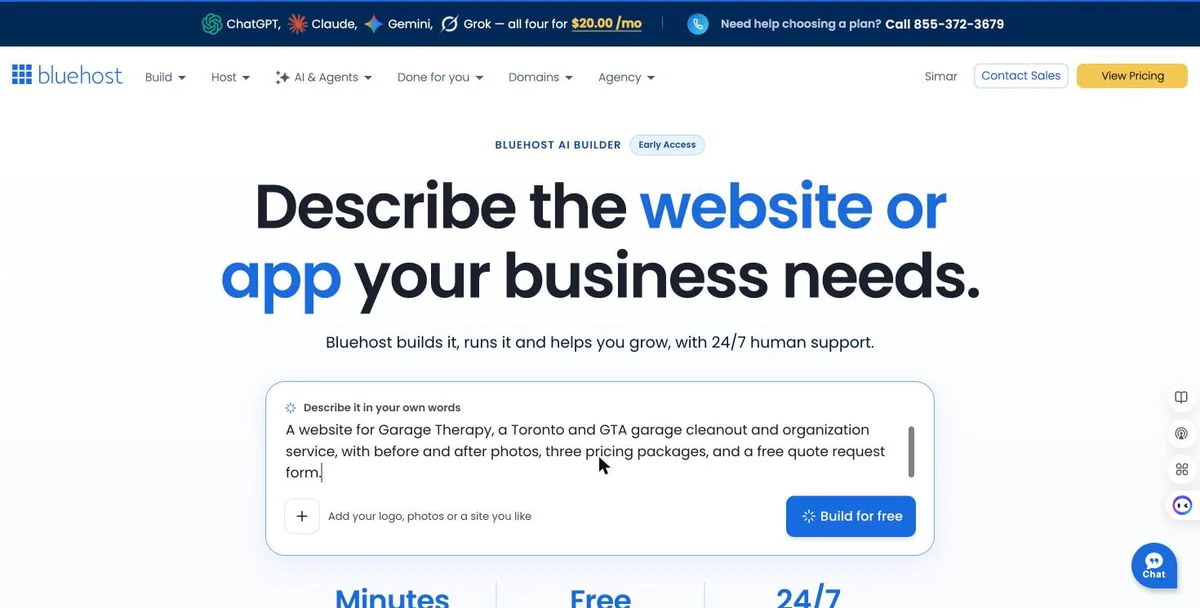
I was already signed in to Bluehost, so clicking “Build for free” took me straight into the builder. No card, no plan picker.
How long did the first version take?
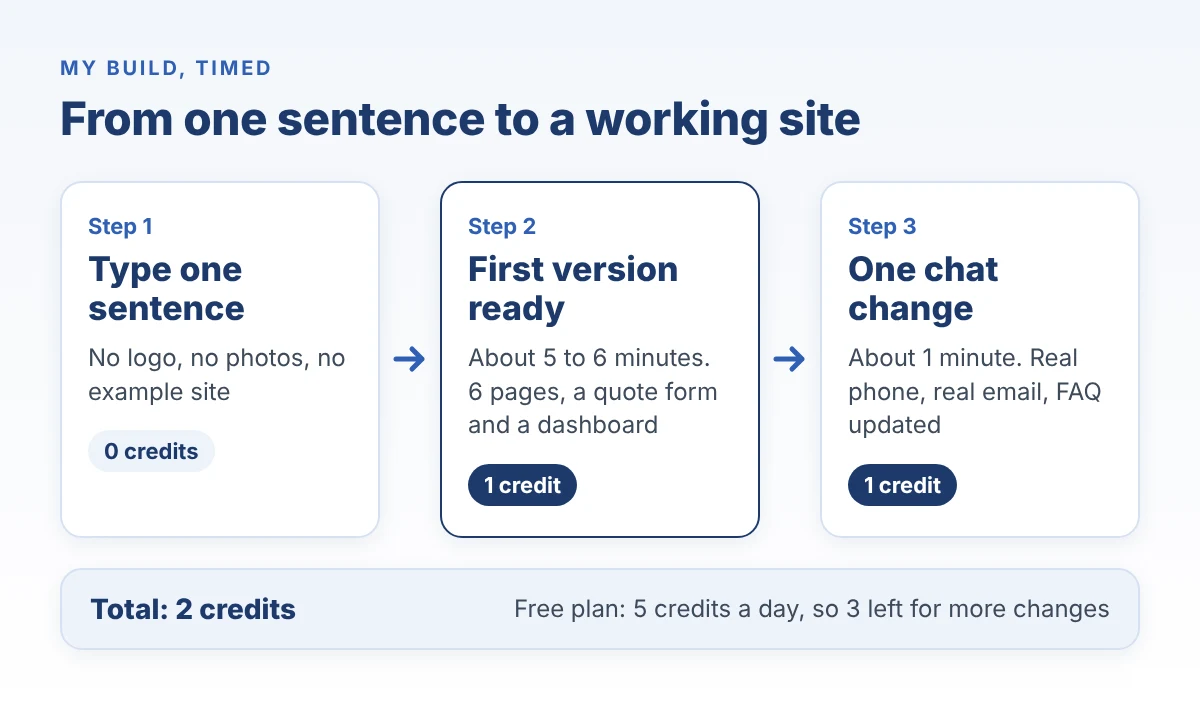
About five to six minutes from click to finished preview.
It shows its progress as it works: set up the site’s look, add packages and projects, build the dashboard, build the pages. It also asked four optional questions about who I am. I skipped them.
When it finished, the chat summed up what it made: six pages, three pricing packages, before and after projects and a free quote form, in a “steel-and-cobalt industrial look”.
Then it said something I wish every AI tool said: the prices, address, phone and hours are samples. Replace them.
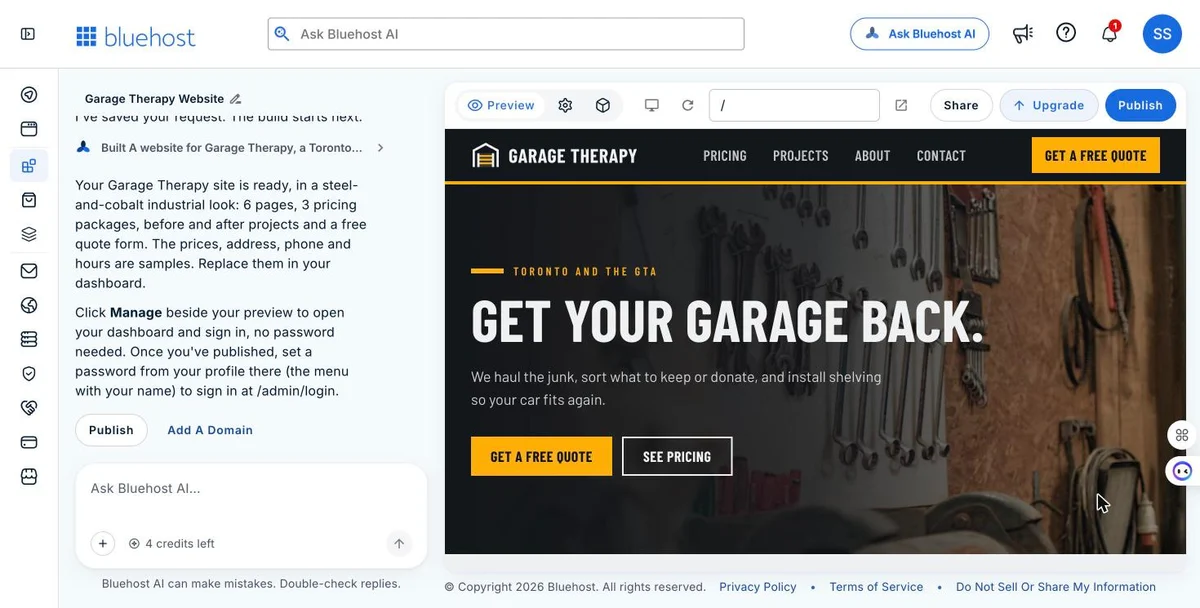
My credit counter went from 5 to 4.
What did one sentence actually produce?
More than I asked for.
Six pages and a strong hero
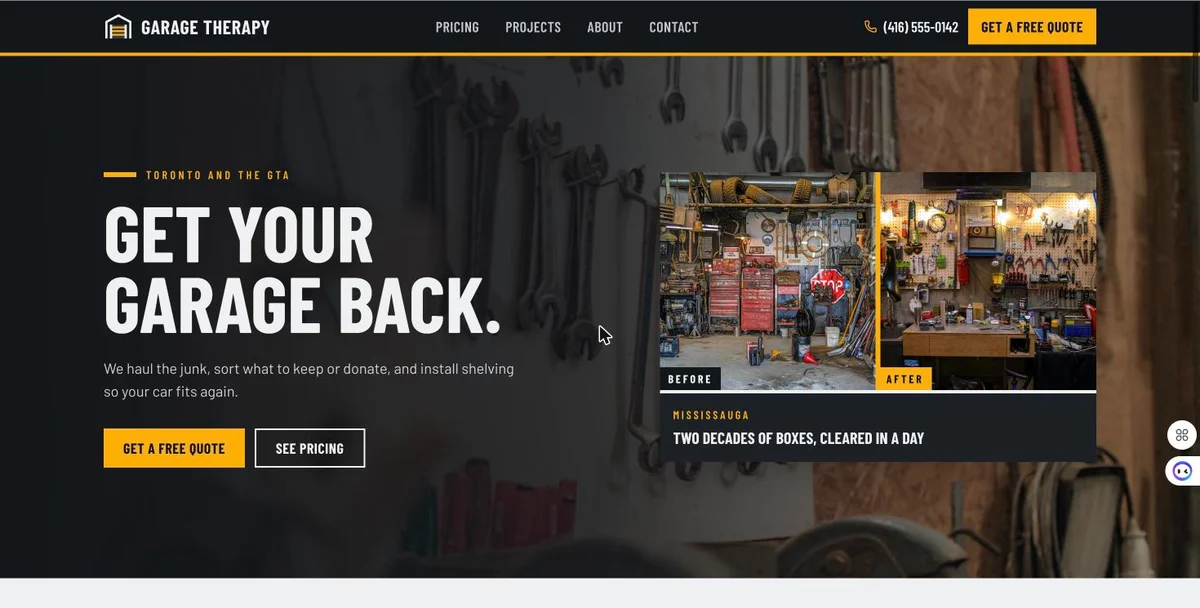
Home, Pricing, Projects, About, Contact and a separate Quote page. The hero reads “Get your garage back.” with a before and after image, bold condensed type and one yellow call to action. It looks like a trades business, which is the point.
Three pricing packages
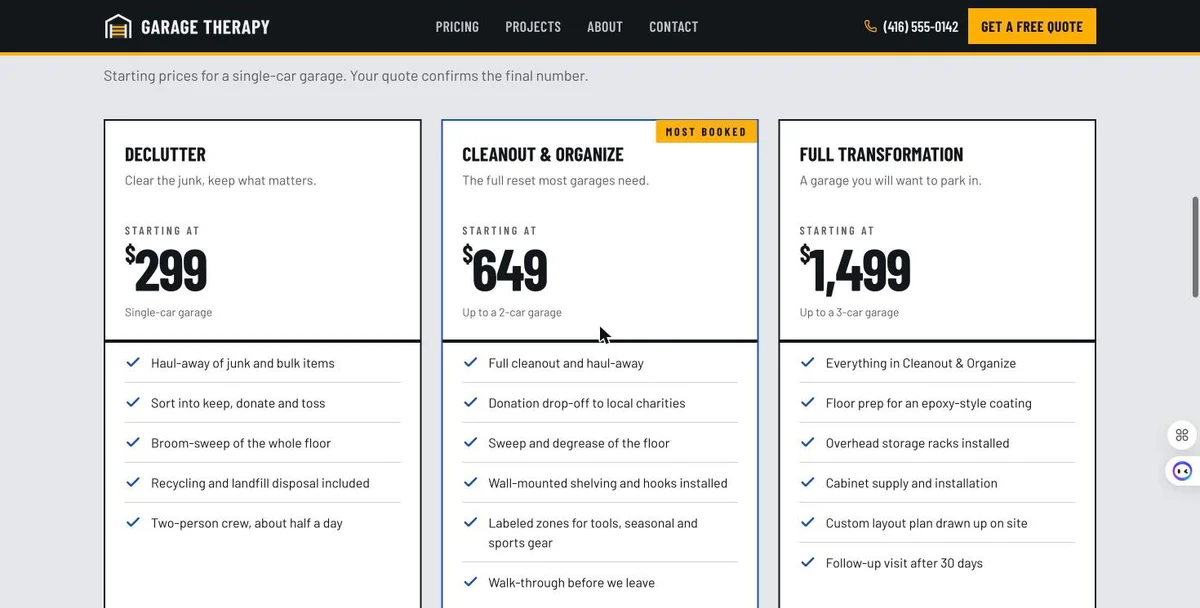
Declutter from $299, Cleanout & Organize from $649 (marked “most booked”) and Full Transformation from $1,499. Each one lists what’s included and has a “quote this package” button.
These are AI sample prices, not Garage Therapy’s real prices. They look believable, which is exactly why you have to check them.
A quote form that asks the right questions
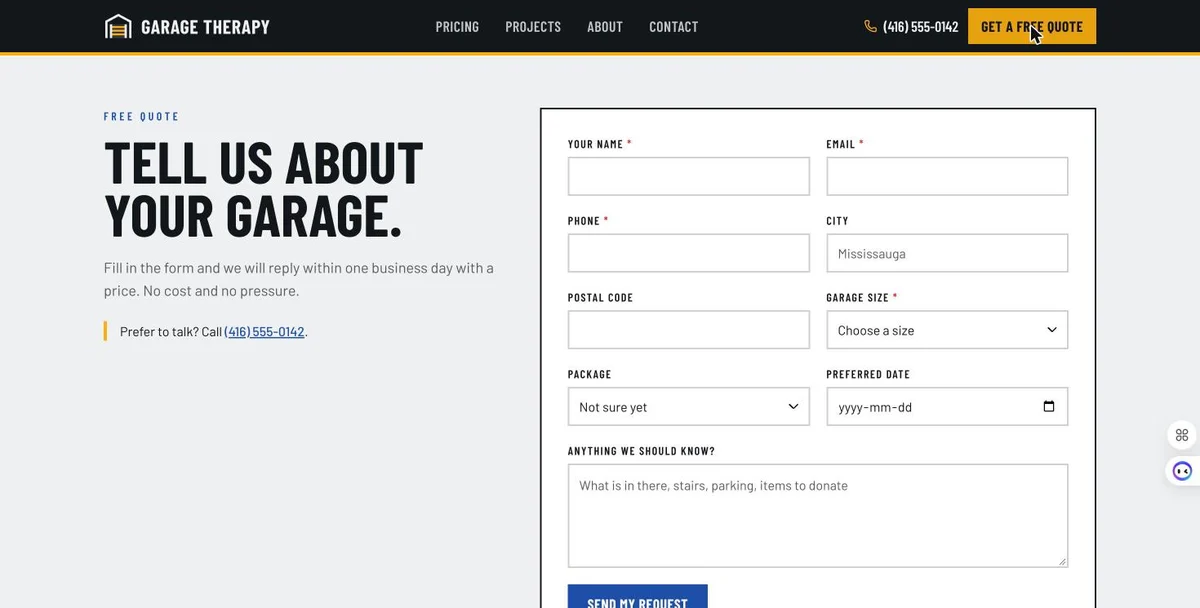
Name, email, phone, city, postal code, garage size, package, preferred date and a notes box that prompts for “what is in there, stairs, parking, items to donate”. That last one is the kind of detail a garage business actually needs before quoting.
A dashboard behind the site
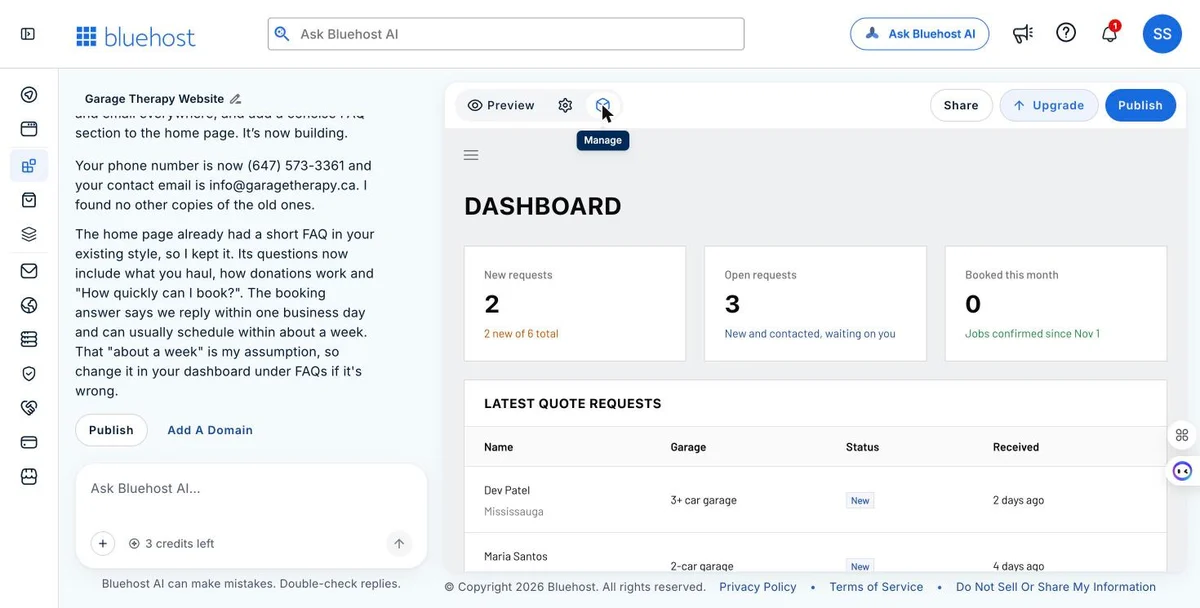
This is the part that makes it more than a website. Behind the site is an admin panel with new requests, open requests, jobs booked this month and a table of the latest quote requests. The names in it were sample data. But the structure is what a small service business needs to stop losing leads in an inbox.
It also wrote a “Recent garages” project section and a short FAQ. Those projects were invented too.
Can you change it by chatting?
Yes, and this is where it surprised me.
I sent one message with two requests: replace the sample phone number with the real one and use info@garagetherapy.ca as the contact email, and add a short FAQ about what we haul, donations and how fast you can book.
About a minute later it was done.
- It updated the phone and email, and said it found no other copies of the old ones.
- It didn’t duplicate the FAQ. The home page already had one, so it added my questions to it.
- It flagged its own guess. The booking answer says the business can usually schedule within about a week. The AI said that “about a week” was its assumption and to change it if it’s wrong.
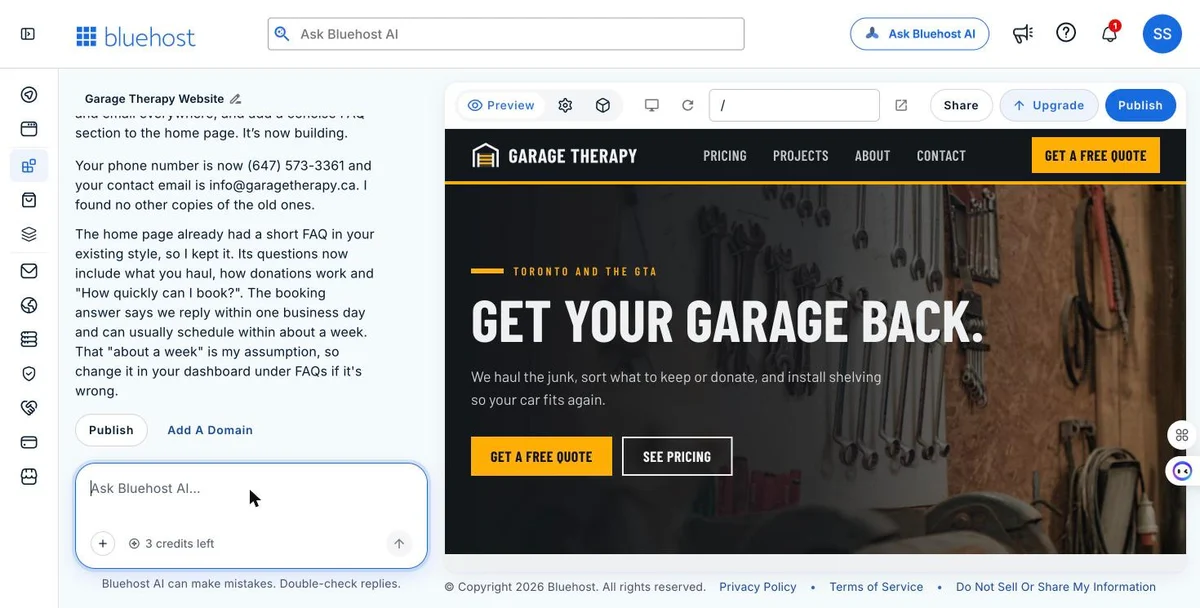
That one message used one more credit. 5, then 4, then 3.
Is the site good for SEO and AI search?
The basics are there. A few things you will want to add.
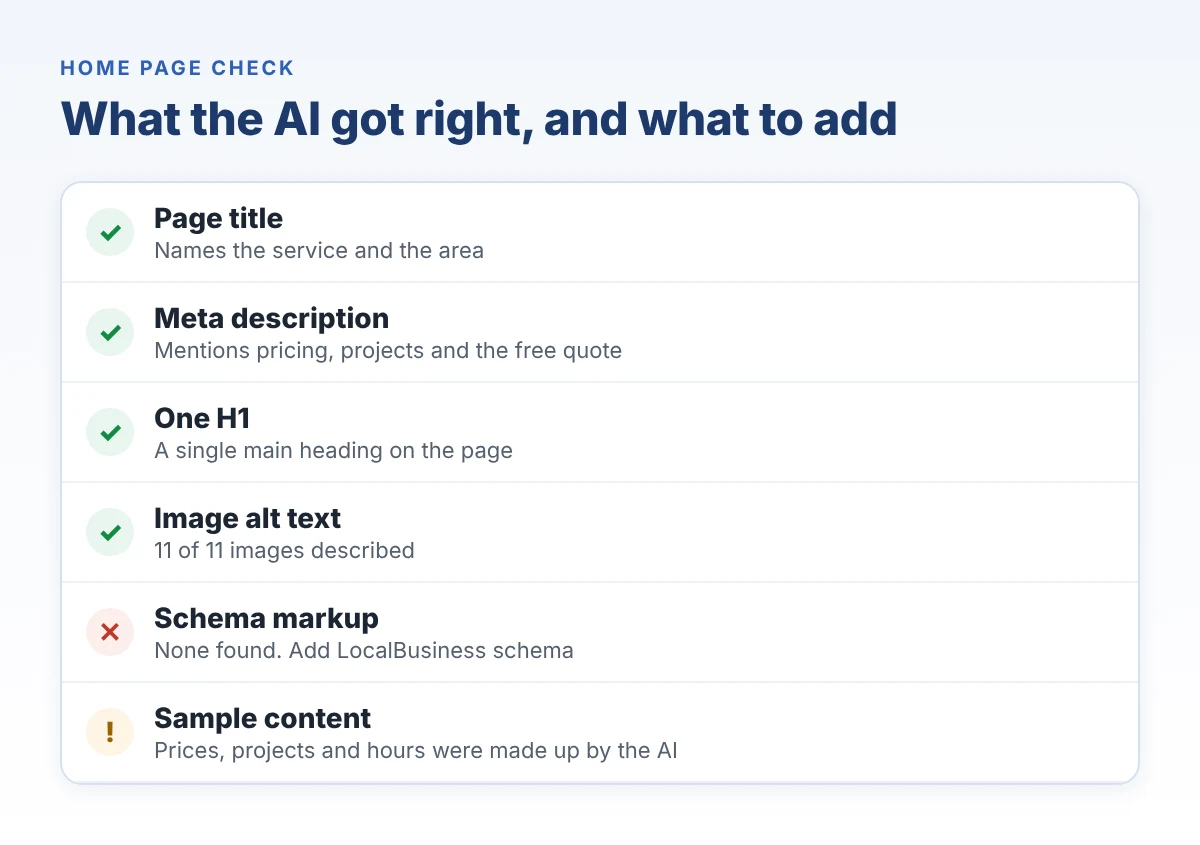
I checked the home page code. Here is what I found.
What it got right
- A clear page title: “Garage cleanout and organization in Toronto and the GTA”
- A meta description that names the service, the area, the pricing and the quote
- One H1 on the page
- Alt text on all 11 images
What I would add
- Schema markup. None on the home page. For a local service business, LocalBusiness schema helps Google and AI tools read your name, area, hours and contact details.
- Real details. Invented prices, projects and hours on a live page can confuse customers and the AI tools that read your site.
Bluehost says the builder writes page titles, descriptions, headings and alt text, and that rankings are not guaranteed. That matches what I saw.
A clean first version is a starting point. Getting cited by ChatGPT, Perplexity and Google’s AI Overviews takes more than a good template, which is the work we do in AI search optimization. If you want to check your own site first, our free SEO and GEO audit template walks you through it.
What does it cost, and how far do credits go?
Bluehost AI Builder is $0 to start, no credit card. Paid plans from $20/mo.
| Plan | Price | AI credits | What you get |
|---|---|---|---|
| Free | $0/mo | 5 a day, up to 30 a month | Publish on a Bluehost subdomain, forms, bookings, user accounts, admin panel, hosting, 24/7 support |
| Lite | $20/mo | Up to 100 a month, no daily limit | Everything in Free, plus your own domain, credit top-ups and no Bluehost badge |
| Standard | $40/mo | 200 a month | Everything in Lite, with more credits |
Prices from Bluehost’s US site in November 2026, billed monthly.
How credits work
- Each message you send uses one credit.
- The AI’s clarifying questions are free.
- Credits expire after 30 days.
- Hosting never uses credits. If you run out, your live site stays up and only new changes pause.
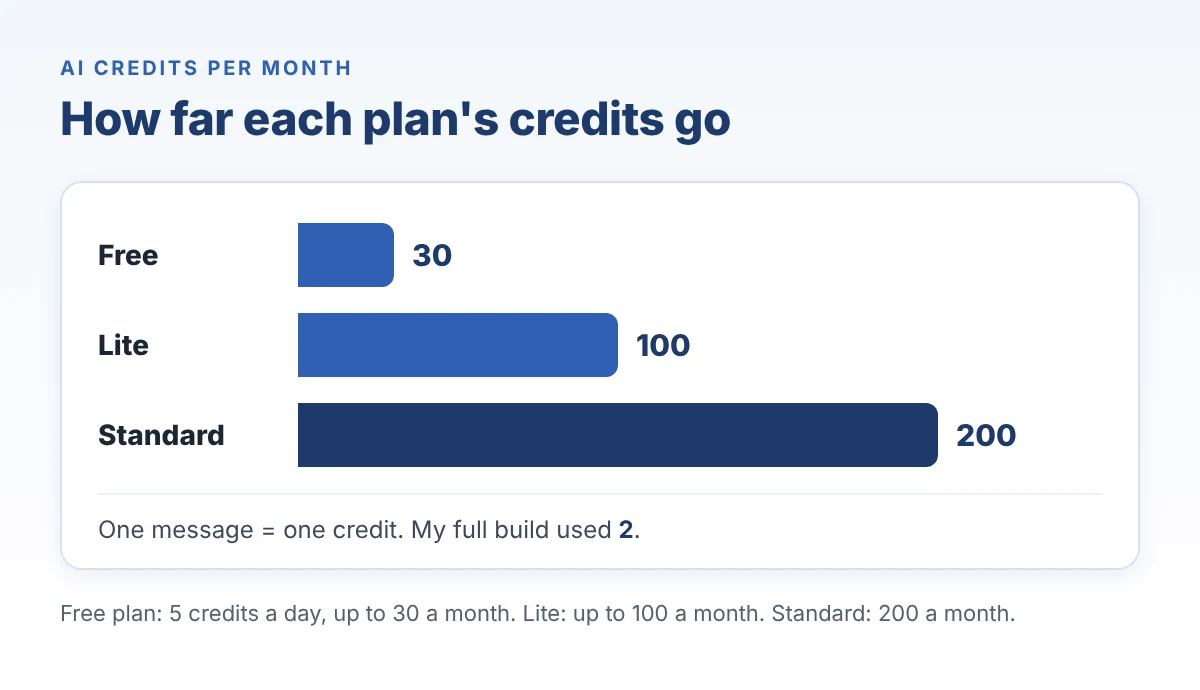
My whole build used two credits: one for the first version and one for the refinement. On the free plan, that leaves room for three more changes the same day.
The trick is to batch your changes. One message with five edits costs the same as one message with one edit. I go deeper on the plan math in my Bluehost AI Builder pricing review.
Try it with your own business. Describe it in one sentence and see what comes back. $0 to start, no credit card.
Start free with Bluehost AI BuilderAffiliate link. We may earn a commission if you upgrade, at no extra cost to you.
Who should use it, and who should skip it?
Use it if
- You run a local service business with no website and need quote requests coming in this week.
- You want to test an offer or a new service before paying for a custom build.
- You need a simple booking or quote flow with a dashboard, not just a brochure page.
Think twice if
- You need an app in the Apple App Store or Google Play. Bluehost AI Builder makes browser-based apps, not native ones.
- You won’t take the time to replace every sample detail. The AI fills gaps with believable guesses.
- You already have a site that ranks. Moving it is a migration plan, not a new prompt.
For trades and home services, the site is only one piece. The listings, reviews and local pages around it matter just as much, which is what our home services marketing covers. And if you want a fully custom site, our website design team builds those.
Frequently asked questions
Is Bluehost AI Builder free?
Yes. Bluehost AI Builder is $0 to start, no credit card. The free plan gives you 5 credits a day, up to 30 a month, and publishes on a Bluehost subdomain. Paid plans from $20/mo add your own domain and more credits.
How many credits does it take to build a website?
My first version used one credit, and one message with two changes used one more. Each message uses one credit, and the AI’s clarifying questions are free.
Can Bluehost AI Builder build web apps, not just websites?
Yes. Bluehost lists booking sites, quote request forms, customer portals, directories and internal tools. My garage site came with an admin dashboard for quote requests. It does not publish native apps to the App Store or Google Play.
What happens if I run out of credits?
Your site stays online. Hosting never uses credits, so running out only pauses new changes until your credits refresh or you top up.
Will a Bluehost AI Builder site rank on Google or show up in AI answers?
It may, but nothing is guaranteed. The builder writes page titles, descriptions, headings and alt text. My build had no schema markup, and the sample content needs to be replaced with real details before it can earn trust.
One sentence gets you the draft
Bluehost AI Builder did the slow part fast: structure, pages, a quote form and a dashboard, in minutes.
The part only you can do is still yours. Your real prices. Your real projects. Your real hours.
One sentence gets you a draft. Your real details make it a business.
Build your first version today. Bluehost AI Builder is $0 to start, no credit card, and paid plans from $20/mo when you want your own domain.
Try Bluehost AI Builder freeAffiliate link. Digital 6ix is paid by Bluehost for this post and may earn a commission.
Your site is live. Does AI know it exists?
Publishing a website and showing up in ChatGPT, Perplexity or Google’s AI answers are two different things.
Run a free Radar scan of your business. In 30 seconds you will see whether AI recommends you, who it names instead, and three quick wins.
No sign-up. No email. Results on the spot.
Run my free Radar scan →
About the author
Simar Singh founded Digital 6ix, a Toronto SEO, GEO and content marketing agency. Before recommending a tool to a client, he builds something real with it and reports what worked and what didn’t. His free audit and planning templates live at digital6ix.ca/templates. Find him on LinkedIn.
Sources
New site? Check if AI sees it
A fresh website is invisible until AI tools pick it up. Radar shows in 30 seconds whether they name you, or a competitor.
Scan my businessTalk it through with us
Not sure if an AI builder or a custom site fits your business? Book 30 minutes and we will look at it together.
Book a free call