
Google Now Lets Restaurants Tag Dishes Halal, Kosher, Gluten-Free and Dairy-Free. Here’s How to Show Up When People Ask Maps and AI for Them
Bottom line first: Google Business Profile now lets restaurants mark single dishes as halal, kosher, gluten-free or dairy-free, next to the vegetarian and vegan badges it already had. Google’s Ask Maps, which is rolling out in Canada, says it can take a diner’s dietary needs into account when it suggests places. Tag only the dishes you can stand behind, put the same labels on your website menu, and test a “diet plus neighbourhood” question in Maps and ChatGPT.
When someone has a dietary need, the question gets specific. Not “restaurants near me.” More like “halal lunch near me that’s open now.” Or “gluten-free pizza I can pick up on the way home.” This guide answers the questions restaurant owners are asking about Google’s new dietary badges, and how to use them to show up in those answers.
What did Google just change?
On October 13, 2026, Search Engine Roundtable reported that Google added four new dietary attributes to Business Profile menus: gluten-free, dairy-free, halal and kosher.
Vegetarian and vegan were already there.
Google’s Lisa Landsman announced it on LinkedIn and called it great news for local restaurants.
The key detail: the badges go on individual dishes, not on the restaurant as a whole. According to Landsman, tagged dishes help those items stand out on your profile when people search for a specific diet, such as “gluten-free dinner near me.”
Two things Google hasn’t said yet:
- Which countries get it first. If you don’t see the new options in your menu editor, the rollout may not have reached your profile yet.
- Any written rules. As of today, Google’s help page for the menu editor still lists only the item name, description, price and section.
Why would AI care about a badge on one dish?
Because AI answers lean on facts they can check.
“Halal” in your restaurant name is a hint. A line in your Instagram bio is a hint. A halal badge on a specific dish, inside your Business Profile, is a clear fact that Google holds itself.
And Google is building AI right into Maps. In August, Google said Ask Maps, its chat-style search inside Google Maps, is rolling out in Canada. In the same announcement, Google said Ask Maps can “consider things like your saved places or specific dietary needs” when it suggests restaurants.
Google hasn’t said exactly which data Ask Maps reads for dietary questions. But the new badges are the most direct way you can tell Google yourself.
This fits a bigger pattern. Google keeps moving restaurant discovery into AI, from AI Mode alerts for new restaurants and deals to Ask Maps. Each one needs clean facts about what you serve.
How do I add the dietary badges to my menu?
It takes about ten minutes for your top dishes.
- Open your Business Profile. Search your restaurant’s name on Google while signed in to the account that manages it, or go to business.google.com.
- Select Edit menu. If you don’t have a menu yet, add your sections and dishes first, with prices.
- Pick a dish. Start with your best sellers and the dishes people ask about most.
- Check the dietary badges that are true for that dish. The options now include vegetarian, vegan, gluten-free, dairy-free, halal and kosher.
- Save, then give it time. Google says menu changes can take 24 to 48 hours to show on Maps and Search.
- Work through the rest of the menu. Do a few sections a day if the menu is long.
Running several locations? Google’s developer guide for menus in the Business Profile API already lists dietary restrictions such as halal, kosher, gluten free and dairy free, so whoever manages your API connection can tag dishes in bulk.
What should my website say so ChatGPT and Gemini agree?
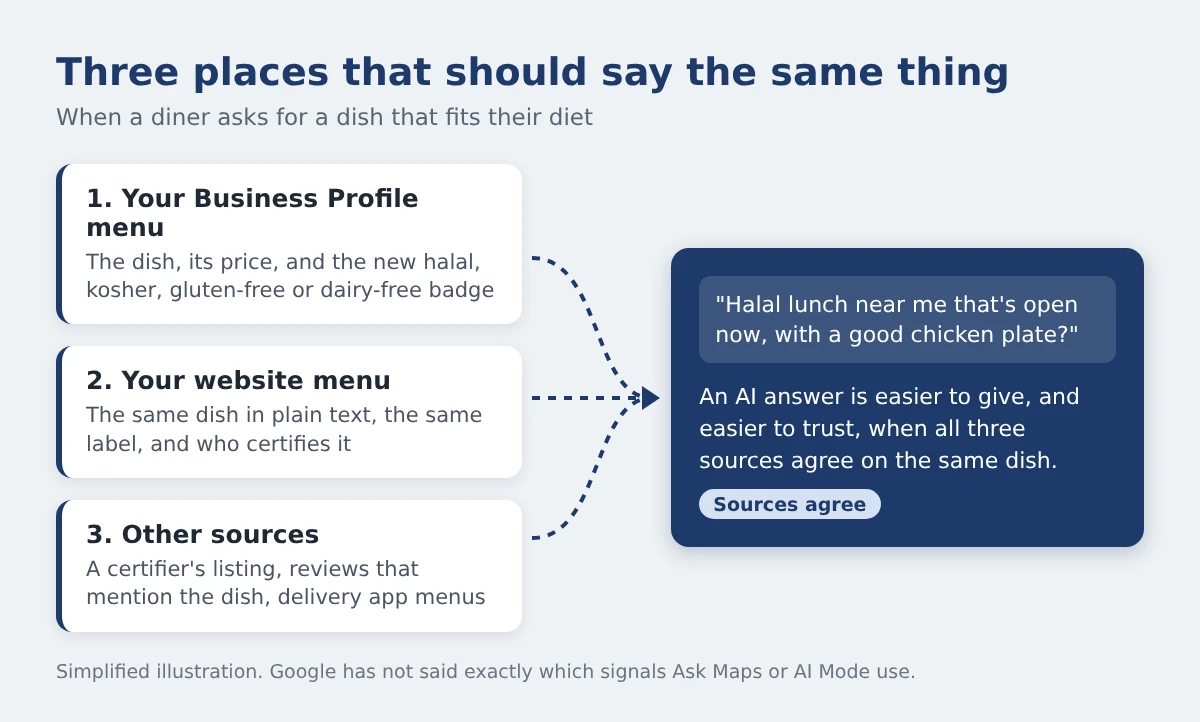
Your Business Profile is Google’s data. Other AI assistants build their answers from what they can find on the open web. Your website is the one source you fully control.
New data shows why that matters. On October 12, 2026, Ahrefs published a study of about 15 million searches that ChatGPT ran in the background while answering people. In September, 13.1% of those searches included the word “official,” up from 10.1% in August. Searches with “price” rose from 6.0% to 8.9%.
In a separate Ahrefs test of 20,000 US questions, 84.4% of ChatGPT’s answers to plain fact questions cited at least one official source.
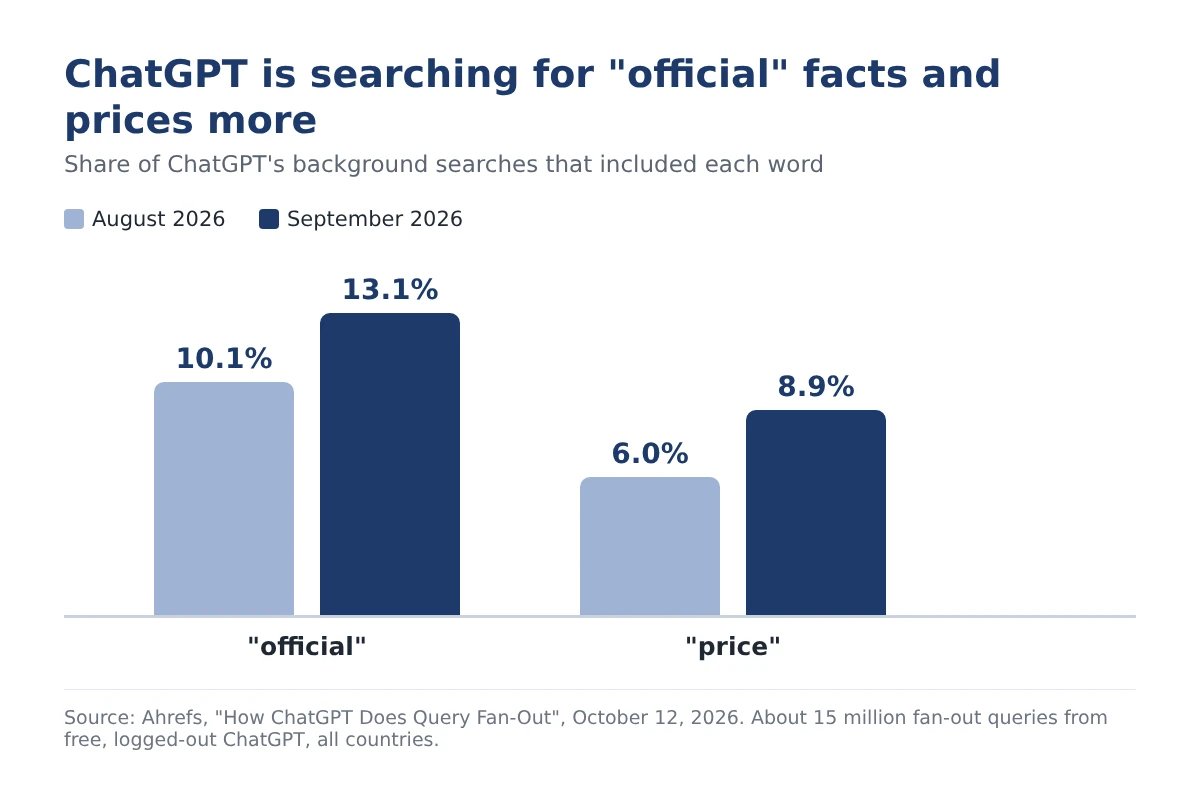
That study covered free ChatGPT in every country, not restaurant questions in Toronto. Still, the direction is clear: ChatGPT is looking for the business’s own word on facts and prices. “Is this dish halal?” is exactly that kind of fact.
There’s a Google reason too. Google’s menu editor help page says Google may transcribe menu data from your website. A clear website menu helps both sides.
Here’s what to put on your site:
- A real menu page in text. Not only a PDF or a photo of the printed menu.
- The label next to the dish. For example: “Chicken shawarma plate (halal).”
- The price. AI tools are searching for it.
- Who certifies you, in one sentence. For example: “Our chicken and beef are certified halal by [your certifier].”
- Menu schema. Mark each dish as a MenuItem with the suitableForDiet property. Schema.org has values for halal, kosher, gluten-free, vegan and vegetarian. It has no dairy-free value, so state dairy-free in plain text.
- The same dish names everywhere. Website, Business Profile and delivery apps should match.
Can I tag a dish halal or kosher without certification?
Google doesn’t ask for proof. Barry Schwartz, who covered the update, pointed out that the kosher badge likely isn’t backed by any rabbinical check. Diners have to take the restaurant’s word for it.
That trust is the whole point.
If a diner finds out a “halal” dish isn’t, they may say so in a review. Reviews are public, and AI tools can find them.
If you are certified, say so in more than one place. In Toronto, for example:
- COR (The Kashruth Council of Canada) runs a kosher dining directory for Toronto.
- HMA (Halal Monitoring Authority), based in Scarborough, lists the locations it certifies.
A certifier’s listing is another place the same fact appears, outside your own site.
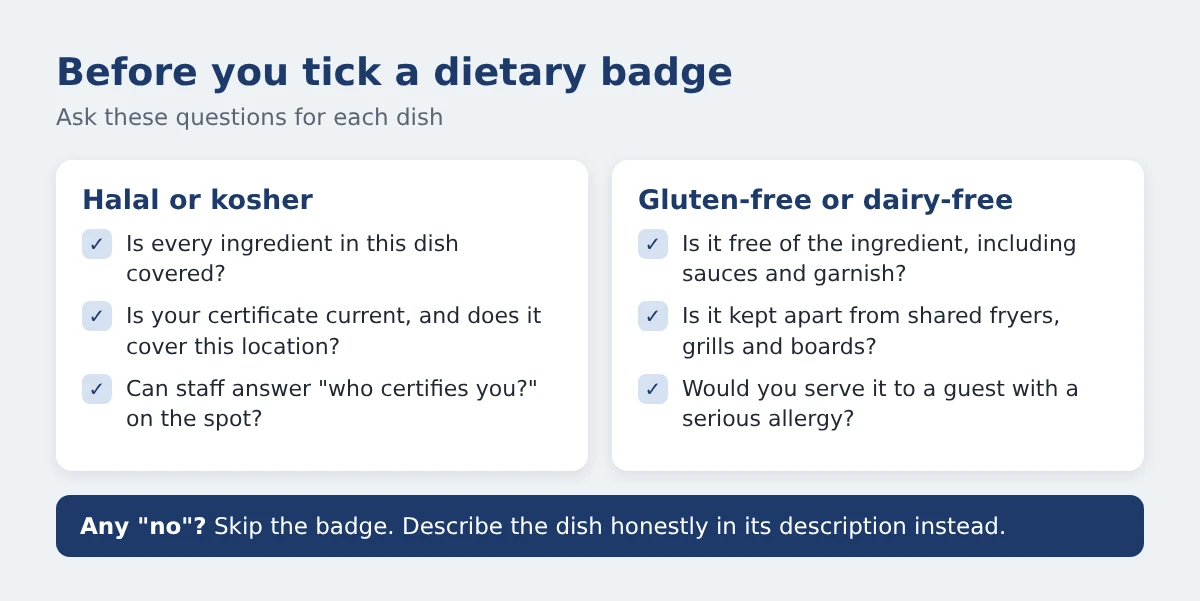
Tag what’s true for that dish. If you are halal or kosher certified, name the certifier on your website and keep the certificate current.
What about gluten-free and dairy-free in a shared kitchen?
A diner with celiac disease who reads “gluten-free” expects the dish to be safe. Not just made without wheat flour.
Fries cooked in the same fryer as breaded chicken may not be safe for them. Neither is a dish finished on a shared grill with buttered buns.
The badge is a simple yes or no. Your kitchen may not be that simple. So:
- Badge only what you can truly guarantee.
- Use the dish description for the rest. For example: “Made without gluten. Prepared in a shared kitchen.”
- Train staff on the same answer. What your server says should match what Google says.
Does this matter more in Toronto?
The demand is already there. Here are the average monthly Google searches in Canada, from Semrush’s Canadian database:
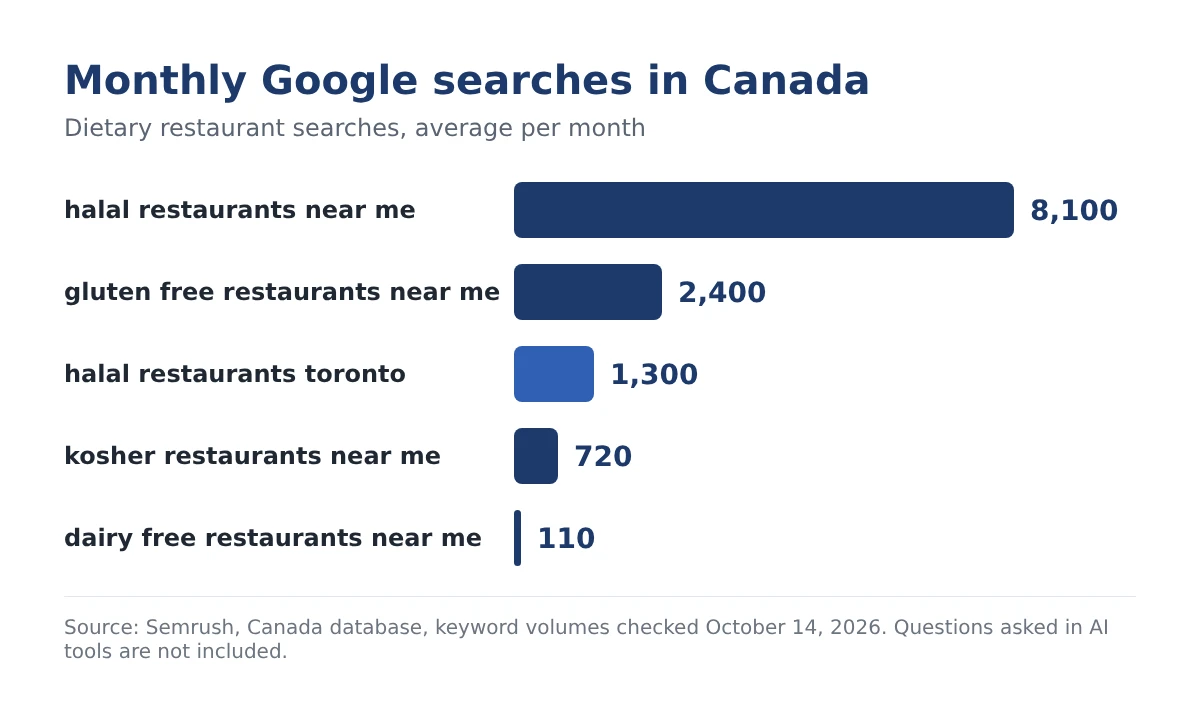
“Halal restaurants toronto” alone gets about 1,300 searches a month.
And these are only typed Google searches. Questions asked in Ask Maps, AI Mode or ChatGPT aren’t counted here.
Those AI questions tend to be longer. A diet, plus a place, plus a need. Example questions to test (illustrative, not real data):
- “Halal brunch near Thorncliffe Park for six people”
- “Kosher bakery on Bathurst that’s open Friday morning”
- “Gluten-free pizza in Leslieville I can pick up tonight”
Want to see where Toronto businesses stand in AI answers today? Our Toronto AI Visibility Index tracks it.
How do I check if it’s working?
Give it 48 hours after you save. Then:
- Ask Google Maps. If you see Ask Maps, type a diet plus neighbourhood question for your area.
- Ask AI Mode and ChatGPT the same question.
- Write down three things. Were you named? Was the diet described right? Was a specific dish mentioned?
- Repeat a few times. AI answers change from one try to the next, so look for the pattern.
- Check again every month.
For a full self-test you can run on any AI tool, use the steps in how to get your business into ChatGPT’s answer.
And once AI recommends you, the next step is being easy to book. AI agents now try to book tables for people, so make sure that part works too.
Start with one dish
You don’t need a full project. Pick your best-selling dish that fits a diet. Tag it. Put the same label on your website. Ask Maps about it in two days.
If you want help getting your restaurant named in AI answers across Google, ChatGPT and Gemini, that’s what our AI search optimization services cover.
Tag what’s true. Say it everywhere. Let AI do the matching.
When diners ask AI where to eat, are you in the answer?
Dietary questions are some of the most specific questions people ask. The restaurants that get named are the ones AI can check.
Run a free Radar scan in 30 seconds. See if AI recommends your business, who it names instead, and three quick wins.
Free. No sign-up. Results right away.
Scan my business free →
About the author
Simar Singh founded Digital 6ix, a Toronto SEO and GEO agency. He works with local businesses, including restaurants and hospitality brands, on showing up in Google Maps, AI Overviews, AI Mode, ChatGPT and Gemini. Free audit and tracking templates are at digital6ix.ca/templates. You can find Simar on LinkedIn.
Sources
- New Google Local Dietary Attributes: Gluten-Free, Dairy-Free, Halal & Kosher (Search Engine Roundtable, Oct 13, 2026)
- How ChatGPT Does Query Fan-Out (15 Million Queries Studied) (Ahrefs, Oct 12, 2026)
- Update food menus, Business Profile APIs (Google for Developers)
- About the menu editor (Google Business Profile Help)
- Google Maps’ Ask Maps gets more helpful with food ordering (Google, Aug 6, 2026)
- RestrictedDiet (Schema.org)
- Kosher dining in Toronto (COR, The Kashruth Council of Canada)
- Halal Monitoring Authority
- Semrush keyword data, Canada database, checked October 14, 2026
Is AI naming your restaurant?
Ask Radar what AI says about your restaurant. In 30 seconds, see if you are recommended, who gets named instead, and three fixes to try first.
Scan my restaurantTalk it through with Simar
Not sure which dishes to tag, or why AI skips you? Book a free call and we will look at your profile, menu and AI answers together.
Book a free call