
Google’s AI Now Writes Your Reviews Into Your Ads. Here’s How to Make Sure It Says the Right Things
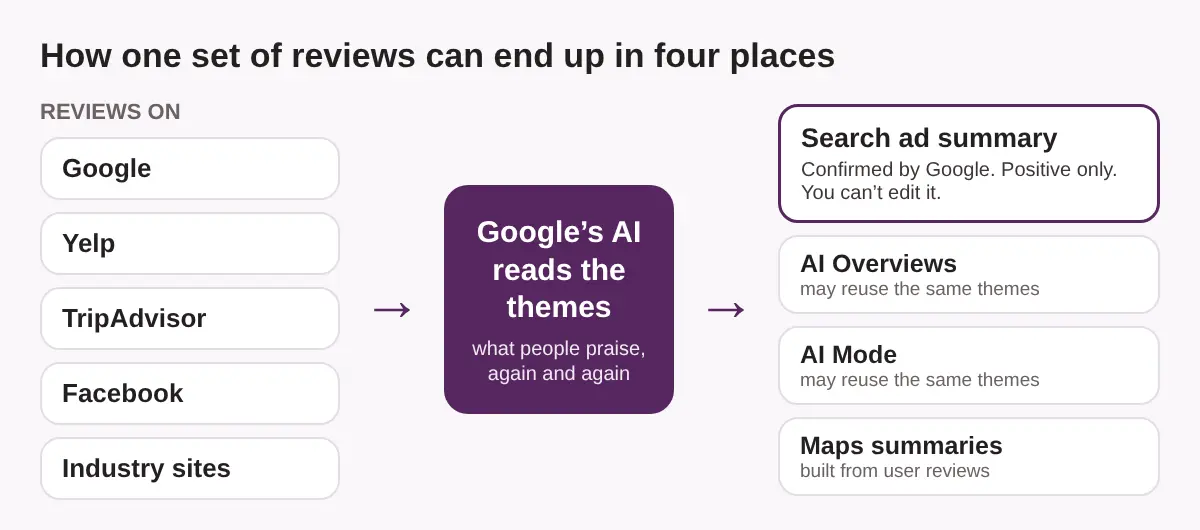
Bottom line first: Google’s AI now writes short, positive-only review summaries into some Search ads, using reviews from across the web, and you can’t edit them. It runs today in English in the US, UK, Australia and India. Canada isn’t on that list. What customers write about you on Google, Yelp, TripAdvisor and Facebook is now part of your ad copy, so check what your reviews praise and ask for reviews that name the services you want repeated.
You write your ad. Google may now add a line to it that you didn’t write.
That line comes from your reviews.
This guide covers what Google confirmed, who sees it today, and six steps to check and steer what your reviews say. It ends with a checklist for Toronto restaurants, hotels, clinics and trades.
Before you start: what Google confirmed
Google added a help page called “About Review summaries” to Google Ads Help. Search Engine Land covered it on October 26, 2026, and Search Engine Roundtable wrote it up too.
Here is what the page says, as those reports describe it:
- Google’s AI collects online reviews from across the web and turns them into short commentary inside your Search ad.
- The summaries are positive only.
- You can’t directly edit or customize the text, because Google treats it as customer feedback.
- Google shows a summary only when it predicts the summary will help ad performance.
Here is what the page leaves out, according to the same coverage:
- Which review sites Google reads
- How many reviews you need before a summary appears
- A reporting column that shows when a summary ran
- A way to switch it off
I couldn’t read the live help page myself, so check Google’s own page before you quote it to a client.
Where it runs, and why Toronto businesses may already see it
Google’s page lists English-language Search campaigns in four markets: the US, the UK, Australia and India. It covers every ad position on Google.com. Pharmaceuticals and other sensitive categories are excluded.
Canada isn’t listed. Google hasn’t said whether it will be added.
That matters if your Toronto business advertises to visitors from those markets. Think of a hotel that targets US weekend travellers, a restaurant that runs ads for UK tourists before a big event, or a clinic that serves medical travellers from Australia. If your campaign targets one of the four markets, your ad may already carry a summary you have never seen.
You may not see it from Toronto. Search from a US, UK or Australian location, or ask someone there to send you a screenshot.
If you run Canada-only campaigns, you may be safe for now. But the same reviews already feed other Google answers, as the next section shows. Our pay per click advertising service is where we handle Google Ads for clients.
Why your reviews now work as ad copy and AI answer copy
The ad summary is one use of your reviews. There are others.
Google already shows AI summaries on Maps listings. Google’s Places API documentation describes them as summaries based solely on user reviews. Business Profile Help describes “place topics”, which are the main themes drawn from your reviews.
AI Overviews are also now close to everywhere on commercial searches. Semrush tracked 400 commercial keywords in banking, software and ecommerce. AI Overviews showed on 45.75% of them in September 2025 and 88% in August 2026. For searches that include the word “reviews”, the jump was from 30.14% to 89.04%.
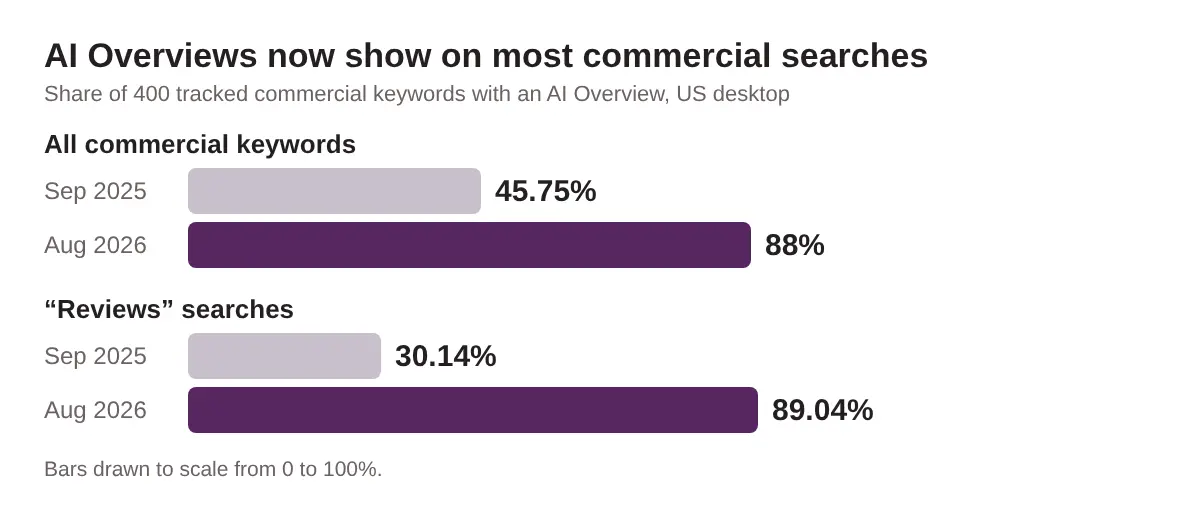
What we don’t know. Semrush’s study covers US desktop results and doesn’t say where the AI Overviews got their wording. Google hasn’t published a list of what AI Overviews or AI Mode pull from. The idea that one set of review themes feeds the ad summary, AI Overviews, AI Mode and Maps is our read of where this is heading. It isn’t something Google has confirmed.
The safe takeaway is this. Reviews are public text that Google’s AI can read. Treat them as copy you don’t control, and shape them the only way you can: by earning better, more specific reviews.
Six steps to check and steer what your reviews say
Use this tally sheet for steps 1 to 3. It’s blank on purpose. Fill it in from your own reviews.
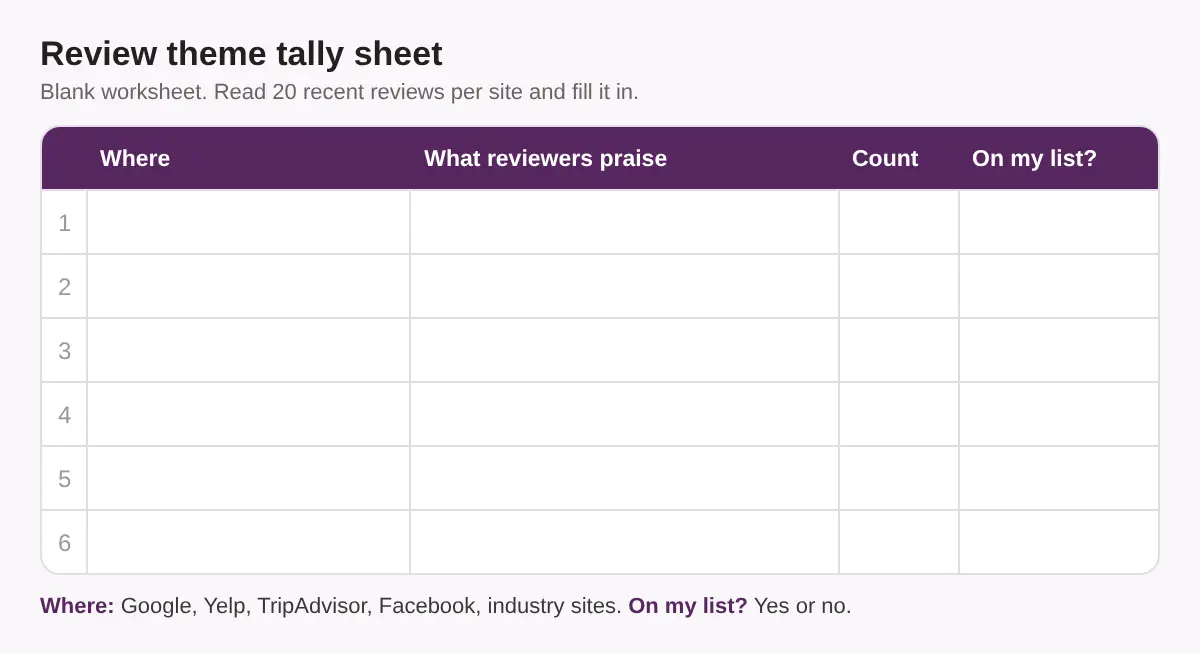
- Collect your reviews from every place they live. Open Google, Yelp, TripAdvisor and Facebook, plus the sites that matter in your trade. Examples are OpenTable for restaurants, Booking.com for hotels, and RateMDs or HomeStars for clinics and trades. Read the last 20 reviews on each.
- Tally what reviewers actually praise. Write each repeated theme in the sheet: a dish, a service, a neighbourhood, a staff member, speed, price, parking. Count how often it appears.
- Compare the tally with your list. Write down the five services, dishes or details you want known. Mark each one yes or no. A “no” is a gap. If your best-paid service never appears in a review, an AI summary built from those reviews has nothing to say about it.
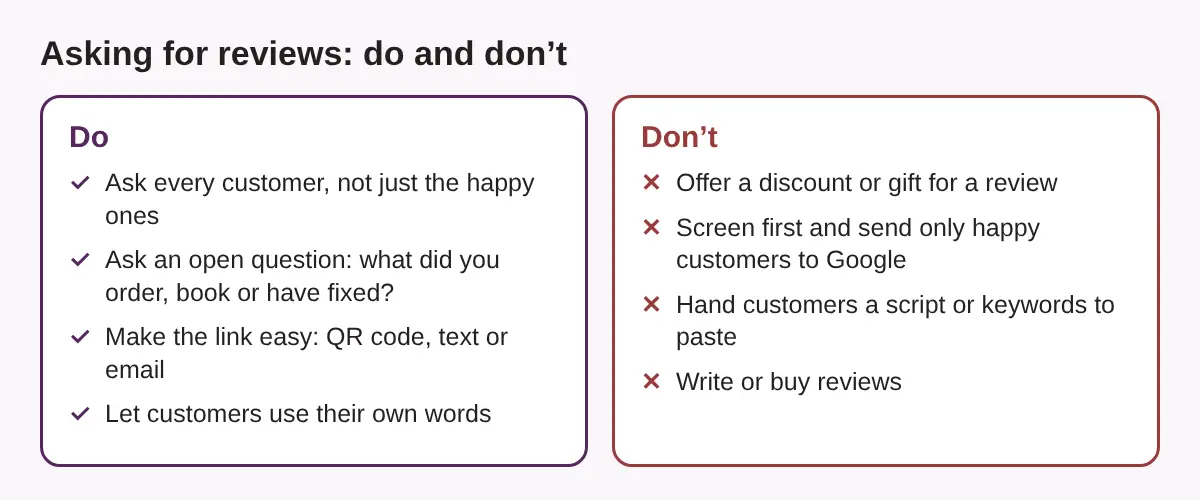
- Ask for reviews in a way that invites specifics. Ask every customer. Ask an open question, such as “What did you have?” or “What did we fix for you?”. Don’t write the review for them.
- Restaurants: ask what they ordered and what the room was like.
- Hotels: ask which room type they stayed in and what the area was like.
- Clinics: ask about the visit in general terms. Never ask for health details, and don’t reply with any.
- Trades: ask what job you did and how long it took.
- Look for the summary in the wild. Search your own services from a US, UK or Australian location, if you target them. Screenshot any ad that shows review wording. Check your Maps listing and search your business name in AI Overviews. Our post on branded AI Overviews shows how.
- Ask your Google Ads rep what you can see. Ask which sources feed the summaries and whether there is a minimum number of reviews. Ask if a reporting column is coming. Ask whether you can opt out, and whether Canada is on the roadmap. Write down the answer and the date.
If you’d rather not do this by hand, our reviews and reputation service can help. Our AI search optimization services cover the wider question of how AI describes you.
Common mistakes that can cost you your reviews
- Paying for reviews. Google’s policies are widely reported to bar rewards for reviews, whether the review is good or bad. A discount for a five-star review isn’t worth the risk.
- Review gating. Sending happy customers to Google and unhappy ones to a private form is also reported to break Google’s rules. It can lead to review removal.
- Treating every site the same. Yelp is reported to penalize businesses that ask for reviews. TripAdvisor is reported to be more relaxed. Check each site’s current rules before you send a request.
- Handing out scripts. Reviews that all repeat the same phrase look fake. Give prompts, not copy.
- Hiding from bad reviews. A summary may be positive only, but your real star rating and every review are still public. Reply to the bad ones. Abusive reviews can be flagged to Google.
Those rules come from industry guides, not from a page I could verify for each site, so read each platform’s current policy first.
Quick checklist for Toronto restaurants, hotels, clinics and trades
Run this before Canada is added. It’s the same list for every trade, with a different example in each row.
| Business | Reviews to build | Check this week |
|---|---|---|
| Restaurants | Dishes, dietary options, the neighbourhood, the room | Google, Yelp, TripAdvisor and Facebook. |
| Hotels | Room types, location, breakfast, check-in | Google, TripAdvisor, Booking.com, and any ads aimed at US, UK or Australian guests |
| Clinics | Services offered, wait time, staff manner | Google and RateMDs. Keep patient details out of every reply. |
| Trades | Jobs done, neighbourhoods served, speed, tidiness | Google and HomeStars. Ask after each finished job. |
Then do these five things:
- Fill in the tally sheet for each review site
- List the five services you want AI to repeat
- Ask every customer for a review, with an open question
- Screenshot your ads from any market you target
- Ask your Google Ads rep the four questions in step 6
Not sure how AI describes you today? Run our AI Visibility Check to see what AI says about your business.
Frequently asked questions
Can I edit or turn off Google’s AI review summaries in my ads?
Not according to Google’s help page. It says you can’t directly edit or customize the text. Coverage of the page says it describes no opt-out. Ask your Google Ads rep for the current answer.
Are the summaries always positive?
Google’s help page says they are positive only. That applies to the ad summary. Your real reviews, including bad ones, stay public on Google and other sites.
Where do the summaries run today?
Google’s page lists English-language Search campaigns in the US, UK, Australia and India. Canada isn’t listed.
Which review sites does Google use?
Google says it pulls from reviews across the web but hasn’t published a source list. That’s why it helps to check Google, Yelp, TripAdvisor, Facebook and your industry sites.
How do I get more specific reviews without breaking the rules?
Ask every customer, use an open question about their visit, and don’t offer rewards, screen who you ask or write the review for them. Check each platform’s current policy before you start.
Your reviews are your ad copy now
You can’t edit the summary. You can change what people say about you.
Start with the tally sheet, and do it before the feature reaches Canada.
Earn the reviews you want read back to your customers.
See what AI says about your business before your customers do
Reviews feed ads, Maps and AI answers. You can’t edit the summaries, but you can see what they’re built from.
Run a free Radar scan of your business. It takes 30 seconds and shows whether AI recommends you and who it names instead.
No sign-up. No email. Instant results.
Run my free Radar scan →
About the author
Simar Singh is the founder of Digital 6ix, a Toronto-based SEO, GEO and content marketing agency. His team works on local search, Google Ads and how AI answers describe Toronto businesses. The audit and content-planning templates Digital 6ix uses are free at digital6ix.ca/templates. Connect with Simar on LinkedIn.
Sources
- About Review summaries, Google Ads Help
- Google confirms AI-generated review summaries in Search ads, Search Engine Land
- Google Ads AI-Generated Review Summaries Help Document, Search Engine Roundtable
- Over 80% of Google Searches Have AI Overviews, Search Engine Roundtable
- AI Overviews have nearly doubled across five commercial search modifiers, Semrush
Instant AI visibility scan
Run a 30-second test scan of your business with Radar. See if AI recommends you, who it names instead, and three quick wins to fix it.
Run my free scanBook a free audit call
Want a deeper review? We will walk through your AI visibility, what competitors are doing, and where to start.
Book my call