
Google Now Shows an AI Answer When People Search Your Business Name. Here’s How to Check and Fix It
The short answer: Google now shows an AI Overview on about 8 in 10 brand searches, so the first thing a customer reads about your business may be an AI summary, not your website. That summary can pull from third-party sites and get facts wrong. Search your business name, check every claim, find the source behind each error, then fix the source. Google’s feedback button is a last step, not the first one.
Think about the last time you looked up a restaurant, a clinic or a contractor by name.
You probably read the top of the results page and made a call.
That top spot now often belongs to an AI answer. This guide covers what changed, how to see what that answer says about your business, and what to fix.
What changed: AI answers on brand searches
Until recently, a search for a business name mostly showed the business: its site, its map listing, its reviews.
In late September 2026, that shifted.
DemandSphere tracks branded keywords. It saw AI Overviews on 26.12% of them on September 1. By September 29 that was 82.06%. The sustained jump began on September 26.
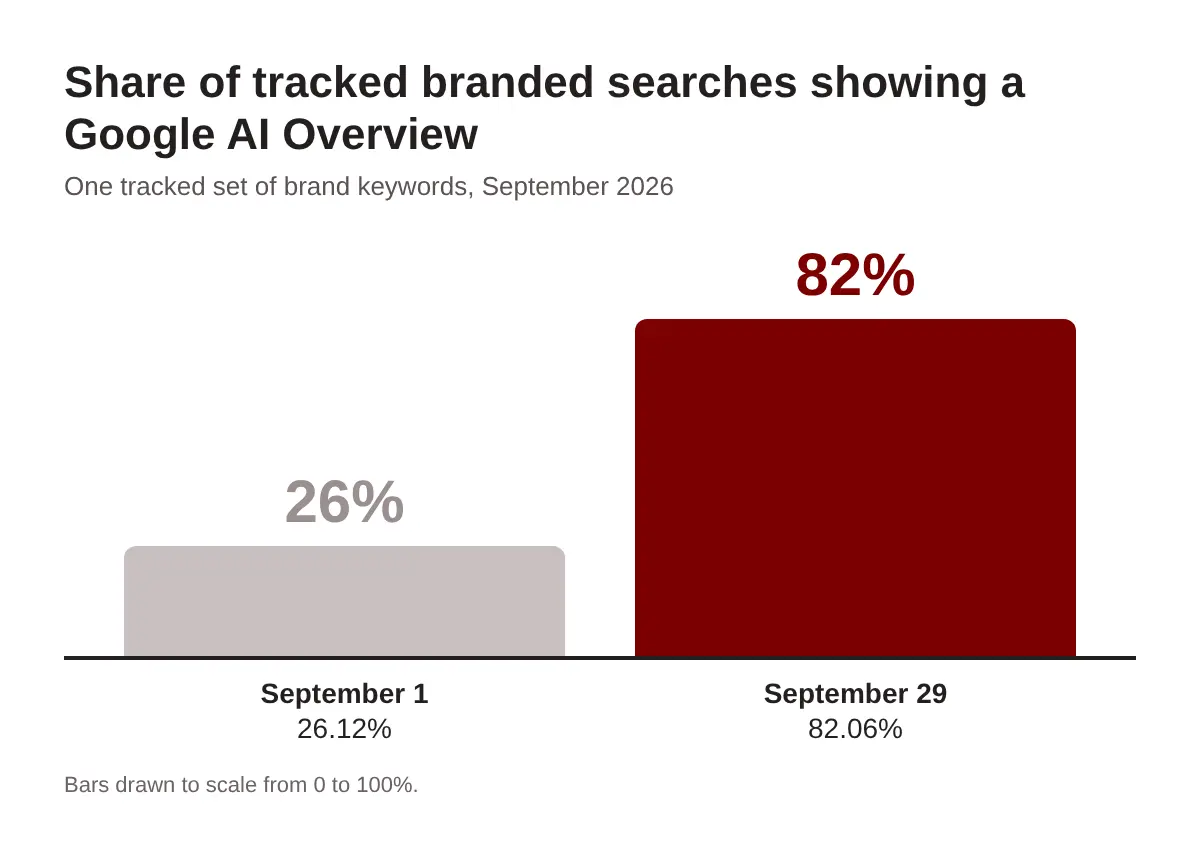
Ahrefs measured it a different way. It reports AI Overviews on 83% of branded queries in its latest data. Its monthly averages climbed from 61.3% in July to 65.1% in August to 73.3% in September.
The numbers differ because the tools track different keyword sets. The direction is the same.
One caution. These figures measure how often an AI Overview appears. They do not measure whether it names or cites you.
Why this matters for a local business
People are using AI to find businesses.
SOCi’s 2026 Local Discovery Index surveyed more than 1,000 U.S. consumers. It found 52% had used an AI tool to find a local business in the last 30 days. A year earlier it was 9%.
The same survey found 67% of AI users had received wrong local information at least once. And 30% said the bad information caused a real problem.
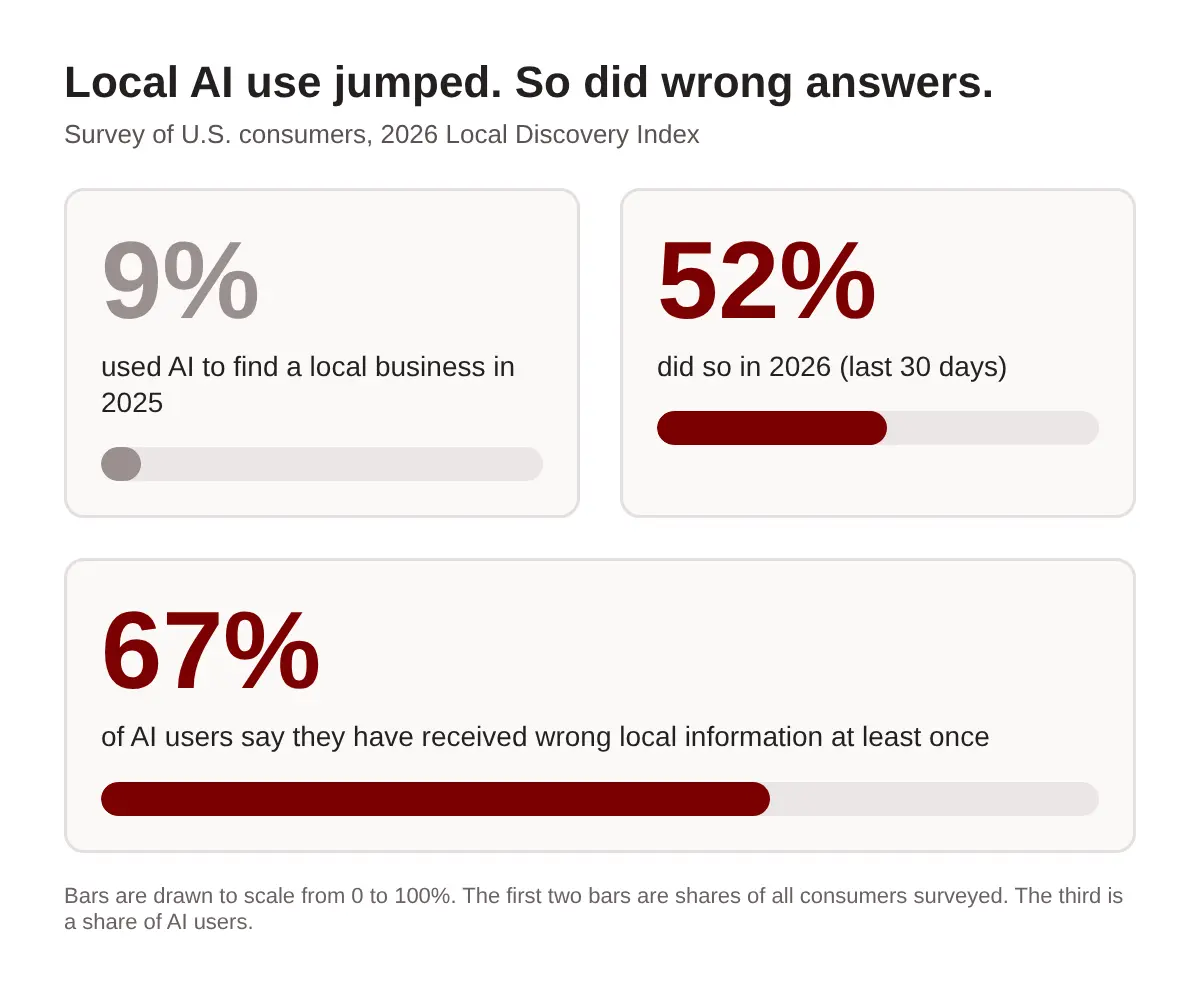
That survey is American, so treat the numbers as a signal for Toronto, not a count.
The signal is clear enough. A wrong closing time or an old address in an AI answer sends a customer to a locked door. You never see that lost visit in your analytics.
It also changes what people click. Ahrefs notes that these answers can reduce clicks to a brand’s own site and give third-party sources a bigger say in how the brand appears.
Where the AI gets its facts
An AI Overview does not read your mind. It reads the web.
Ahrefs found that Wikipedia, YouTube and LinkedIn are among the third-party sources that branded AI Overviews lean on. For a local business, other likely sources include your Google Business Profile, review sites, directories and local news. That last part is our read of how these answers work, not a figure from the studies above.
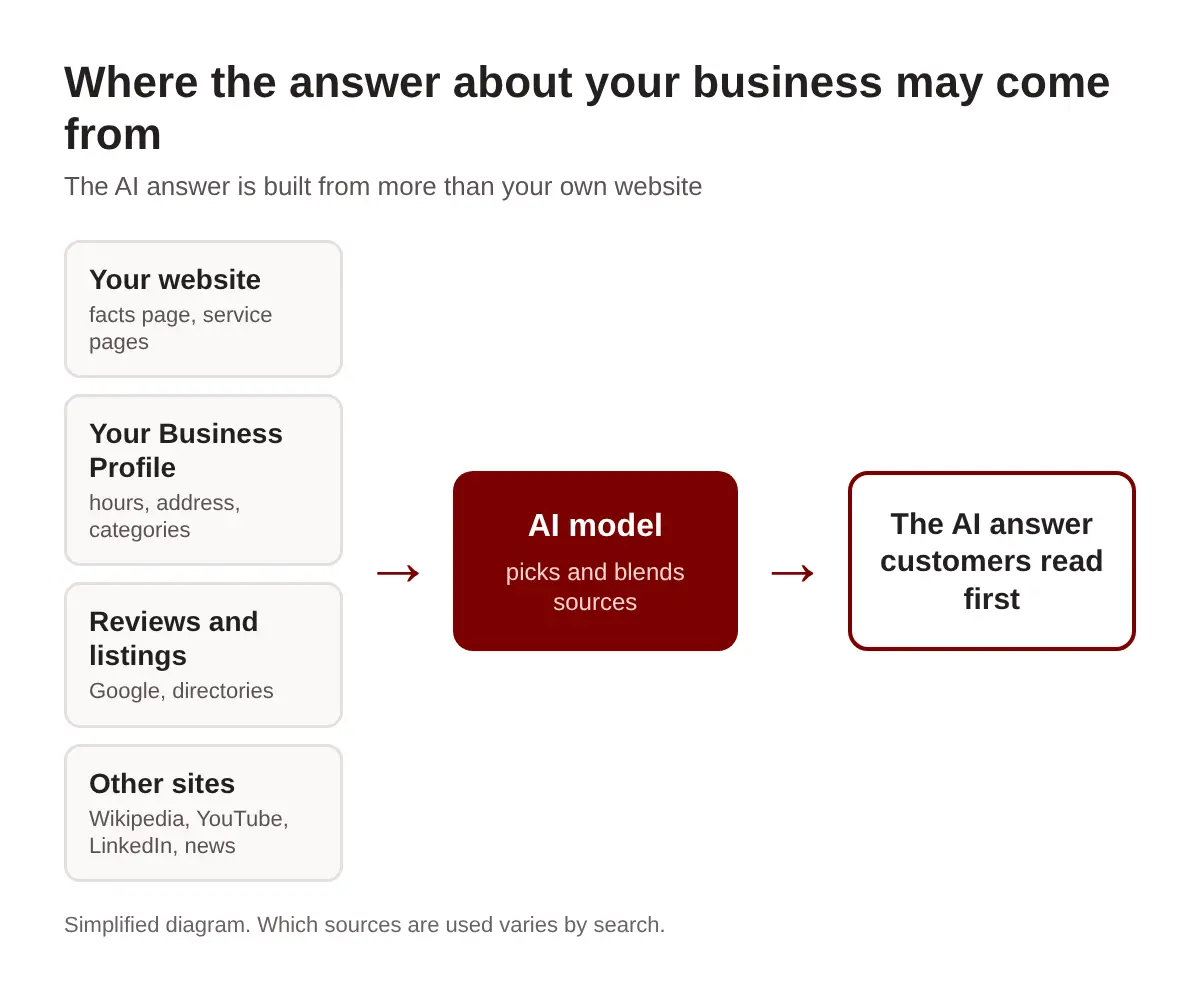
This is why a wrong answer is rarely a mystery. Somewhere, a page says it.
It might be a directory with an old phone number. It might be a review from 2019 that mentions a menu you no longer serve. It might be your own site, with hours buried in a PDF.
Different tools pull from different places. For a side-by-side look, read our comparison of ChatGPT, Perplexity and Google AI Overviews.
The 15-minute brand answer audit
You need a browser, a notes file and fifteen minutes. Use a private window so your own history does not shape the results.
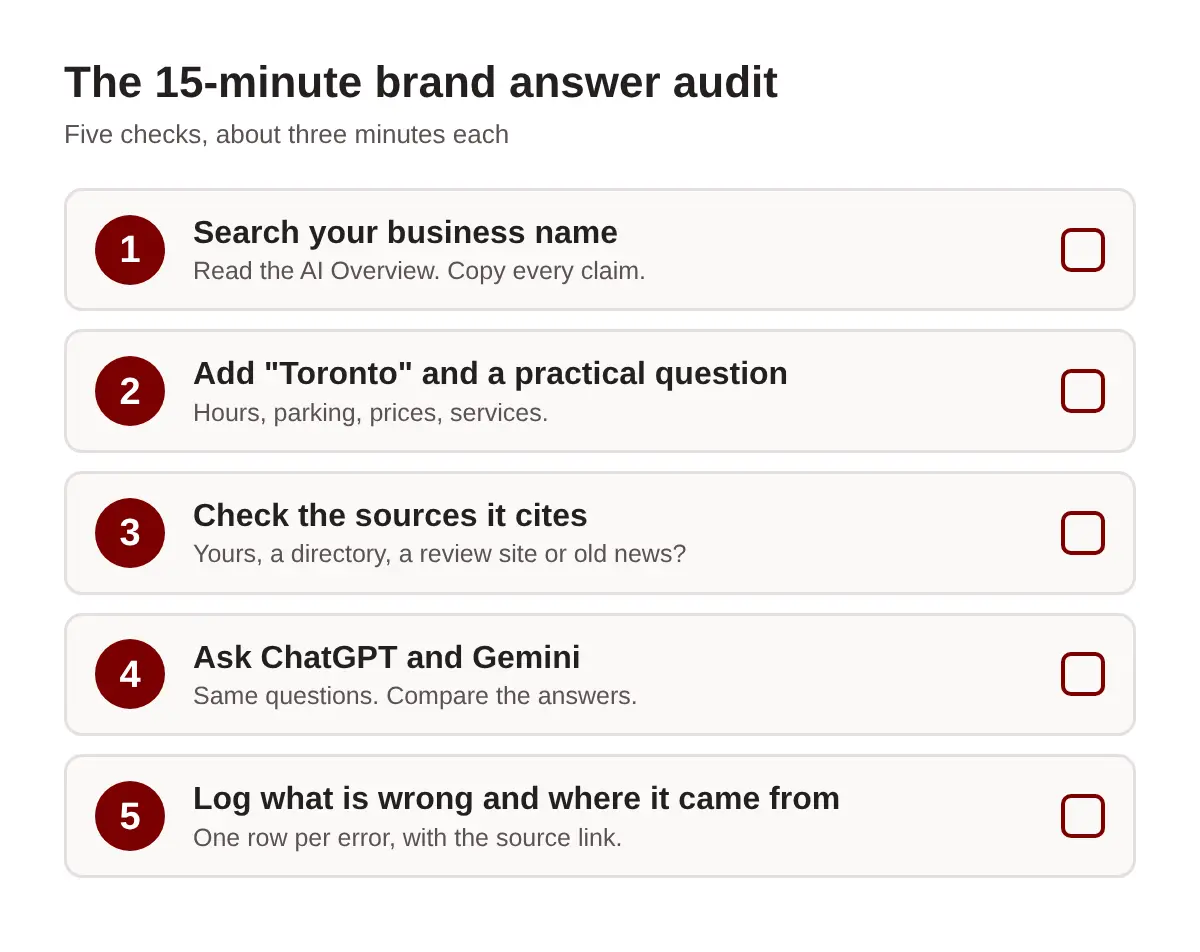
- Search your business name. Read the AI Overview line by line. Copy every claim into your notes: what you do, where you are, when you open, what you charge.
- Add Toronto and a practical question. Try “[your business] Toronto”, “is [your business] open late”, “[your business] parking” and “[your business] reviews”. These are the questions customers actually ask.
- Check the sources it cites. Open each link. Note whether it is your site, a directory, a review platform or something old. Not every answer shows sources, so write down when it does not.
- Ask ChatGPT and Gemini. Run the same questions. Compare the answers with Google’s. If two tools repeat the same error, the cause is probably a source they share.
- Log what is wrong and where it came from. One row per error: the claim, the correct fact, the tool, and the source link if you found one.
Answers change between runs, so repeat the key questions on another day before you act on a single odd result.
Want a faster first pass? Our free AI Visibility Check shows whether AI mentions your business at all.
How to fix what the AI says about you
You cannot edit an AI answer directly. You can fix the sources it reads. Work in this order.
1. Clean up your Business Profile
This is the fastest win. Check your name, address, phone number, website, categories and hours. Add holiday hours before they happen. Google reviews your edits before they go live, so make them early.
Check suggested edits too. Anyone can suggest a change to your listing, and you can accept or reject each one from your profile.
2. Publish one plain facts page
Create a page on your own site that states the basics in plain text: what you do, where you are, hours, services, prices if you share them, parking and how to book.
Use real text, not an image or a PDF. Put the key fact in the first line of each section. Short, direct answers are easier for AI to lift correctly.
3. Make your listings agree
Take the errors from your audit log and trace each one to its source. Then fix the directory, the social profile or the old article.
The goal is one set of facts everywhere. If your site says 10 p.m. and a directory says 9 p.m., the AI has to guess.
4. Answer your reviews
Reviews are text, so AI can read them. You must verify your business before you can reply on Google. After that, reply to reviews that mention hours, prices or services, and state the current fact in the reply.
Keep replies polite and short. Our reviews and reputation management service covers this work for teams that cannot keep up.
5. Use Google’s feedback button last
On an AI Overview, use the thumbs-down icon, then choose “Report a problem”. The three-dot menu works too.
Be specific. Quote the wrong sentence, give the correct fact and point to a page that proves it. Google publishes no timeline for acting on this feedback, so fix the sources first. Source changes tend to show up after Google recrawls the pages.
If you want help tracing and fixing sources across many listings, that is the work we do under AI search optimization.
Toronto examples: what to look for
These are illustrative. They show the kinds of errors an audit can turn up. They are not real AI answers about any business.
| Search | ✕ What the AI may say | ✓ What to check and fix |
|---|---|---|
| “[restaurant name] Toronto” | Describes a menu or cuisine you dropped two years ago, based on an old review site. | Update the menu on your site and your profile. Fix the review site description. Reply to old reviews with the current menu. |
| “is [business] open late” | Gives weekday closing hours that ignore your extended weekend hours. | Set regular and special hours on your profile. Put the same hours in plain text on your site and in directories. |
| “[clinic name] Toronto accepting new patients” | Says you are not taking new patients, based on a page that is a year old. | Update or remove the old page. State current availability on a facts page and on your profile. |
Illustrative examples, not captured AI output.
In each case the fix is the same loop. Find the source, correct it, and make every other source agree.
How to keep watching it
Answers drift. Hours change, a new review lands, a directory refreshes its data.
- Re-run the audit monthly. Use the same questions each time so you can compare.
- Re-check after changes. New hours, a move, a new service or a rebrand all deserve a fresh look.
- Keep a log. Our free GEO tracker template gives you a place to record what each tool says.
Treat it like checking your listing, but for the answer people read first.
Frequently asked questions
Why is Google showing an AI answer when I search my business name?
Google expanded AI Overviews to most branded searches in late September 2026. DemandSphere tracked them rising from 26.12% to 82.06% of its branded keywords during the month, and Ahrefs reports 83%.
Can I turn off the AI Overview for my business name?
We have not found a Google setting that lets a business opt out of an AI Overview for its own name. You can fix the sources behind it and report wrong answers with the feedback button.
How long does it take for a fix to show up?
It varies. Google publishes no timeline for feedback reports. Changes to the sources themselves, such as your Business Profile or website, tend to show up after Google recrawls them.
Does the same answer appear in ChatGPT and Gemini?
Not always. Each tool pulls from its own mix of sources, so run the same questions in each one and compare the results.
How often should I check what AI says about my business?
Monthly is a practical starting point, plus a check after any change to your hours, address, services or branding.
Read the answer before your customers do
Your brand search used to lead to your own pages. Now it often leads to a summary written from many sources.
You cannot write that summary. You can make sure the sources behind it are right.
Search yourself. Read the answer. Fix the source.
See what AI says about your business today
A customer searching your name may read an AI answer before they see your website. Right now you may not know what it says.
Run a free Radar scan in about 30 seconds. See whether AI recommends you, who it names instead, and three quick wins to fix it.
No sign-up. No email. Instant results.
Run my free Radar scan →
About the author
Simar Singh founded Digital 6ix in Toronto. The agency works on SEO, local search and how AI tools describe businesses in their answers. Connect with Simar on LinkedIn.
Sources
- Ahrefs: AI Overviews Currently Appear for 83% of Branded Searches
- Search Engine Land: Google AI Overviews jump from 26% to 80% of branded queries
- DemandSphere: AI Overviews on branded queries tripled in September
- Search Engine Land: AI usage surges 6X for local search (SOCi 2026 Local Discovery Index)
- Google Business Profile Help: Edit your Business Profile
- Google Business Profile Help: Manage customer reviews
Instant AI visibility scan
Check your AI answer
Run a quick Radar scan to see whether AI names your business, which competitors it lists, and where to start fixing it.
Scan my businessTalk it through
Not sure where a wrong answer comes from? Book a free call and we will trace it with you.
Book a free call